Microsoft 365 and Office | SharePoint | For business | Windows
A group of Microsoft Products and technologies used for sharing and managing content, knowledge, and applications.

This browser is no longer supported.
Upgrade to Microsoft Edge to take advantage of the latest features, security updates, and technical support.
' cx='32' cy='32' r='32' /%3E%3Ctext x='50%25' y='55%25' dominant-baseline='middle' text-anchor='middle' fill='%23FFF' %3ELG%3C/text%3E%3C/svg%3E)
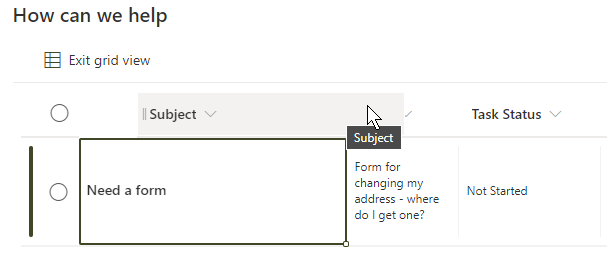
The list is fine when used by itself but when added as a web part on a page, then click Edit in grid view the column headings do not line up and column 1 (Subject) actually covers column 2 (Body)
How can I fix this?
' cx='32' cy='32' r='32' /%3E%3Ctext x='50%25' y='55%25' dominant-baseline='middle' text-anchor='middle' fill='%23FFF' %3EMM%3C/text%3E%3C/svg%3E)
Hi @Lecia Grunfelder ,
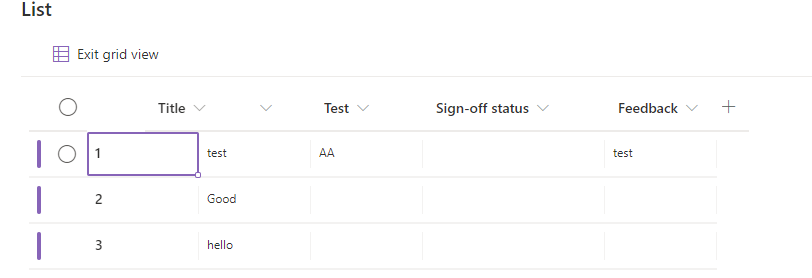
Per my test, I could reproduce this issue as yours on my end. As the below picture shows.
It's not your issue. Looks like the feature Edit in grid view is not very compatible with the list web part currently.
I would sugeest you create a service request to inform Microsoft this issue so they will fix it as soon as possible.
If an Answer is helpful, please click "Accept Answer" and upvote it.
Note: Please follow the steps in our documentation to enable e-mail notifications if you want to receive the related email notification for this thread.
Thanks! I did enter a service request.