Microsoft 365 and Office | SharePoint Server | For business
A family of Microsoft on-premises document management and storage systems.

This browser is no longer supported.
Upgrade to Microsoft Edge to take advantage of the latest features, security updates, and technical support.
' cx='32' cy='32' r='32' /%3E%3Ctext x='50%25' y='55%25' dominant-baseline='middle' text-anchor='middle' fill='%23FFF' %3ETD%3C/text%3E%3C/svg%3E)
Hi Guys,
We found an issue in SP 2016.
When we add a "Document set" content type to a library normally the versioning should start from 1.0 and so on. This has been the case till SP 2013.
But in SP 2016 the Document set version starts from 1.1 when major and minor versions are on and starts from 2.0 when major version is on.
Is it a known issue? If yes, then is there any MS link referencing that.
A family of Microsoft on-premises document management and storage systems.

Hi anonymous user , do you have any progress on this thread?
If you find an Answer helpful, please remember to accept it as answer. It will help others who meet similar questions in this forum. Thank you for your understanding.
That is the default behavior for Document Set Version History in SharePoint Server 2016.
The version of a Document Set would start from 1.1 with draft versions enabled, and start from 2.0 with major versions enabled only.
This setting is not in written in any official document, but it has been changed and kept ever since SharePoint 2016.
In fact, document set version histories do not get recorded and managed as document/item version histories. You will need to manually create a version history for the Document Set (for it to be restored or deleted) using the “Capture Version” option.
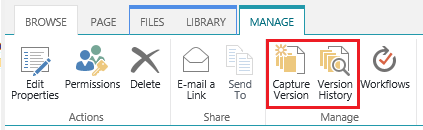
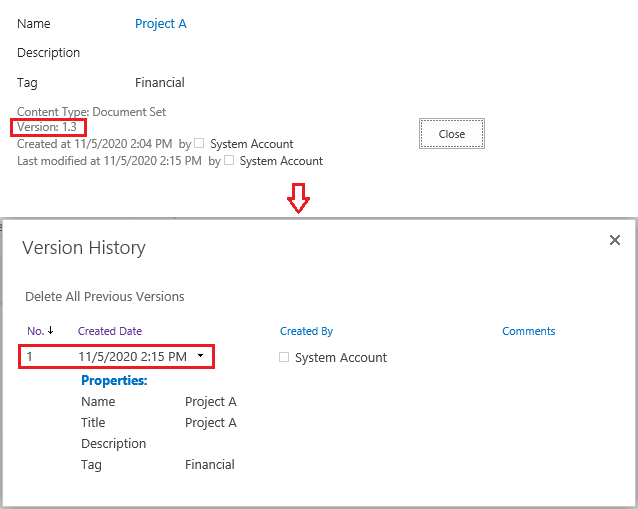
For detailed information on how to manage version history for document set, you can refer to the document here: Create and manage Document Sets (Section: Manage versions).
If an Answer is helpful, please click "Accept Answer" and upvote it.
**Note: Please follow the steps in our documentation to enable e-mail notifications if you want to receive the related email notification for this thread. **
Thanks for the reply.
Is there any MS link which explains the change in behaviour of the docset versioning ( View all properties version number ) from SP 2013 to sp 2016?
Hi anonymous user, please use Comment instead of Write an Answer section to post the reply unless when you provide a valid solution to the question. We will be converting this reply for you.
---
I’m afraid not. This change is not recorded in any Microsoft document.