Hello,
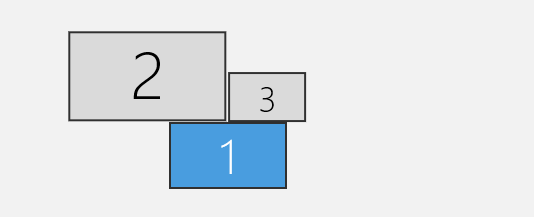
I have three monitors as below image. Display 1 is my labtop and displays 2 and 3 are two identical monitors side by side. I have VS code application. I would like to extend the window of VS code so that I covers monitors 2 and 3 completely. This way I have lots of space for coding purpose. My laptop is extending its disply to Monitors 2 and 3 via USB-C cable. Monitor 2 has can be set to max resolution 2560x1440 and monitor 2 the hight reolution available in the drop down list is 1280x800. To have the app span accross monitors 2 and 3, I have to reduce the display resolution of Monitor 2 to 1280x800 to match the 3rd one. Is this an hardware issue with my laptop?
These are the specifications of my laptop.
Version 10.0.19045 Build 19045
Other OS Description Not Available
OS Manufacturer Microsoft Corporation
System Name DELL-COREI5-256
System Manufacturer Dell Inc.
System Model Latitude 5480
System Type x64-based PC
System SKU 07A7
Processor Intel(R) Core(TM) i5-7300U CPU @ 2.60GHz, 2701 Mhz, 2 Core(s), 4 Logical Processor(s)
BIOS Version/Date Dell Inc. 1.17.1, 1/7/2020
SMBIOS Version 3.0
Embedded Controller Version 255.255
BIOS Mode Legacy
BaseBoard Manufacturer Dell Inc.
BaseBoard Product 0R75NX
BaseBoard Version A00
Platform Role Mobile
Secure Boot State Unsupported
PCR7 Configuration Binding Not Possible
Windows Directory C:\Windows
System Directory C:\Windows\system32
Boot Device \Device\HarddiskVolume1
Locale United States
Hardware Abstraction Layer Version = "10.0.19041.3636"
User Name DELL-COREI5-256\Parisa
Time Zone Eastern Standard Time
Installed Physical Memory (RAM) 16.0 GB
Total Physical Memory 15.6 GB
Available Physical Memory 6.51 GB
Total Virtual Memory 18.0 GB
Available Virtual Memory 5.23 GB
Page File Space 2.38 GB
Page File C:\pagefile.sys
Kernel DMA Protection Off
Virtualization-based security Not enabled
Device Encryption Support Reasons for failed automatic device encryption: PCR7 binding is not supported, Hardware Security Test Interface failed and device is not Modern Standby
Hyper-V - VM Monitor Mode Extensions Yes
Hyper-V - Second Level Address Translation Extensions Yes
Hyper-V - Virtualization Enabled in Firmware Yes
Hyper-V - Data Execution Protection Yes
' cx='32' cy='32' r='32' /%3E%3Ctext x='50%25' y='55%25' dominant-baseline='middle' text-anchor='middle' fill='%23FFF' %3ECS%3C/text%3E%3C/svg%3E)

' cx='32' cy='32' r='32' /%3E%3Ctext x='50%25' y='55%25' dominant-baseline='middle' text-anchor='middle' fill='%23FFF' %3EA%3C/text%3E%3C/svg%3E)