Azure Load Balancer
An Azure service that delivers high availability and network performance to applications.
This browser is no longer supported.
Upgrade to Microsoft Edge to take advantage of the latest features, security updates, and technical support.
' cx='32' cy='32' r='32' /%3E%3Ctext x='50%25' y='55%25' dominant-baseline='middle' text-anchor='middle' fill='%23FFF' %3ESR%3C/text%3E%3C/svg%3E)
Hi,
I am new to azure and i was trying to create load balancing and was adding 2 VM instance from same regions to backend pool , only one was updating and another was failure was getting error like below
Deployment to resource group 'shree' failed.
Additional details from the underlying API that might be helpful: At least one resource deployment operation failed. Please list deployment operations for details. Please see https://aka.ms/DeployOperations for usage details.
An Azure service that delivers high availability and network performance to applications.

Hello @shrindhi rao ,
May I know if it is a Basic or Standard SKU load balancer?
If it is Standard load balancer, you can add any virtual machines or virtual machine scale sets in a single virtual network.
If it is Basic load balancer, you can add Virtual machines in a single availability set or virtual machine scale set.
Thanks,
Gita
Hello @shrindhi rao ,
Following up again to check if there is any update on this post. Please let us know if you need any further assistance on this issue.
Thanks,
Gita

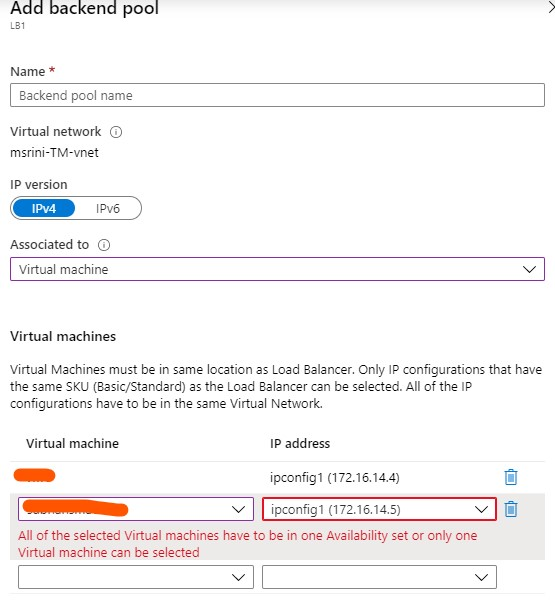
The UI has changed in the portal. All you need to do is to select Virtual Machine and select VMs which you wanted to add (Part of availability set).
If you try to add VM which are part of different availability set, you get an validation error as below:
Please don't forget to Accept Answer and Up-vote if the response helped