Strange AppLocker Behaviour

Jason Hall 101 Reputation points
2020-11-06T11:18:05.863+00:00

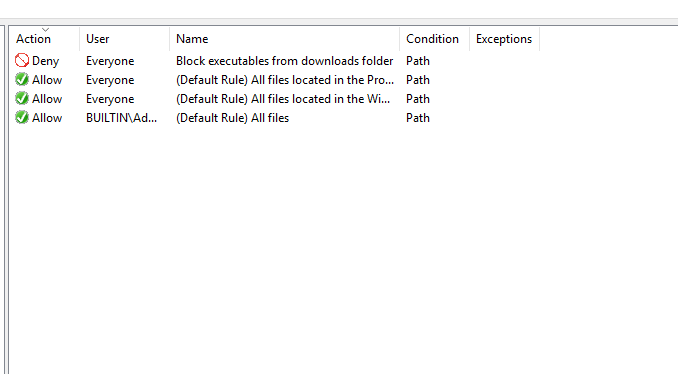
I am looking at implementing AppLocker to deny executables running from the downloads folder.

I have the following set via GPO
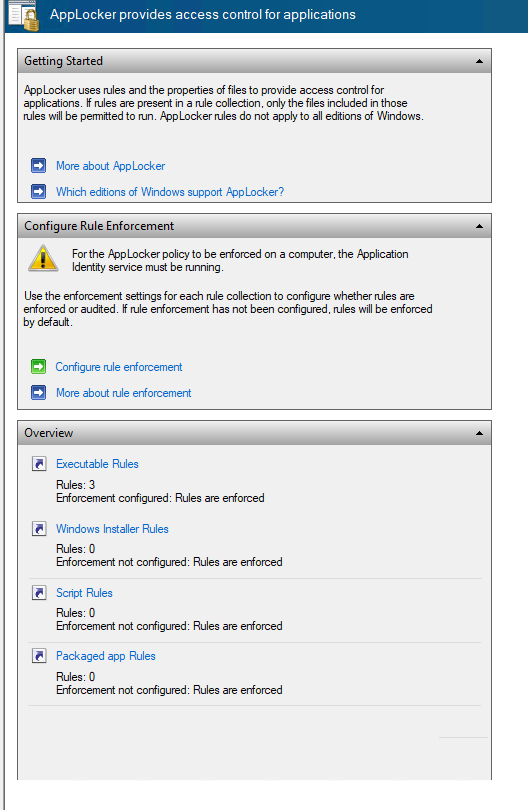
37930-enforcement.png

37897-default-rules.png

37968-block-downloads.png

When i apply the group policy it works as expected. I am blocked from running exe files from the downloads folder.
But with it applied it causes some strange issues with other applications.

For example Outlook and MS Teams will no longer connect but can be run.

37898-teams.png

And the start menu or search no longer respond.

As soon as i remove the GPO and perform a gpupdate they begin to work again.

Looking in the event logs there are no 8004 events for any of these applications.

Windows for business | Windows Client for IT Pros | Devices and deployment | Configure application groups
Windows for business | Windows Client for IT Pros | User experience | Other
0 comments No comments
{count} votes

Answer accepted by question author
  1. Jason Hall 101 Reputation points
    2020-11-06T12:19:22.327+00:00

    Figured out the issue,
    Noticed in the "Packaged app-Execution" event logs errors stating "No packaged apps can be executed while Exe rules are being enforced and no Packaged app rules have been configured."

    Creating the default allow rule in Package app rules fixed it

    1 person found this answer helpful.
    0 comments No comments

1 additional answer

Sort by: Most helpful
  1. Jimmy 11 Reputation points
    2023-01-14T03:12:19.7966667+00:00

    I recently found a problem in Server 2022, setting up Edge and IE 11 to be blocked in AppLocker via GPO. In my test environment, I created the GPO and configured Executable Rules for both using Path as the condition denying access to Everyone. I linked the GPO to my test OU, and it blocked them both, but it also blocked Settings app from opening. Watching the AppLocker Event Logs I also saw "No packaged apps can be executed while Exe rules are being enforced and no Packaged app rules have been configured" So I researched Packaged app rules and found your article here. I added an allow rule for Microsoft Edge and that worked. IE / Edge blocked but Settings App was accessible. Big WIN!! I tried this in my production environment but when I went to set the Packaged app allow rule there was no Microsoft Edge???, but there was Settings package for WINDOWS.IMMERSIVECONTROLPANEL allowing that rule worked allowing the Settings app to work! I guess in the end my conclusion is that IE and Edge are still so deep rooted in the OS;s "Immersive" experience that blocking them breaks some things that you really need.

    Your article here helped me find the magic jelly bean I needed to get my problem solved. THANK YOU!!!

    0 comments No comments

Your answer

Answers can be marked as 'Accepted' by the question author and 'Recommended' by moderators, which helps users know the answer solved the author's problem.