SQL Server Reporting Services
A SQL Server technology that supports the creation, management, and delivery of both traditional, paper-oriented reports and interactive, web-based reports.
This browser is no longer supported.
Upgrade to Microsoft Edge to take advantage of the latest features, security updates, and technical support.
' cx='32' cy='32' r='32' /%3E%3Ctext x='50%25' y='55%25' dominant-baseline='middle' text-anchor='middle' fill='%23FFF' %3EFM%3C/text%3E%3C/svg%3E)
Hi,
I have a weird problem that I don't know how to address.
Having a PowerBi report with a view in the Data Warehouse as the Data Source. IN the data source connection I use the server alias;
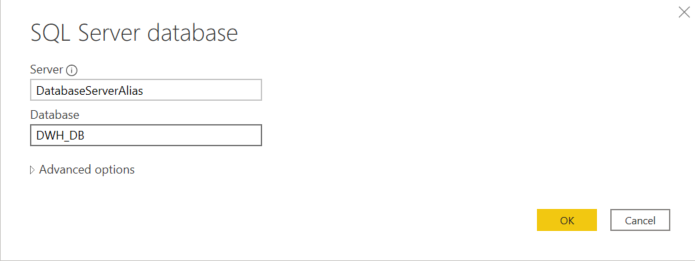
I get this error message then;
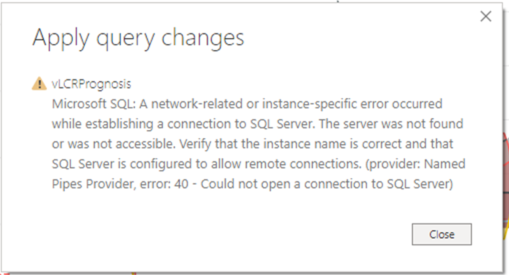
If I change from alias to full server name, it works. You kind of think that it is something wrong with the alias, but it is not. In fact, there are several other reports with no problems using the same alias. Even more weird is that it works with the alias when I use it locally, testing the report.
I don't even know where to start.... Any ideas?


Hi @Fredrik M ,
Assume you are using PBI desktop to connect to the remote SQL Server instance using an alias.
"SQL Alias" is a client Setting.
You may need to create the alias on every client.
Regards,
Zoe
If the answer is helpful, please click "Accept Answer" and upvote it.
Note: Please follow the steps in our documentation to enable e-mail notifications if you want to receive the related email notification for this thread.
What can I do if my transaction log is full?--- Hot issues November
How to convert Profiler trace into a SQL Server table -- Hot issues November
We are using PBI Desktop.
You mean that I have to create a alias on every client running the report...?
This kind of explains then why it is working for me but not for my college, since he doesn't have the SQL Server Client Network Utility?
Does this mean that it is not recommended to use server aliases for Power Bi desktop?
Hi @Fredrik M ,
If you are opening the report from PBI report server by editing in PBI desktop, you could easily run or modify the report with PBI desktop.
However, if you want to create a new report and connect the remote server with an alias, you need to create the alias on the client.
So if you just want to modify or run the report on the client, you don't need to do any change.
Only in the situation that you want to directly connect to the remote server with alias, you need to create it on your client.

Hi @Fredrik M ,
I don't even know where to start.... Any ideas?
I test it on my side, firstly I have the same issue as yours, then I clear cache and cookies and then follow steps as this :overview-of-sql-server-alias
Check the protocol you used is enable in the SQL Server Client network utility, for my case, the protocol is disabled, so I choose TCP/IP into the enabled column and then it works.
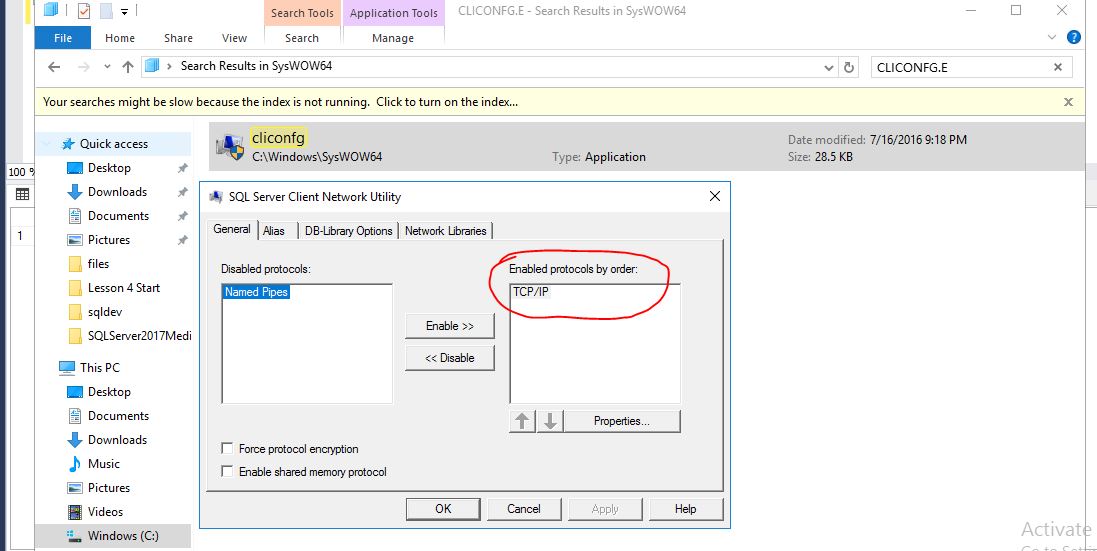
BR,
Mia
If the answer is helpful, please click "Accept Answer" and upvote it.