SQL Server Integration Services
A Microsoft platform for building enterprise-level data integration and data transformations solutions.
This browser is no longer supported.
Upgrade to Microsoft Edge to take advantage of the latest features, security updates, and technical support.
' cx='32' cy='32' r='32' /%3E%3Ctext x='50%25' y='55%25' dominant-baseline='middle' text-anchor='middle' fill='%23FFF' %3EPV%3C/text%3E%3C/svg%3E)
HI.
I am using SSIS 2016 and in my solution I have 4 packages. In the first package, which is set as starup object , I have added a flat file connection and using that as a custom information logger.
How to invoke this flat file connection in script task of the subsequent child packages, so that there is only one custom logger file created ?
In the parent package - in the script task, i have like this:
ConnectionManager cmError = Dts.Connections["CustomLog"];
string strLogpath = cmError.ConnectionString;
string textToWrite = Environment.NewLine + "Completed Reading config files. Invoking Child Package" + Environment.NewLine;
System.IO.File.AppendAllText(strLogpath, textToWrite);
' cx='32' cy='32' r='32' /%3E%3Ctext x='50%25' y='55%25' dominant-baseline='middle' text-anchor='middle' fill='%23FFF' %3EYK%3C/text%3E%3C/svg%3E)
I have added a flat file connection and using that as a custom information logger.
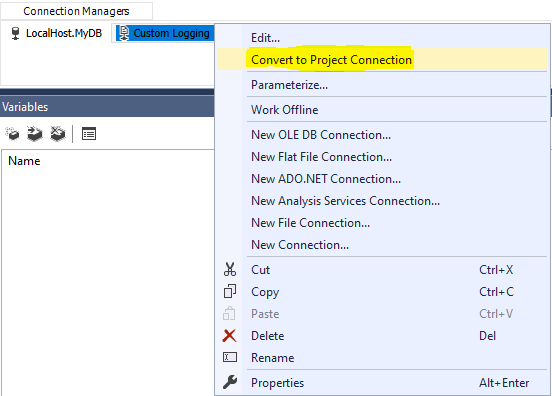
Just switch that connection to the project level. To do that, right mouse click on the package level connection, there is an option to do that.
' cx='32' cy='32' r='32' /%3E%3Ctext x='50%25' y='55%25' dominant-baseline='middle' text-anchor='middle' fill='%23FFF' %3EMM%3C/text%3E%3C/svg%3E)
We can right click the package connection manager and then choose "Convert to Project Connection".
Please refer to the following link and picture:
Package level and project level connection managers
Best Regards,
Mona
----------
If the answer is helpful, please click "Accept Answer" and upvote it.
Note: Please follow the steps in our documentation to enable e-mail notifications if you want to receive the related email notification for this thread.
Hot issues in November--What can I do if my transaction log is full?
Hot issues in November--How to convert Profiler trace into a SQL Server table?
May I know if you try the solutions that we provided?
Please contact us if you have anything to update.
Best Regards,
Mona