Azure Databricks
An Apache Spark-based analytics platform optimized for Azure.
This browser is no longer supported.
Upgrade to Microsoft Edge to take advantage of the latest features, security updates, and technical support.
' cx='32' cy='32' r='32' /%3E%3Ctext x='50%25' y='55%25' dominant-baseline='middle' text-anchor='middle' fill='%23FFF' %3EJ%3C/text%3E%3C/svg%3E)
We have Databricks pipeline build and running using datafactory in batches with multiple files. At random, processing of a given file will fail causing the automation to abort processing that file and move on to the next. The error is consistent but indescript: “Caused by: com.databricks.NotebookExecutionException: FAILED” and the troubleshooting documentation for the error code thrown (3204) says “N/A” and applies to issues such as “an unexpected cluster state”. When we rerun the files through the same orchestration and pipelines or manually they typically work fine
Do you have any recommendations for troubleshooting this issue? Trace from DF.
DataBricks Stack Trace from DataFactory Output URL:
at com.databricks.workflow.WorkflowDriver.run(WorkflowDriver.scala:75)
at com.databricks.dbutils_v1.impl.NotebookUtilsImpl.run(NotebookUtilsImpl.scala:122)
at line1ee345426a1546219668c06720be0c2627.$read$$iw$$iw$$iw$$iw$$iw$$iw.\

Hello @Jeeva ,
I would recommend you to enable retry in the activity using the below option and check if that works.
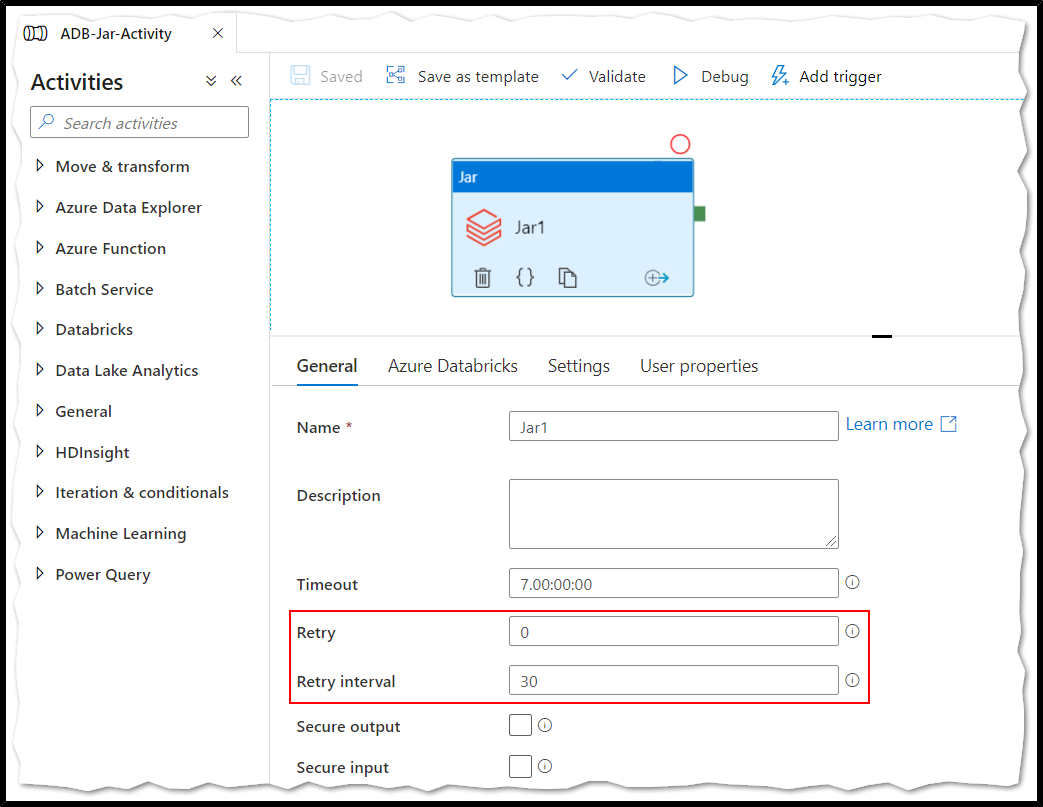
Hope this helps. Do let us know if you any further queries.
------------
Hello @Jeeva ,
Just checking in to see if the above answer helped. If this answers your query, do click “Accept Answer” and Up-Vote for the same. And, if you have any further query do let us know.
Hello @Jeeva ,
Following up to see if the above suggestion was helpful. And, if you have any further query do let us know.
Take care & stay safe!
Thanks. This is one of the viable solution fixes our issue.
' cx='32' cy='32' r='32' /%3E%3Ctext x='50%25' y='55%25' dominant-baseline='middle' text-anchor='middle' fill='%23FFF' %3EMD%3C/text%3E%3C/svg%3E)
Hello,
I have the same issue but this didn't fixe the issue for me!
' cx='32' cy='32' r='32' /%3E%3Ctext x='50%25' y='55%25' dominant-baseline='middle' text-anchor='middle' fill='%23FFF' %3EAV%3C/text%3E%3C/svg%3E)
Hi,
We do exact the same ETL: using Azure Data Factory to orchestrate Python Databricks notebooks and we experience the same behavior.
The retry policy solves the issue, but is there no better way to solve this?