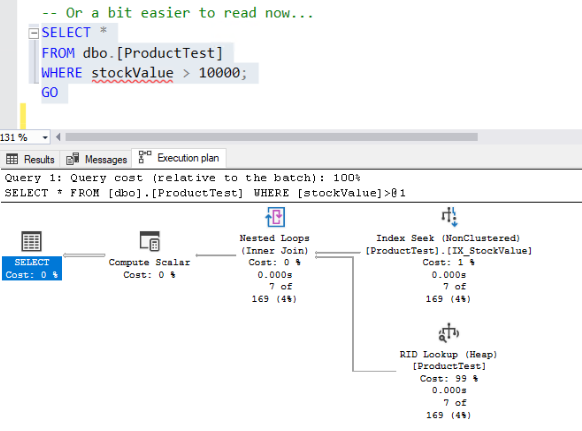
Query estimated row on the execution plan

sakuraime 2,351 Reputation points
2020-11-16T18:10:28.193+00:00

I have the following setup from Adventureworks database

CREATE TABLE [dbo].[ProductTest]
(
[StockQty] smallint NOT NULL,
[ProductID] int NOT NULL,
[UnitPrice] money NOT NULL,
[UnitPriceDiscount] money NOT NULL,
[StockDate] DATETIME NOT NULL
);
GO

-- Populate table
INSERT INTO [dbo].[ProductTest]
SELECT [OrderQty], [ProductID], [UnitPrice], [UnitPriceDiscount], [ModifiedDate]
FROM [Sales].[SalesOrderDetail];
GO

UPDATE dbo.[ProductTest]
SET UnitPriceDiscount = ROUND((UnitPrice * ProductID % 8), 1),
StockDate = CAST (((2013 - ProductID % 5) * 10000 + ((ProductID % 11) + 1) * 100 + ((ProductID) % 27) + 1) AS CHAR(8));
GO

ALTER TABLE [ProductTest]
ADD stockValue AS (isnull(([UnitPrice] * ((1.0) - [UnitPriceDiscount])) * [StockQty], (0.0))) PERSISTED;
GO
CREATE INDEX IX_StockValue ON dbo.ProductTest;
GO

And the I select the computed column

SELECT *
FROM dbo.[ProductTest]
WHERE stockValue > 10000;
GO

40184-image.png

what the estimation row is 169

40149-stats.jpg

SQL Server | Other
{count} votes

3 answers

Sort by: Most helpful
  1. Erland Sommarskog 128.7K Reputation points MVP Volunteer Moderator
    2020-11-16T22:54:23.493+00:00

    I believe the story is that the estimate is made with the computed column expanded, and then later the expression is rematched to the computed column. I tried this query:

    SELECT *
    FROM dbo.[ProductTest]
    WHERE isnull(([UnitPrice] * ((1.0) - [UnitPriceDiscount])) * [StockQty], 0.0) > 10000
    

    I got the same estimate - and the same plan!

    By the way, see that button with ones and zeroes on the tool bar? Use that do include code in your posts. This is not a true WYSIWYG editor, but uses a light markup, so some characters in your code was lost. This thing is that you can paste your into the window directly, and then select it and press the button.


  2. tibor_karaszi@hotmail.com 4,316 Reputation points
    2020-11-17T10:47:38.863+00:00

    Your code wasn't executable. I got errors from the UPDATE and ALTER TABLE commands. If you follow Erland's advice and use "code Sample" and also make sure that the code is executable by trying it, I could give it a spin. I can't say that I would have an answer, but I could at least try it.

    0 comments No comments

  3. Erland Sommarskog 128.7K Reputation points MVP Volunteer Moderator
    2020-11-17T22:50:22.473+00:00

    but how to get 169 ?

    I don't have the exact formula, but in the range from 2379.993000 to 14948.118900, there are 433 rows, distributed over 67 distinct values. So the value. But if you take (14948 - 2379) / (14948 - 10000) * 433, you get pretty close to 169.

    Tibor, here is a cleaned-up version of the script if you want to play with it:

    DROP TABLE dbo.ProductTest
    go
    CREATE TABLE [dbo].[ProductTest]
    (
    [StockQty] smallint NOT NULL,
    [ProductID] int NOT NULL,
    [UnitPrice] money NOT NULL,
    [UnitPriceDiscount] money NOT NULL,
    [StockDate] DATETIME NOT NULL
    );
    GO
    
        INSERT INTO [dbo].[ProductTest]
        SELECT [OrderQty], [ProductID], [UnitPrice], [UnitPriceDiscount], [ModifiedDate]
        FROM [Sales].[SalesOrderDetail];
        GO
    
    UPDATE dbo.[ProductTest]
    SET UnitPriceDiscount = ROUND((UnitPrice * ProductID % 8), 1),
    StockDate = CAST (((2013 - ProductID % 5)* 10000 + ((ProductID % 11) + 1) * 100 + ((ProductID) % 27) + 1) AS CHAR(8));
    GO
    
    ALTER TABLE [ProductTest]
    ADD stockValue AS (isnull(([UnitPrice] * ((1.0) - [UnitPriceDiscount])) * [StockQty], (0.0))) PERSISTED;
    GO
    CREATE INDEX IX_StockValue ON dbo.[ProductTest](stockValue);
    
    SELECT * FROM dbo.ProductTest WHERE StockValue > 10000
    
    SELECT *
    FROM dbo.[ProductTest]
    WHERE isnull(([UnitPrice] * ((1.0) - [UnitPriceDiscount])) * [StockQty], 0.0) > 10000
    
    DBCC SHOW_STATISTICS (ProductTest, IX_StockValue)
    

Your answer

Answers can be marked as 'Accepted' by the question author and 'Recommended' by moderators, which helps users know the answer solved the author's problem.