SQL Server Reporting Services
A SQL Server technology that supports the creation, management, and delivery of both traditional, paper-oriented reports and interactive, web-based reports.
This browser is no longer supported.
Upgrade to Microsoft Edge to take advantage of the latest features, security updates, and technical support.
' cx='32' cy='32' r='32' /%3E%3Ctext x='50%25' y='55%25' dominant-baseline='middle' text-anchor='middle' fill='%23FFF' %3EK%3C/text%3E%3C/svg%3E)
How can I add two columns in ssrs? When I do ssrs expression sum(Field!Results.Value).
I get incorrect total.

Hi Zoe,
Thanks for your help. I figured out what I was doing wrong and the two numbers weren't adding up correctly. The issue was with my query. thanks again

Hi @Kimmie ,
You may add a single textbox and use sum(Field!Results.Value) for a test.
You may also use add total and then use sum(Field!Results.Value).
Here is may own test:
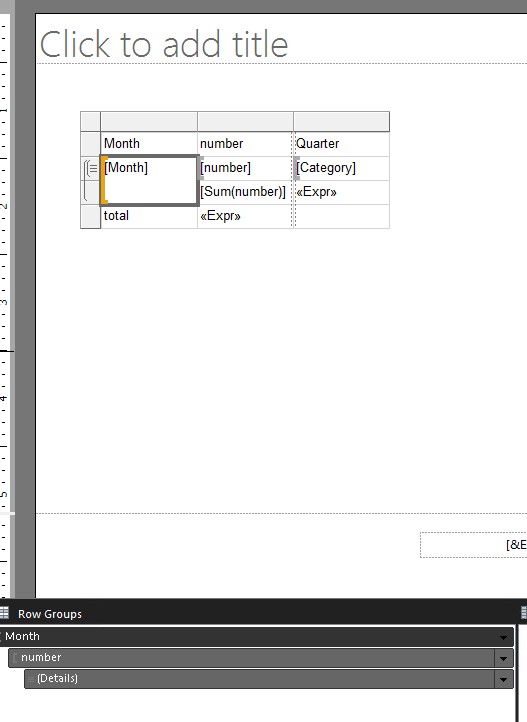
If I misunderstand your meaning, I'd like to suggest that you may share the design sample for us to do more analysis.
Regards,
Zoe
If the answer is helpful, please click "Accept Answer" and upvote it.
Note: Please follow the steps in our documentation to enable e-mail notifications if you want to receive the related email notification for this thread.
Hot issues October
Hi Zoe,
I tried adding a test and doing sum(Field!Result.Value) and RunningValue(Field!Results.Value,SUM,”CTL”), neither worked. Add total is greyed out, but I can select it from the group panel but that does not work either.
Hi @Kimmie ,
The "Add Total" command is context-sensitive and only supports numeric fields. Please check the data type of the 'Results'.
In addition, as you said the Add total is greyed out, suppose that you didn't add the Fields to the row group. please have a check.
