Hyper-V
A Windows technology providing a hypervisor-based virtualization solution enabling customers to consolidate workloads onto a single server.
2,637 questions
This browser is no longer supported.
Upgrade to Microsoft Edge to take advantage of the latest features, security updates, and technical support.
' cx='32' cy='32' r='32' /%3E%3Ctext x='50%25' y='55%25' dominant-baseline='middle' text-anchor='middle' fill='%23FFF' %3EJD%3C/text%3E%3C/svg%3E)
We have an old physical Windows XP system (32-bit) we want to virtualize in Hyper-V.
With an older 32-bit Disk2vhd utility we have created a VHD of this machine.
In Hyper-V Manager on Windows 10 we have created a Gen-1 virtual machine with the VHD of the physical system.
We want to connect this Gen-1 VM to our network. I have created a default switch but we cannot connect to the network.
What is the procedure to connect a Gen-1 VM to a network?
I can only find descriptions voor Gen-2 VMs.

' cx='32' cy='32' r='32' /%3E%3Ctext x='50%25' y='55%25' dominant-baseline='middle' text-anchor='middle' fill='%23FFF' %3EZH%3C/text%3E%3C/svg%3E)
Hello
Thank you for posting in Q&A forum.
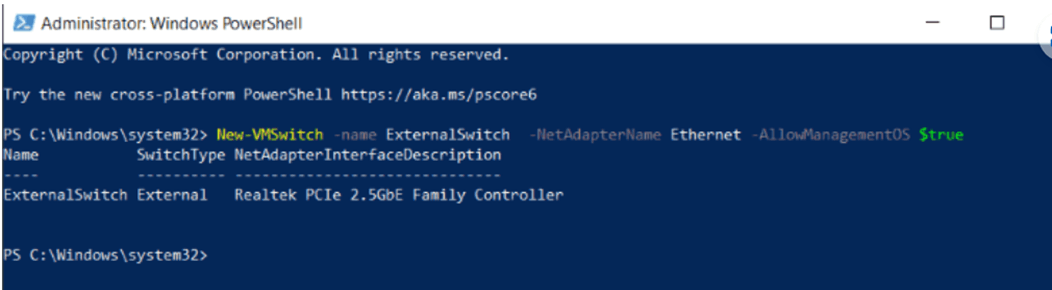
I suggest you try the following powershell command to create a virtual external switch which should resolve your issue:
New-VMSwitch -Name ExternalSwitch -NetAdapterName Ethernet -AllowManagementOS $True
-name: What the network adapter looks like in Hyper-V Manager.
-NetAdapterName: The name of the network adapter.
-AllowManagementOS – $true for both the host and the virtual machine with internet.
Reference links:Create a Virtual Network | Microsoft Learn
I hope the information above is helpful.
Best regards
Zunhui
============================================
If the Answer is helpful, please click "Accept Answer" and upvote it.
We have tried a virtual external switch but then we have problems with some applications on the host that no longer can connect to the internet.