Microsoft Security | Microsoft Entra | Microsoft Entra ID
A cloud-based identity and access management service for securing user authentication and resource access

This browser is no longer supported.
Upgrade to Microsoft Edge to take advantage of the latest features, security updates, and technical support.
' cx='32' cy='32' r='32' /%3E%3Ctext x='50%25' y='55%25' dominant-baseline='middle' text-anchor='middle' fill='%23FFF' %3EQD%3C/text%3E%3C/svg%3E)
Hi!
Can I use a single Active Directory app for OAuth on the web and mobile?
Currently, we are using separate apps for web and mobile. When a customer login to the web app the first time - he should accept OAuth permissions and the same after login to the mobile app. So we want the user accept permissions only once for better UX. It is possible?
' cx='32' cy='32' r='32' /%3E%3Ctext x='50%25' y='55%25' dominant-baseline='middle' text-anchor='middle' fill='%23FFF' %3ESM%3C/text%3E%3C/svg%3E)
Hello @QA Devico , thank you for reaching out. You can surely add more than one platform within a single App Registration in AAD. For eg: if you have registered your app let's say App1 as Web, you can surely add another platform like Mobile and Desktop Apps.
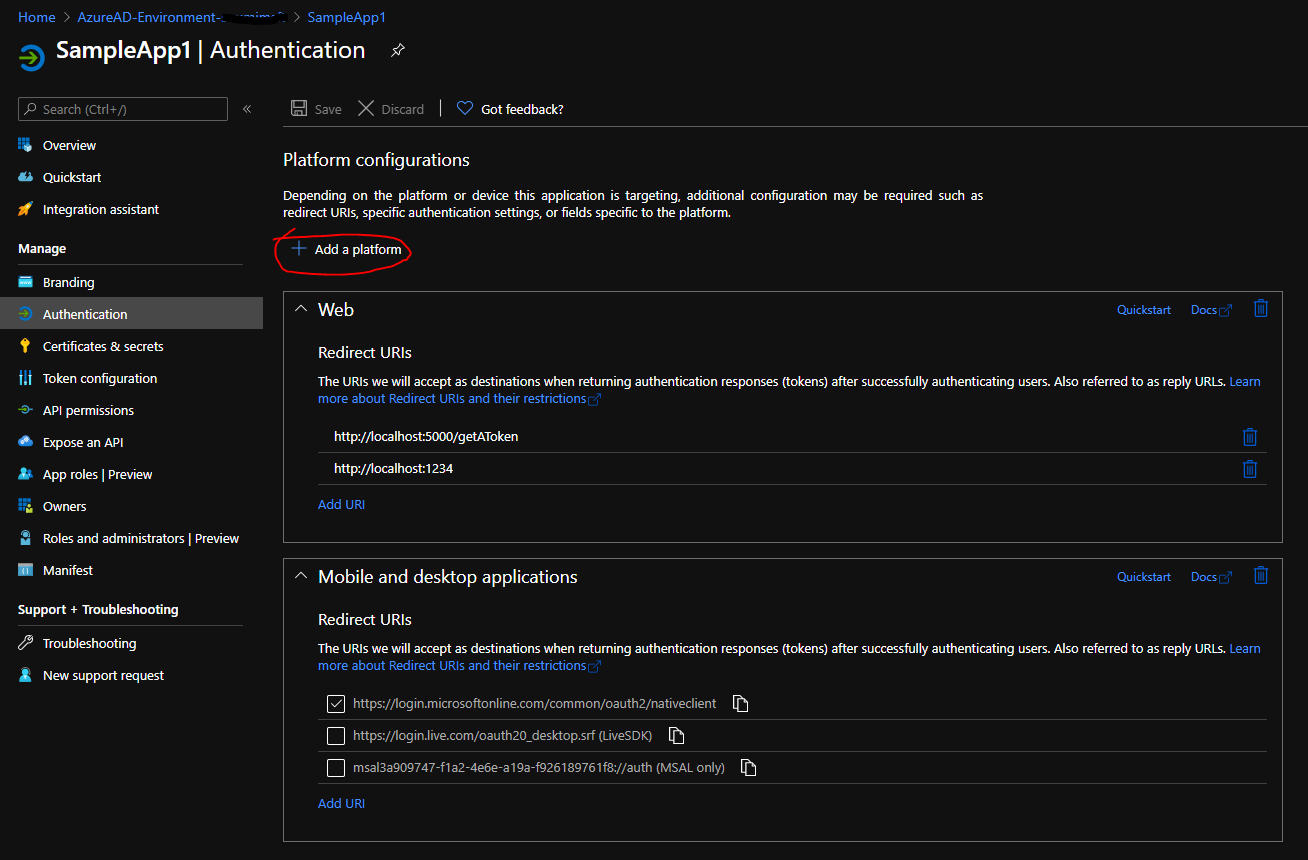
But you would have to test this out if it would work properly or not. As per my understanding, it should work, but I have not tested the same yet. You can add both the web and mobile&Desktop platform and you should have two different redirect URIs as shown in that screenshot but the same app ID. So, you can add the same app ID for both your apps ie for your WebApp and MobileApp, and mention the redirect URIs separately for each case, and then test it out once.
Ideally, this should work, and once you give the consent through any of the interfaces like either from the webapp or the mobile app first on the other interface when accessed the app won't ask you for consent again since the service principal object is also the same and it would have the consent for the users recorded in it.
Hope this helps.
Do let us know if this helps and if there are any more queries around this, please do let us know so that we can help you further. Also, please do not forget to accept the response as an Answer; if the above response helped in answering your query.
@soumi-MSFT Yes, It helped!
Note:
We changed the mobile app to support the web.
But it doesn't work - error=unsupported_response_type returned.
And then we added "oauth2AllowIdTokenImplicitFlow": true, "oauth2AllowImplicitFlow": true to the app manifest - and it helped!
Now everything works fine.
Hello @QA Devico , thanks for sharing this great news. I would certainly keep the points in mind and hopefully, it helps others too who are trying to implement similar setups in the future referencing to this thread.
I'll try this. Thanks a lot for the quick response!