Developer technologies | Transact-SQL
A Microsoft extension to the ANSI SQL language that includes procedural programming, local variables, and various support functions.
This browser is no longer supported.
Upgrade to Microsoft Edge to take advantage of the latest features, security updates, and technical support.
' cx='32' cy='32' r='32' /%3E%3Ctext x='50%25' y='55%25' dominant-baseline='middle' text-anchor='middle' fill='%23FFF' %3ESB%3C/text%3E%3C/svg%3E)
I have store procedure which return data fine and it was developed by some one else who now not in touch.
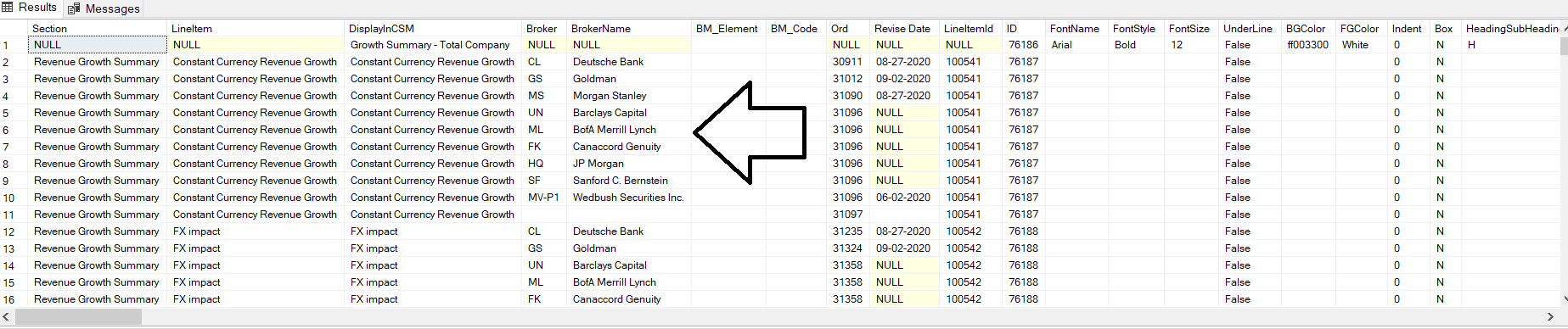
Here i am attaching a part of the query which return data.
SET @sql = '
Select XX.*,'''' scale,Isnull(AllowComma,''FALSE'') AllowComma,Isnull(AllowedDecimalPlace,''0'') AllowedDecimalPlace,
 Isnull(AllowPercentageSign,''FALSE'') AllowPercentageSign,Isnull(CurrencySign,'''') CurrencySign,Isnull(BM_Denominator,'''') BM_Denominator
From
(
---- Broker Detail
Select AA.Section,AA.LineItem,Csm.DisplayInCSM ,AA.BrokerCode Broker,AA.BrokerName,'''' BM_Element,'''' BM_Code,AA.Ord,AA.[Revise Date],AA.LineItemId,
Csm.ID,[FontName],[FontStyle],[FontSize],[UnderLine],[BGColor],[FGColor],[Indent],[Box],[HeadingSubHeading],
'+@PeriodCols+','+@PeriodColsComment +',LineItem_Comment,BrokerName_Comment,Date_Comment
From tblCSM_ModelDetails Csm LEFT OUTER JOIN  (
Select b.*,L.ID LineItemId
From #TmpAll_Broker_LI b
INNER JOIN TblLineItemTemplate L ON TickerID='''+@TickerID+''' AND b.LineItem= L.LineItem
 ) AA ON Csm.LineItemId=AA.LineItemId
WHERE Csm.CSM_ID='+TRIM(CONVERT(CHAR(10),@CSM_Id))+' AND Csm.BMID=0 AND Type !=''SHEET''
UNION
----- Consensus
Select Section, b.LineItem,DisplayInCSM, '''' Broker,'''' BrokerName,'''' BM_Element,'''' BM_Code, Ord,'''' [Revise Date],L.ID LineItemID,
Csm.ID,[FontName],[FontStyle],[FontSize],[UnderLine],[BGColor],[FGColor],[Indent],[Box],[HeadingSubHeading],
'+@PeriodCols+','+@PeriodColsComment +',LineItem_Comment,BrokerName_Comment,Date_Comment
From #TmpZacksCons b
INNER JOIN TblLineItemTemplate L ON TickerID='''+@TickerID+''' AND b.LineItem= L.LineItem
INNER JOIN tblCSM_ModelDetails Csm ON Csm.LineItemID=L.ID
WHERE Csm.CSM_ID='+TRIM(CONVERT(CHAR(10),@CSM_Id))+' AND Csm.BMID=0
---- Blue Metrics
 UNION
Select Section, b.LineItem,DisplayInCSM,'''' Broker,'''' BrokerName,BM_Element,Code BM_Code, Ord,'''' [Revise Date],L.ID LineItemID,
Csm.ID,[FontName],[FontStyle],[FontSize],[UnderLine],[BGColor],[FGColor],[Indent],[Box],[HeadingSubHeading],
'+@PeriodCols+','+@PeriodColsComment +',LineItem_Comment,BrokerName_Comment,Date_Comment
From #TmpBM b
INNER JOIN TblLineItemTemplate L ON TickerID='''+@TickerID+''' AND b.LineItem= L.LineItem
INNER JOIN tblCSM_ModelDetails Csm ON Csm.BMID=b.code AND Csm.LineItemID=L.ID
WHERE Csm.CSM_ID='+TRIM(CONVERT(CHAR(10),@CSM_Id))+'
AND Ord IS NOT NULL
) XX
Left Outer Join tblLiConfig ZZ
On XX.Section=ZZ.Section And XX.LineItem=ZZ.LI And ZZ.Ticker='''+@Ticker+'''
Order by ID,Ord,BM_Code,LineItem,BrokerName'
Now broker Name is not coming as alphabetical order and it is the issue. because in order by clause there are some other fields which is required.
see this line at the bottom of my sql code Order by ID,Ord,BM_Code,LineItem,BrokerName
When i try to change this order by like Order by ID,Ord,BM_Code,LineItem,BrokerName IN (SELECT BrokerName FROM #Brokers ORDER BY BrokerName ASC)' then getting error like clause is invalid in views, inline functions, derived tables, subqueries, and common table expressions, unless TOP, OFFSET or FOR XML is also specified.
in my order by there are many columns and data is getting order by that way but i need to show broker name in alphabetical order but i am not being able. so please some one guide me how can i customize this sql.
Here i have not attached my full store procedure code because it is very large. looking for suggestion & help. Thanks

Hi there,
maybe it is quite simple
You have Order by ID,Ord,BM_Code,LineItem,BrokerName'
So BM_Code before BrokerName
From your screenshot I can see that there is not really a value coming in for BM_Code.
So, you are ordering 1st by ID
2nd by ord, 3rd by BM_Code which seems to contain just hot air
How do you want to sort an emtpy string?
Just skip BM_Code in your order clause
or take a look here and use a CASE in your order by
https://stackoverflow.com/questions/9021526/sql-how-can-i-order-null-and-empty-entries-to-the-front-in-an-orderby
when there are multiple columns in order by clause then can write things like this way
'Order by ID,Ord,BM_Code,LineItem, CASE WHEN UPPER(BrokerName) Like 'A%' Then 1
WHEN UPPER(BrokerName) Like 'B%' Then 2
WHEN UPPER(BrokerName) Like 'C%' Then 3
end'
in above code there are many columns in order by and i use case for last column. but still broker name order is not getting perfect. please suggest me something. thanks
Hi there,
Use my example for BM_Code
As I have pointed out:
You have emtpy strings but you sort after those empty strings 1st before sorting BrokerName.
Use the example with the column BM_Code in your order by and tell us if this works out
or just rethink if BM_code needs to be before BrokerName
So, tried the Syntax by myself in one of my databases.
Modify your order by:
ORDER BY ID, ORD,
CASE

    WHEN BM_Code IS NULL THEN 1
    WHEN BM_Code= '' THEN 2
    ELSE 3
END DESC, BM_Code ASC,
LineItem, BrokerName
and tell us if it works in that way

Did you also try something like order by BrokerName,ID,Ord,BM_Code,LineItem or order by ID,BrokerName,Ord,BM_Code,LineItem etc.?
yes when i change order like Order by ID,BM_Code,LineItem,BrokerName,Ord then output changed which is not acceptable.
here is my SP full code please check this link https://github.com/karlosRivera/SampleRepo/blob/master/Dynamic%20SP.txt
thanks
Which results are acceptable and did you try something like order by BrokerName,ID,Ord,BM_Code,LineItem or order by ID,BrokerName,Ord,BM_Code,LineItem?

yes when i change order like Order by ID,BM_Code,LineItem,BrokerName,Ord then output changed which is not acceptable.
First you complain that you don't get the order you want, and when you are suggested to change the ORDER BY to get the order you want, you complain that the output changes?
You can't both have your cake and eat it.
If you want to sort by BrokerName first, you need to have it first in ORDER BY clause. Now you are sorting by ID first, so you only get a sorting of BrokerName within an ID and the other three columns.
The things you are trying with CASE and IN is just nonsense. Stop it.