
Are you using conversation view?
This browser is no longer supported.
Upgrade to Microsoft Edge to take advantage of the latest features, security updates, and technical support.
' cx='32' cy='32' r='32' /%3E%3Ctext x='50%25' y='55%25' dominant-baseline='middle' text-anchor='middle' fill='%23FFF' %3EVM%3C/text%3E%3C/svg%3E)
When I reply to an email, it always starts a new thread in a new email. How can I change the settings so that a reply would keep it in the same thread?

Are you using conversation view?

Hi @Vitali Matskevich ,
What exactly does the "starts a new thread in a new email" you mentioned mean?
To better solve your issue, please provide me with more information related to your issue(such as screenshots of your issue. Notice: Please hide your personal information in the screenshot for security.).
If you mean that when replying to a message, Outlook will not include the original message text or will open in a new window, you could modify the settings via File > Options > Mail > Replies and forwards.
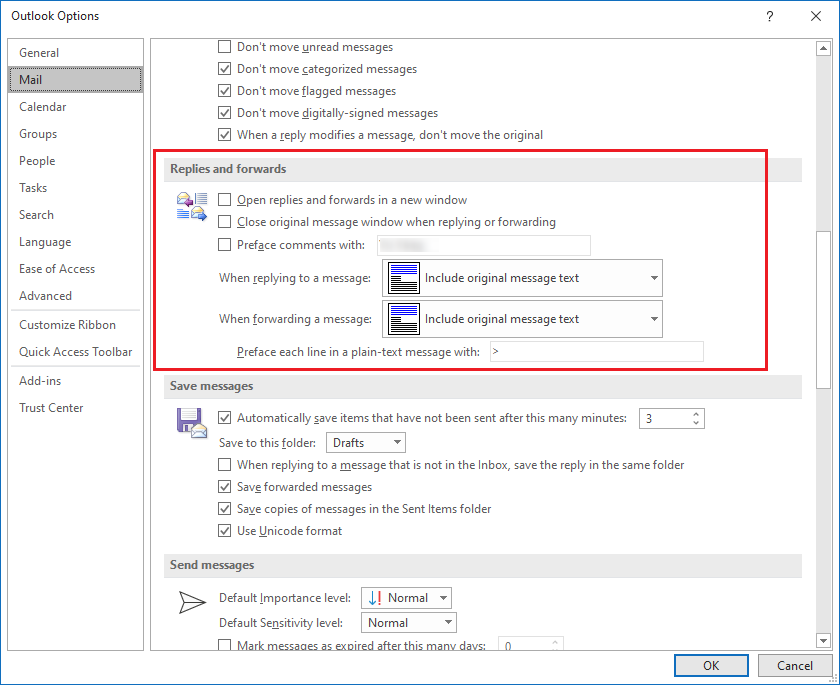
If all these above is not your case, please feel free to let me know.
Hope this can be helpful.
If an Answer is helpful, please click "Accept Answer" and upvote it.
Note: Please follow the steps in our documentation to enable e-mail notifications if you want to receive the related email notification for this thread.
Hi @Vitali Matskevich ,
Just checking in to see if above information was helpful. If you have any further updates on this issue, please feel free to post back.