Microsoft 365 and Office | SharePoint Server | For business
A family of Microsoft on-premises document management and storage systems.

This browser is no longer supported.
Upgrade to Microsoft Edge to take advantage of the latest features, security updates, and technical support.
' cx='32' cy='32' r='32' /%3E%3Ctext x='50%25' y='55%25' dominant-baseline='middle' text-anchor='middle' fill='%23FFF' %3ES%3C/text%3E%3C/svg%3E)
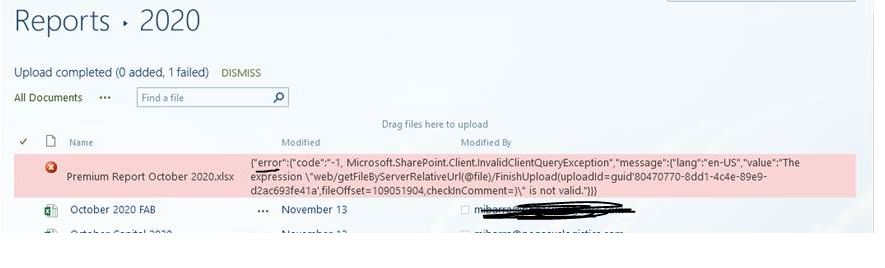
External SharePoint farm. External user is trying to upload a file which is about 110 MBs. She can upload smaller files into the same library with no issues. Library is plain library, no extra meta-data or anything like that. Problem is new, worked fine in the middle of October, and has been working all summer. I turned off the Scan on Upload setting of the AntiVirus and had her try it again with no change in behavior. Below is the error she gets.
Question: How long does it take for the anti virus software to promulgate a change like that?

Hi, @sns ,
If you client is using SharePoint 2016 or 2019 with the November CU, it seems to be a known issue with the patch. Please check the updated reply.
Hi, @sns ,
The Anti-Virus software has its own settings so we are not sure if it needs long time to finish the changing process.
According to the error message we can only find that the upload request is failed. Please have a check on the ULS log and event viewers for more information. And does this issue occur on many documents or only this one has problems on uploading?
One workaround you can try is to open the library in explorer and move the file into it.
And you can try to map the SharePoint library as a network drive, then copy the file to the library.
Update: Are you using SharePoint 2016 or 2019 with the latest CU(November ) patched ? If so, it may be a known issue
An error may occur when you upload a file that's larger than 100 MB to a document library.
Workaround
Use one of the following methods:Use the Upload button on the ribbon.
Note You must set Allow management of content types to Yes in document library settings.
Use the Open with Explorer command.
Note This option can be used to open Internet Explorer 32-bit to do file transfers.
Use another upload page for which the URL resembles the following:
http://<site_url>/_layouts/15/uploadex.aspx.
Notes
In this URL, <site_url> represents the actual URL of the webpage.
This method uploads the file to the root of the specific library. The file must be copied manually to the final folder structure destination.
If an Answer is helpful, please click "Accept Answer" and upvote it.
Note: Please follow the steps in our documentation to enable e-mail notifications if you want to receive the related email notification for this thread.