SQL Server Integration Services
A Microsoft platform for building enterprise-level data integration and data transformations solutions.
This browser is no longer supported.
Upgrade to Microsoft Edge to take advantage of the latest features, security updates, and technical support.
' cx='32' cy='32' r='32' /%3E%3Ctext x='50%25' y='55%25' dominant-baseline='middle' text-anchor='middle' fill='%23FFF' %3EBK%3C/text%3E%3C/svg%3E)
hi i have one doubt in ssis
how to load multiple text fiels into one excel with file sheet name.
source files : C:\Users\ra\OneDrive\Desktop\New folder
in ths path have 3 files : dept,emp,loc files

same data we need to export in single excel file dynamically.
if one folder have 3 text file then we need 3 sheets in single excel file dynamically and sheet names should be text file name .

I tried like below :
create variable 1) source folderpath :sourcpath: C:\Users\ra\OneDrive\Desktop\New folder
2)filename : emp.txt
then I drag and drop the foreachloopcontainer and insider selected foreachloopenumerator then select directrory mapping as sorucepath variable.
2)variable mapping is done with filename variable
after that drag and drop the text file and i configure the flatfilesource task and configure to excel destinaiton for emp
here i am unable to load remail files due to columns are not matching with other files
could you please tell me how to achive this task in ssis
' cx='32' cy='32' r='32' /%3E%3Ctext x='50%25' y='55%25' dominant-baseline='middle' text-anchor='middle' fill='%23FFF' %3EMM%3C/text%3E%3C/svg%3E)
Hi @balakrishna k ,
According to your source tables and destination tables, we should drag 3 flat file sources and 3 excel destinations in ssis data flow task.
A Data Flow task can include multiple data flows. If a task copies several sets of data, and if the order in which the data is copied is not significant, it can be more convenient to include multiple data flows in the Data Flow task. For example, you might create five data flows, each copying data from a flat file into a different dimension table in a data warehouse star schema.
However, the data flow engine determines order of execution when there are multiple data flows within one data flow task. Therefore, when order is important, the package should use multiple Data Flow tasks, each task containing one data flow. You can then apply precedence constraints to control the execution order of the tasks.
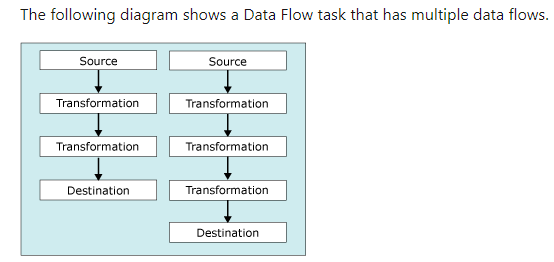
Please refer to Multiple Flows in Data Flow Task.
Best Regards,
Mona
----------
If the answer is helpful, please click "Accept Answer" and upvote it.
Note: Please follow the steps in our documentation to enable e-mail notifications if you want to receive the related email notification for this thread.
Hot issues in November--What can I do if my transaction log is full?
Hot issues in November--How to convert Profiler trace into a SQL Server table?