Developer technologies | .NET | Xamarin
A Microsoft framework for building cross-platform mobile apps using .NET and C# with native performance and user interfaces.
This browser is no longer supported.
Upgrade to Microsoft Edge to take advantage of the latest features, security updates, and technical support.
' cx='32' cy='32' r='32' /%3E%3Ctext x='50%25' y='55%25' dominant-baseline='middle' text-anchor='middle' fill='%23FFF' %3ETT%3C/text%3E%3C/svg%3E)
I am developing an application in Xamarin Forms 4.8 version with Shell feature and I need both side menu and bottom bar for navigation. In VS 2019, my AppShell.xaml page is like below,
<Shell xmlns="http://xamarin.com/schemas/2014/forms"
       xmlns:x="http://schemas.microsoft.com/winfx/2009/xaml"
       xmlns:local="clr-namespace:MyApp.Views"
       xmlns:localHome="clr-namespace:MyApp.Views.Home"
       xmlns:localOnlineStore="clr-namespace:MyApp.Views.OnlineStores"
       xmlns:localBooks="clr-namespace:MyApp.Views.BookList"
       xmlns:localUniforms="clr-namespace:MyApp.Views.Uniforms"
       xmlns:localUser="clr-namespace:MyApp.Views.User"
       xmlns:localMyAccount="clr-namespace:MyApp.Views.MyAccount"
       xmlns:localCart="clr-namespace:MyApp.Views.Cart"
       xmlns:flyouthead="clr-namespace:MyApp"
       xmlns:controls="clr-namespace:MyApp.Renderer;assembly=MyApp"
       Title="MyApp"
       x:Class="MyApp.AppShell"
       FlyoutBehavior="Flyout"
       FlyoutHeaderBehavior="Fixed"
       FlyoutBackgroundColor="#011948">

       <Shell.Resources>
           <ResourceDictionary>
               <Color x:Key="NavigationPrimary">#011948</Color>
               ...
               ...
           </ResourceDictionary>
        </Shell.Resources>

        <Shell.FlyoutHeader> ... </Shell.FlyoutHeader>
        <Shell.ItemTemplate> ... </Shell.ItemTemplate>
        <Shell.MenuItemTemplate> ... </Shell.MenuItemTemplate>


       <TabBar>
          <Tab Title="Home"
               Icon="ic_home">
               <ShellContent Route="HomePage" Shell.TabBarBackgroundColor="{StaticResource NavigationPrimary}" ContentTemplate="{DataTemplate localHome:HomePage}" />
          </Tab>
          <Tab Title="Books"
               Icon="ic_book">
               <ShellContent Route="ItemsPage" ContentTemplate="{DataTemplate local:ItemsPage}" />
           </Tab>
           <Tab Title="Cart"
               Icon="ic_cart">
               <ShellContent Route="AboutPage" ContentTemplate="{DataTemplate local:AboutPage}" />
           </Tab>
           <Tab Title="Uniforms"
               Icon="ic_uniform">
               <ShellContent Route="UniformsPage" ContentTemplate="{DataTemplate localUniforms:UniformsPage}" />
           </Tab>
           <Tab Title="Profile"
               Icon="ic_profile">
               <ShellContent Route="MyProfilePage" ContentTemplate="{DataTemplate localMyAccount:MyProfilePage}" />
            </Tab>
     </TabBar>


     <FlyoutItem FlyoutDisplayOptions="AsMultipleItems">
         <ShellContent Title="Online Store" Icon="ic_online_store" ContentTemplate="{DataTemplate localOnlineStore:OnlineStorePage}" />
         <ShellContent Title="About Us" Icon="ic_about_us" ContentTemplate="{DataTemplate localHome:AboutUsPage}" />
         <ShellContent Title="Contact Us" Icon="ic_contact_us" ContentTemplate="{DataTemplate localHome:ContactUsPage}" />
         <ShellContent Title="Sign In" Icon="ic_login" Route="LoginPage" ContentTemplate="{DataTemplate localUser:LoginPage}" />
      </FlyoutItem>


</Shell>
When I run in Android Emulator, my page look in images below

Pic: 1

Pic: 2
When I click on any items in Side menu, the corresponding page load with updated bottom bar items. Refer Pic: 3 below
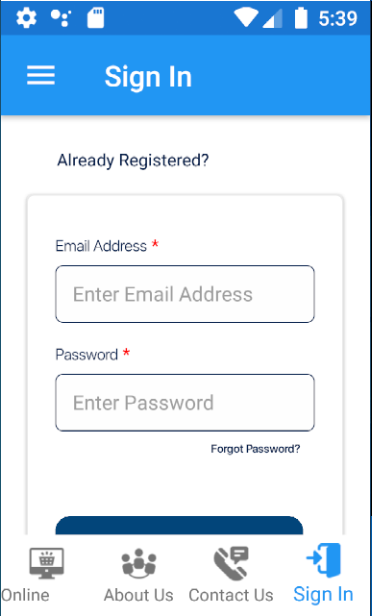
I don't know why this happens. My need is having items in bottom bar as in Pic: 1 around the application.
' cx='32' cy='32' r='32' /%3E%3Ctext x='50%25' y='55%25' dominant-baseline='middle' text-anchor='middle' fill='%23FFF' %3EA%3C/text%3E%3C/svg%3E)
@Thamaraiselvan T Could you share your Application.Resources code in App.xaml and completely code in Shell.xaml, I create an default demo, change the <Color x:Key="Primary">#0000F3</Color> in the App.xaml, and add two ShellContent in the FlyoutItem like your design, it works normal. Here is running gif. https://imgur.com/a/7IC9VXc
My Application.Resources code in App.xaml
<Application.Resources>
    <ResourceDictionary>
         <Color x:Key="Primary">#02457A</Color>
         <Style TargetType="Button">
              <Setter Property="TextColor" Value="White"></Setter>
              <Setter Property="BackgroundColor" Value="White"></Setter>
         </Style>
         <Style TargetType="Frame">
             <Setter Property="BorderColor" Value="#E9E9E9"></Setter>
         </Style>
    </ResourceDictionary>
</Application.Resources>
I don't know why bottom tab items are replaced with flyout items.
@Anonymous , Your .gif shows you have tabbed pages in Browse page. Meanwhile I have Bottom Tabbar included with 5 items in AppShell as in Pic: 1 and it need to be present around all pages in my application.
Could you share an demo that you reproduce this issue?