Microsoft 365 and Office | SharePoint | For business | Windows
A group of Microsoft Products and technologies used for sharing and managing content, knowledge, and applications.

This browser is no longer supported.
Upgrade to Microsoft Edge to take advantage of the latest features, security updates, and technical support.
' cx='32' cy='32' r='32' /%3E%3Ctext x='50%25' y='55%25' dominant-baseline='middle' text-anchor='middle' fill='%23FFF' %3ECB%3C/text%3E%3C/svg%3E)
Trying to create a document set using the listdata.svc in SharePoint online using REST service, following the pointers here
https://powerusers.microsoft.com/t5/Building-Flows/Need-help-making-Sharepoint-Document-Set-with-Power-Automate/m-p/452906#M53992
The server gives 500 internal error every time. Is it a way to find a more specific error in some logs anywhere?
I have recreated the request on a sharepoint on-prem farm, and it works without issues here.
The parameters (library URL, name, content type ID) are correct.
A group of Microsoft Products and technologies used for sharing and managing content, knowledge, and applications.

Hi @C Bennett ,
Would you tell me whether your issue has been resolved or have any update ?
I am looking forward to your reply.
Have a nice day!
Hi, I still can't get it to work. I can get it to work using Flow/Power automate, however when using Logic apps or Postman, it fails. The only difference being that the latter need a bearer token supplied (which works successfully for all API calls except listdata.svc)
Hello @C Bennett ,
ListData.svc is Lists Data Service. So, when you executing the "HTTP CreateDocumentSet" steps, you need to make sure that the entered uri is correct :
Note [yourDocumentLibraryName]:
1.When the display name of the Document Library is different from the internal name. Please enter the internal name of the Document Library.
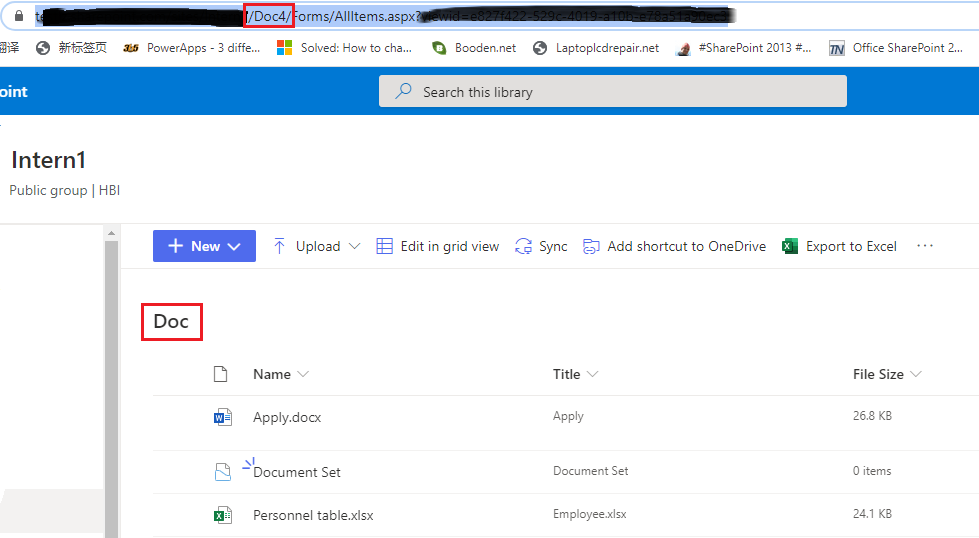
2.When the display name of the Document Library contains spaces or other strange characters we need to set a varDocLibNameClean variable:
@{replace(replace(variables('varDocLibName'),' ',''),'_','')}
Please refer to the following article to get more information:
Thanks,
Echo Du
================
If an Answer is helpful, please click "Accept Answer" and upvote it.
Note: Please follow the steps in our documentation to enable e-mail notifications if you want to receive the related email notification for this thread.
I made sure that the internal name and display name were identical to simplify the testing (ie no spaces or special characters).
Are there any logs or more detailed error messages available anywhere, or something that can be requested?
Thanks.
Hi @C Bennett ,
This may be due to some limitations of SharePoint ListData.svc:
If it is not for the above restrictions, it may be user created a list has same displayname as another list on the site (URL’s different).
This caused the entire site to throw a 500 error when accessing it with listdata.svc. Even when explicitly going to a list on the site that wasn’t affected. Once the user switched one of the lists to <listname> (old) everything started working.
Have a nice day!
Thanks,
Echo Du