Developer technologies | Visual Studio | Testing
A suite of integrated tools for creating, running, and managing tests to ensure code quality and reliability.
This browser is no longer supported.
Upgrade to Microsoft Edge to take advantage of the latest features, security updates, and technical support.
' cx='32' cy='32' r='32' /%3E%3Ctext x='50%25' y='55%25' dominant-baseline='middle' text-anchor='middle' fill='%23FFF' %3EPM%3C/text%3E%3C/svg%3E)
Hi,
I got this issue when porting the Unit Test Project from .NET Framework to .NET core 3.1.
I do not understand what caused the issue.
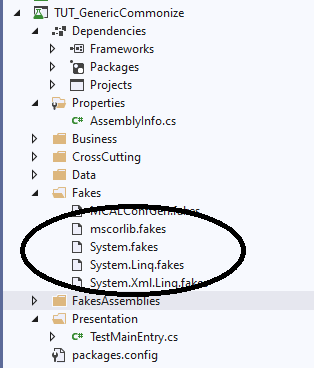
Could you please solve it if have any?
I used VS Studio 2019, v16.8.2
' cx='32' cy='32' r='32' /%3E%3Ctext x='50%25' y='55%25' dominant-baseline='middle' text-anchor='middle' fill='%23FFF' %3ETS%3C/text%3E%3C/svg%3E)
Hi @Pham Minh Tu ,
Thank you for taking time to post this issue in Microsoft Q&A forum.
It seems that there are something wrong with the assemblies(Fakes), maybe the versions, or some related files that generated before, under .NET Framework, but are not supported in .NET Core 3.1.
I suggest you try to remove the Fakes, the FakesAssemblies, the bin and obj folders in your project folder, then try to re-add the projects reference in VS (right-click the Dependencies > Add Project Reference… > Uncheck the project checkbox > OK > Do the same operations but this time check the project checkbox > OK).
After that re-add the Fakes Assembly(right-click the project under Dependencies , Projects > Add Fakes Assembly) and rebuild then rerun your project. Please remember to make a backup of your solution and then delete the folders.
In short, make a backup of your solution > delete Fakes, FakesAssemblies, bin and obj folders > re-add the project reference > re-add the Fakes Assembly > rebuild your unit test project > run the test.
Hope this helps.
Sincerely,
Tianyu
Hi @Tianyu Sun-MSFT ,
Thank you for your response.
I will try it.
But I have other concern that I got the issue from fake of System library
System.Fake....

And I solved the following ways.
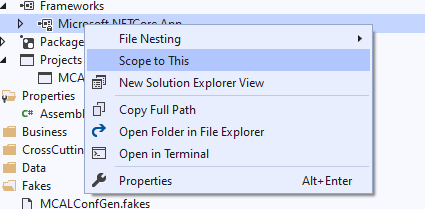
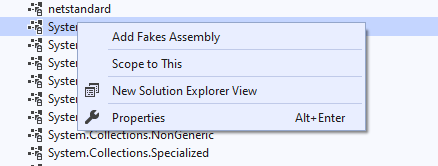
If I am wrong, please give me a solution.
Thank you.
Hi @Pham Minh Tu , thank you for your feedback. Although I don’t know the detailed error message that got from the codes you shared(System.Fakes…), and I am not sure if you mean you clicked the Add Fakes Assembly in the second part, I think it’s the correct way. You can refer to this document: Choose between stub and shim types and this document: Get started with shims.
The first document(part) points this: “But external assemblies such as System.dll typically are not provided with separate interface definitions, so you must use shims instead”, and the second document(part) points to add fakes assembly. So, if you use shim and maybe some external assemblies, it is needed to add fakes assembly. Also, generally, this will not cause error like “The type or namespace name Fakes does not exist…”
' cx='32' cy='32' r='32' /%3E%3Ctext x='50%25' y='55%25' dominant-baseline='middle' text-anchor='middle' fill='%23FFF' %3EJ%3C/text%3E%3C/svg%3E)
Hello,
i have the same problem with Xunit under .NET 5. I'm not able to use shims there.
I added a new Xunit project for .NET 5, i went to Frameworks / Microsoft.NETCore.App, right click on System and "Add Fakes Assembly". VS added some packages and created a fakes folder.
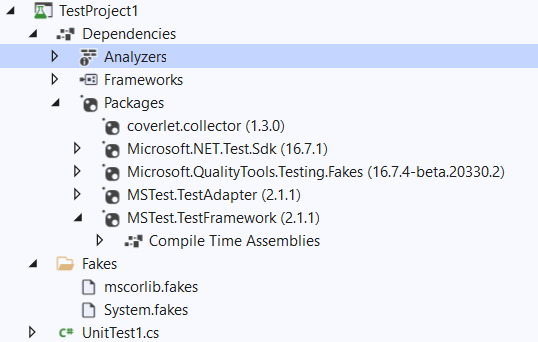 ]2
]2
When i try to use shims for DateTime i got the message:
The type or namespace name 'Fakes' does not exist in the namespace 'System' (are you missing an assembly reference?)

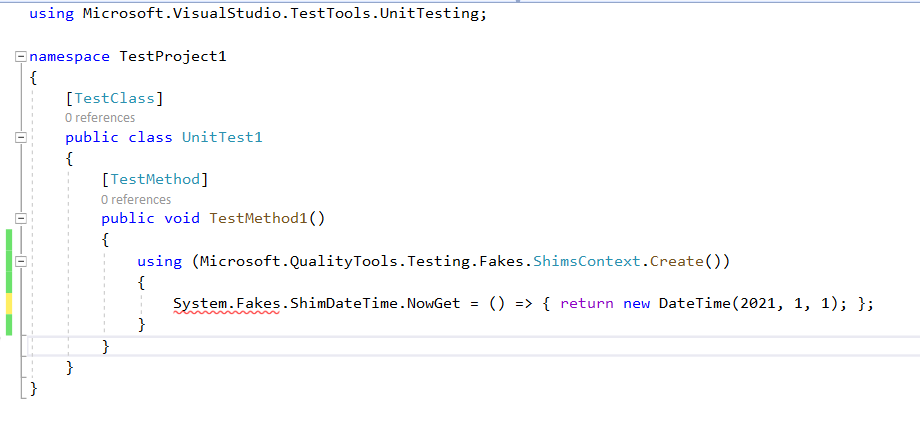
Is it possible to use MS Fakes in XUnit under .NET 5 or .NET Core 3.1?
Sincerely
Johannes
Hello Johannes, actually, you need to Add Fakes Assembly for System.Runtime, instead of for System. Have a nice day :)