Microsoft 365 and Office | SharePoint Server | Development
The process of building custom solutions for SharePoint Server.

This browser is no longer supported.
Upgrade to Microsoft Edge to take advantage of the latest features, security updates, and technical support.
' cx='32' cy='32' r='32' /%3E%3Ctext x='50%25' y='55%25' dominant-baseline='middle' text-anchor='middle' fill='%23FFF' %3EH%3C/text%3E%3C/svg%3E)
Dear Team,
I would like to create folder based on user display name(using created by field) when user uploads documents into library.
Thanks in advance.
' cx='32' cy='32' r='32' /%3E%3Ctext x='50%25' y='55%25' dominant-baseline='middle' text-anchor='middle' fill='%23FFF' %3EED%3C/text%3E%3C/svg%3E)
@Harshavardhan
Try below PowerShell:
$Web = Get-SPWeb "site collection URL"
$List = $web.Lists["document library name"]
$Item = $List.GetItembyID("document ID")
$Author = New-Object Microsoft.SharePoint.SPFieldUserValue($web, $Item["Author"])
$files=$List.RootFolder.files
for($i = 0; $i -lt $files.Count){
$file=$files[$i]
$f = $web.GetFolder($list.RootFolder.ServerRelativeUrl + "/" + $Author.user.displayname)
if ($f.Exists -eq $false)
  {
    $folder = $list.Items.Add($list.RootFolder.ServerRelativeUrl, [Microsoft.SharePoint.SPFileSystemObjectType]::Folder, $Author.user.displayname)
    $folder.Update();
  }
$file.MoveTo($folder.Url + "/" + $file.name)
}
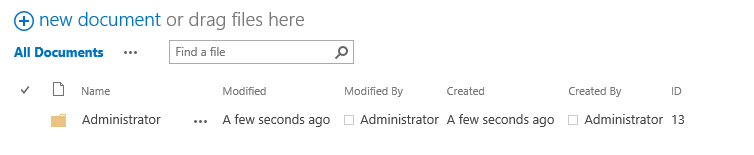
Results:

If an Answer is helpful, please click "Accept Answer" and upvote it.
Note: Please follow the steps in our documentation to enable e-mail notifications if you want to receive the related email notification for this thread.
@Emily Du-MSFT
Thanks for your answer.
i want to move all the documents uploaded by the user inside the folder as well.
@Harshavardhan
I have updated the answer, please check.
If an Answer is helpful, please click "Accept Answer" and upvote it.
Note: Please follow the steps in our documentation to enable e-mail notifications if you want to receive the related email notification for this thread.