
Error code 0x80070005 means Access denied and it usually occurs because of lack of permissions. Might try using elevated credentials.
--please don't forget to Accept as answer if the reply is helpful--
This browser is no longer supported.
Upgrade to Microsoft Edge to take advantage of the latest features, security updates, and technical support.
' cx='32' cy='32' r='32' /%3E%3Ctext x='50%25' y='55%25' dominant-baseline='middle' text-anchor='middle' fill='%23FFF' %3EA%3C/text%3E%3C/svg%3E)
Hi,
I have a problem with updates, my server have role from domain controller, and windows update display error 0x80070005.
To resolv this problem i've tried to follow next steps:
     net stop wuauserv

     net stop cryptSVC

     net stop bits

     net stop msiserver

     ren c:\Windows\SoftwareDistribution SoftwareDistribution.old

     ren c:\Windows\System32\catoot2 catoot2.old

    net start wuauserv

    net start cryptSVC

    net start bits

    net start msiserver

    PowerShell
    wuauclt.exe /updatenow
I've start cmd in administrator mode, but when execute 'net stop wuauserv' display error 5
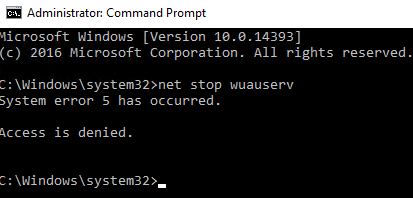
Powershell in administrator mode have this same result.
looking at running services I can't find the update service
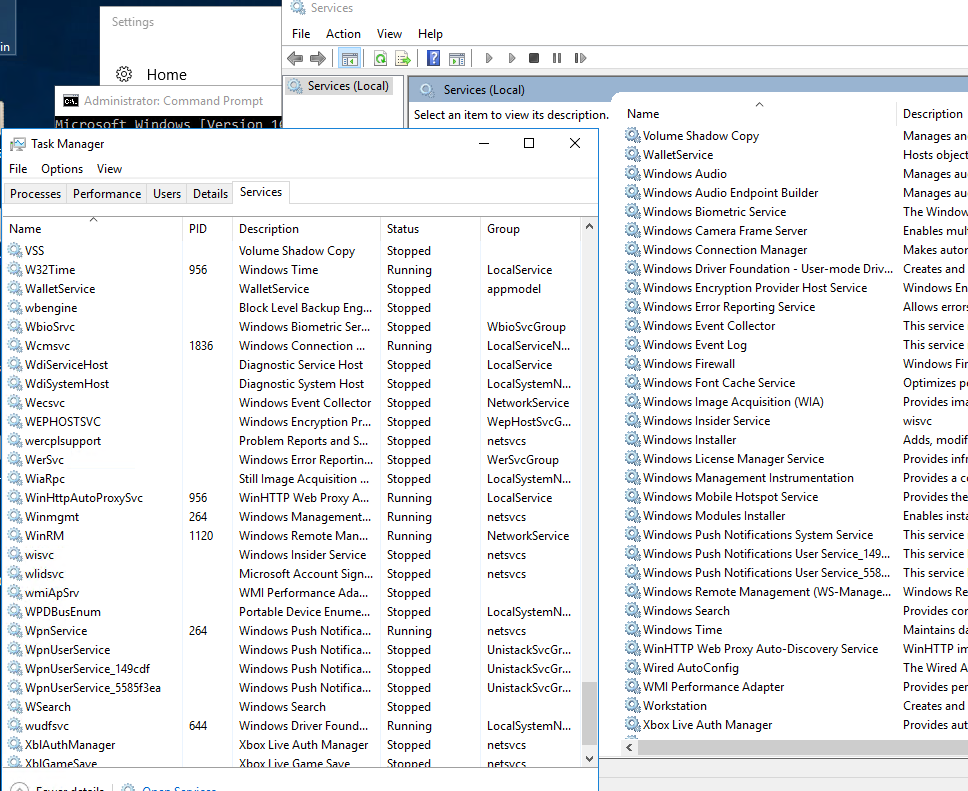
Please if you can helpme.
Regards.

@Anonymous
Hi,
Just checking in to see if the information provided was helpful.
If the reply helped you, please remember to accept as answer.
If no, please reply and tell us the current situation in order to provide further help.
Error code 0x80070005 means Access denied and it usually occurs because of lack of permissions. Might try using elevated credentials.
--please don't forget to Accept as answer if the reply is helpful--
Hi Patrick
we already tried this. We tried to use administrator user from domain controller, but the result is the same. Not solve our problem
Not a lot to go on but the simpler solution may be to just stand up a new one for replacement (shouldn't take more than 30 mins or so)
I'd use dcdiag / repadmin tools to verify health correcting all errors found before starting any operations. Then stand up the new 2016, patch it fully, license it, join existing domain, add active directory domain services, promote it also making it a GC (recommended), transfer FSMO roles over (optional), transfer pdc emulator role (optional), use dcdiag / repadmin tools to again verify health, when all is good you can decommission / demote old one.
--please don't forget to Accept as answer if the reply is helpful--
@Anonymous
Hi,
Error Code 0x80070005—also known as 'Access Denied' error—is related to Windows updates. It occurs when the system or user lacks the required files or permissions to change settings at the time of Windows update.
Please make sure that current user has admin permission on this server.
Besides, you may try to re-start the server in Clean Boot(with 3rd party process disabled), then, try to install the update manually to confirm the result.
Hope above information can help you.
============================================
If the Answer is helpful, please click "Accept Answer" and upvote it.
Note: Please follow the steps in our documentation to enable e-mail notifications if you want to receive the related email notification for this thread.