
Hi, 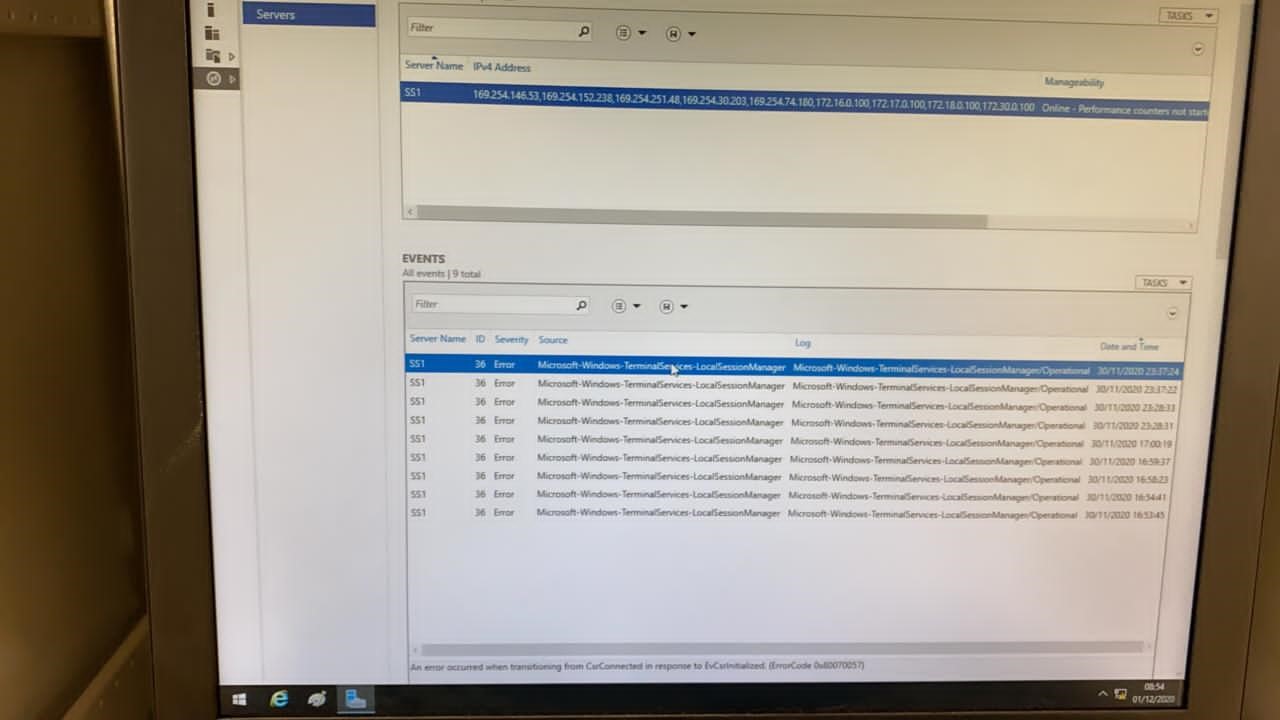
Server wont connect / Refuse to connect. the picture is attached. Event ID -36 reporting Server
This browser is no longer supported.
Upgrade to Microsoft Edge to take advantage of the latest features, security updates, and technical support.
' cx='32' cy='32' r='32' /%3E%3Ctext x='50%25' y='55%25' dominant-baseline='middle' text-anchor='middle' fill='%23FFF' %3ESP%3C/text%3E%3C/svg%3E)
Hi, We are using Windows-2016 Server for our application & Windows-10 Desktop computers are connected on RDP with Server. the issue we are facing that, After somedays Windows Server machine wont allow to connect on RDP until restart. Once system restarted, Server Machine will allow RDP Clients the there wont be any issues for some days. After somedays, again machine wont accept RDP connection, it mostly showing "Black Screen".
We checked & couldn't find any specific issue with software / installations. Also, quite surprised, since the behavior is same for 12 Machines which we are using in different building.
' cx='32' cy='32' r='32' /%3E%3Ctext x='50%25' y='55%25' dominant-baseline='middle' text-anchor='middle' fill='%23FFF' %3EA%3C/text%3E%3C/svg%3E)
Hi,
After somedays, again machine wont accept RDP connection, it mostly showing "Black Screen"
Does this mean a black screen will dispaly after the client remote connect to the server, or the server refused the remote connection with an error message?
Please help to clarify more clearly about the question and share a screenshot if possible. Thanks.
Hi,
Server wont connect / Refuse to connect. the picture is attached. Event ID -36 reporting Server
Could you please go to the Event Viewer to copy the error message of this event?
Event Viewer – Applications and Services Logs – Microsoft –Windows-TerminalServices-LocalSessionManager-Operational
Hello Eleven,
Let me make more clear,
We tried to disconnect or sign out the active users, even server will not allow next session. Restart is the only option, else when we are trying to connect, we will get the Black Screen on RDP. It keeps happening in all our Servers.
We tried to enable below setting:
Computer configuration / Administrative tempates / Windows components / Remote Desktop Sevices / Remote Desktop session host / Session Time limits / Set time for disconnected - 1 Minute: But same result.
once the Server reached maximum connections, we are not in a position to connect further without restart
Hi,
From my understanding, you have enabled below setting to set the maximum client session on RDP, right?
Computer configuration / Administrative tempates / Windows components / Remote Desktop Sevices / Remote Desktop session host / Connections / Limit number of connections - 6
If we disable or not configure this policy, will the issue persist?
Actually, from the point of being in compliance with the Remote Desktop Services license terms, 5 Per User CALs can only allow 5 users to remote connect to the RDS server. Each user needs to be issued with a CAL for remote connection. So if there are more than 5 users to connect, you should ensure there are enough CALs for all of them. Disconnect or sign out the active users will not release the CALs have been issued.
But from our experience, unlike per device cal, per user cal can be overallocated (in breach of the Remote Desktop licensing agreement), so it should not impact the connection number. But we are not sure if it will have some impacts on your problem. You can have a try to install more RDS CALs to see if the issue could be resolved or not.
Thanks,
If the Answer is helpful, please click "Accept Answer" and upvote it. Thanks.
Hello Eleven,
Thanks for the reply. I hope we are on same angle of understanding the issue. Thats good.
First of all the limit "Computer configuration / Administrative tempates / Windows components / Remote Desktop Sevices / Remote Desktop session host / Connections / Limit number of connections" - we do not set anything for the configuration. It is unconfigured.
I have quite doubtful about below statement
Disconnect or sign out the active users will not release the CALs have been issued.
Does it mean that, once the issued CAL reaches the maximum, even though the the user is disconnected / sign out - new user cannot be connected over RDP? if it is, then its not correct.
let me explain a scenario,
For instance, the active users connected to the session is 5 & let the License limit also 5.
on above scenario, if 6th connection is trying, the server wont allow the connection, since it reached maximum limit (this is agreed & as per license its correct)
But, in our case, if one of the active user is signed out / disconnected, then the active RDP connection is reduced to 4 & according to license limit, one more RDP can be connected, but its not happening. the server will not accept any connection from now onwards.
At this stage even if you disconnect / signed out all the remaining active users (4 Nos.), & if you try for another rdp session, it wont happen. Now, we have to restart the server, then it will work again the same behavior as explained above.
How can we over come this limitation? If one user is not active - either disconnected / signed out, the server should accept the next session until it reaches maximum connection as per license.
Hi,
First, please read below articles about the RDS CALs. You have a misunderstanding on the per user cal. Please pay attention to the item "You cannot revoke any RDS CALs."
https://learn.microsoft.com/en-us/windows-server/remote/remote-desktop-services/rds-client-access-license
Per User CALs number does not equal to active users connection number. The CALs are issued to the users who need to connect to the RDS servers. That means, once a cal is issued to user1, then this cal can only support user 1 to connect to the RDS server, it cannot be removed from the user1 and reassign it to user 2.
You can check the CALs assignment on the RDS licensing server where you installed the CALs. Once 5 per-user cals are issued to 5 different users, and at this time, a six user needs to connect to the RDS server, then a cal from Over-Used RDS CAL pool will be issued to this user 6. This user can still connect to the server but it is in violation of the Remote Desktop Services license terms. Also, you can check in AD users and computers, users > select one user >properities > Attribute Editor, you will find there is a value for "msTSExpireDate", this is the expire date of the CAL issued to this user. So, the cal is issue to one specific user not to one specific connection.
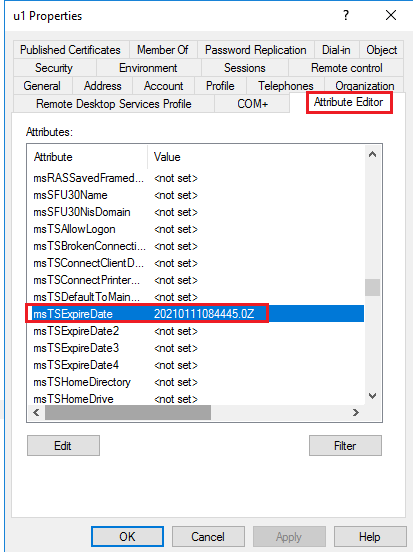
That's why I have said that I am not sure if insufficient CALs will cause your problem. From our experience, it will not. But you can have a try to install more CALs in case this is the cause.
Thanks,
Eleven
----------
If the Answer is helpful, please click "Accept Answer" and upvote it. Thanks.