Hi
I am running the following script to get folders and their permissions on file shares. This returns all the folders and their permissions in a csv file.
$OutFile = "C:\Temp\Permissions.csv" # Insert folder path where you want to save your file and its name
$RootPath = "\wha-fp-1\Share\Housing Management" # Insert your share directory path
$Header = "Folder Path,IdentityReference,AccessControlType,IsInherited,InheritanceFlags,PropagationFlags"
# $Header = "Folder Path,IdentityReference,AccessControlType,IsInherited,InheritanceFlags,PropagationFlags,FilesystemRights"
$FileExist = Test-Path $OutFile
If ($FileExist -eq $True) {Del $OutFile}
Add-Content -Value $Header -Path $OutFile
$Folders = dir $RootPath -recurse | where {$_.psiscontainer -eq $True}
foreach ($Folder in $Folders){
$ACLs = get-acl $Folder.fullname | ForEach-Object { $_.Access }
Foreach ($ACL in $ACLs){
$OutInfo = $Folder.Fullname + "," + $ACL.IdentityReference + "," + $ACL.AccessControlType + "," + $ACL.IsInherited + "," + $ACL.InheritanceFlags + "," + $ACL.PropagationFlags
# If you need detailed file system rights in your report, add the following at the end of previous line:
# + "," + ($ACL.FileSystemRights -replace ',','/' )
Add-Content -Value $OutInfo -Path $OutFile
}}
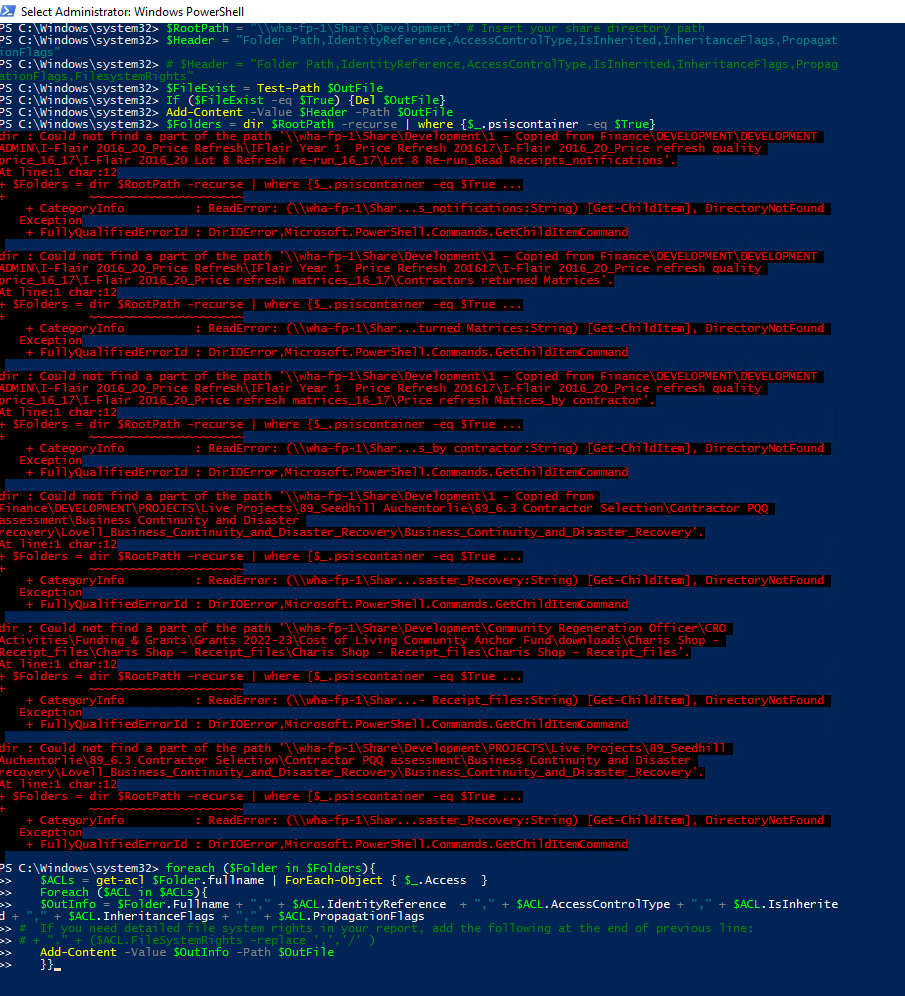
When i change the file path to "wha-fp-1\Share\Development" and run the script it fails with errors and stops running. I checked and the folders exist on the share drive so not sure why its failing unless the script doesnt like the length of the UNC path but i am not sure and that's why i need help.
' cx='32' cy='32' r='32' /%3E%3Ctext x='50%25' y='55%25' dominant-baseline='middle' text-anchor='middle' fill='%23FFF' %3EJK%3C/text%3E%3C/svg%3E)

' cx='32' cy='32' r='32' /%3E%3Ctext x='50%25' y='55%25' dominant-baseline='middle' text-anchor='middle' fill='%23FFF' %3ESR%3C/text%3E%3C/svg%3E)