SQL Server Integration Services
A Microsoft platform for building enterprise-level data integration and data transformations solutions.
This browser is no longer supported.
Upgrade to Microsoft Edge to take advantage of the latest features, security updates, and technical support.
' cx='32' cy='32' r='32' /%3E%3Ctext x='50%25' y='55%25' dominant-baseline='middle' text-anchor='middle' fill='%23FFF' %3EES%3C/text%3E%3C/svg%3E)
I'm still new in SSIS,
Now I can read the SQLStatement, FileName, and FileLocation based on this video
But I'm facing the problems when export the flat file base on the File Location in SQL Table.
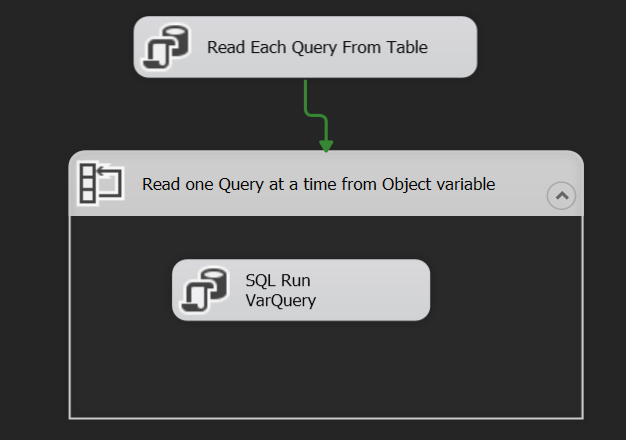
here with my sample package
https://github.com/cheahengsoon/SSISPackage
&
here with sample database
(Different SQL statement, Different File destination and Different file Name)
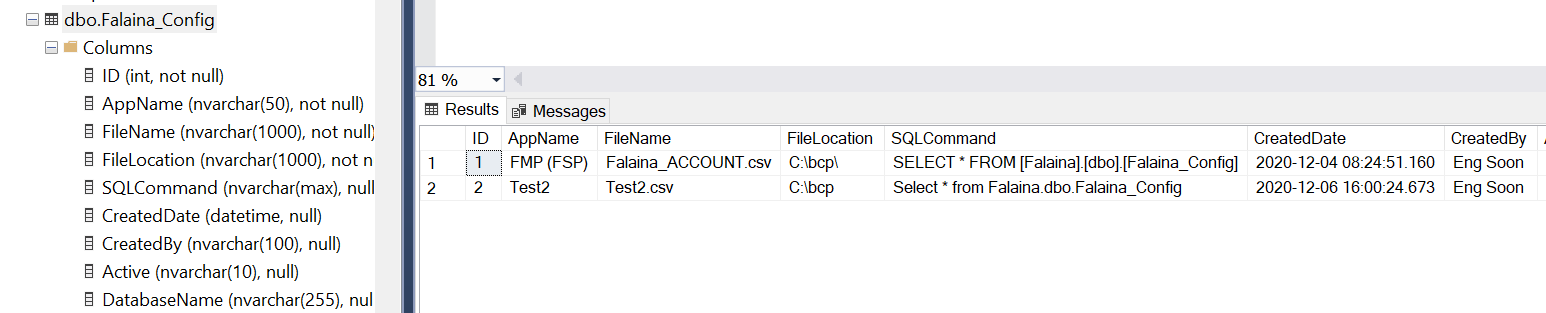
Thanks in Advances.
' cx='32' cy='32' r='32' /%3E%3Ctext x='50%25' y='55%25' dominant-baseline='middle' text-anchor='middle' fill='%23FFF' %3EMM%3C/text%3E%3C/svg%3E)
Hi @Eng Soon Cheah ,
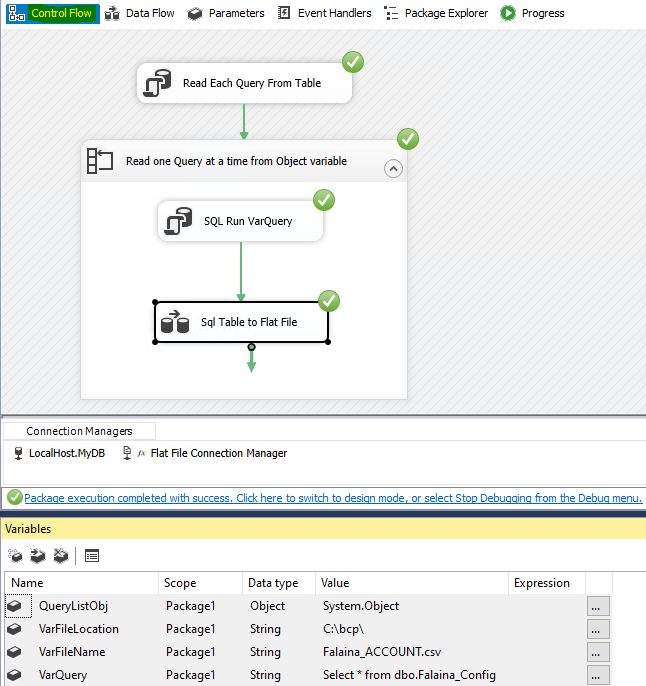
1.Please run the following sql query in the Execute SQL Task:
SELECT [FileName], [FileLocation], [SQLCommand] FROM [MyDB].[dbo].[Falaina_Config];
2.Please read the value from the object variable in Foreach Loop Container.
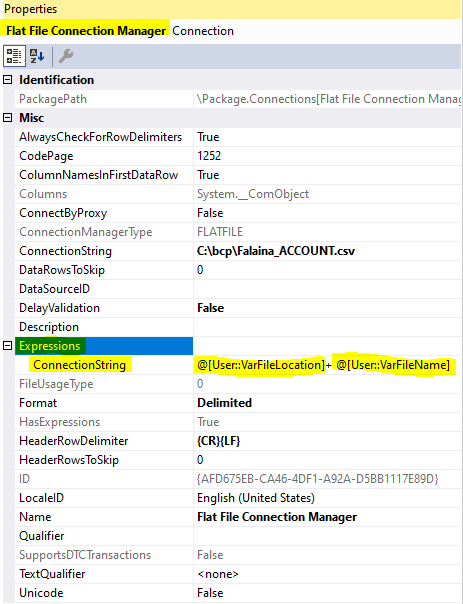
3.Please set the expression for ConnectionString in Flat File Connection Manager.
Hope the following pictures will be helpful:
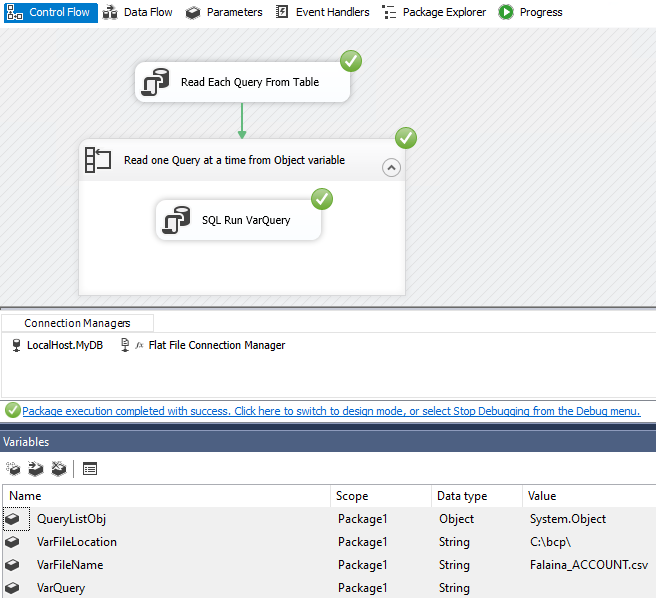
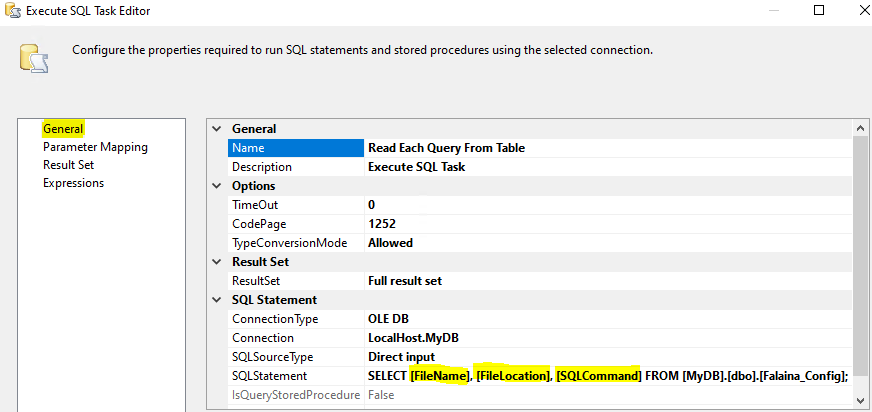
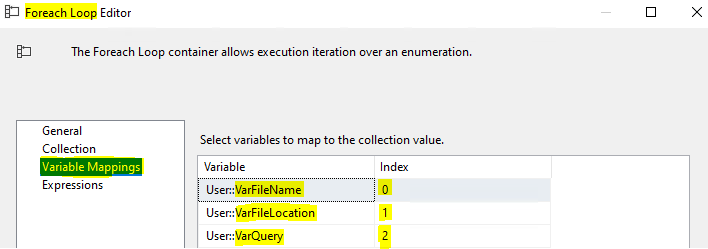
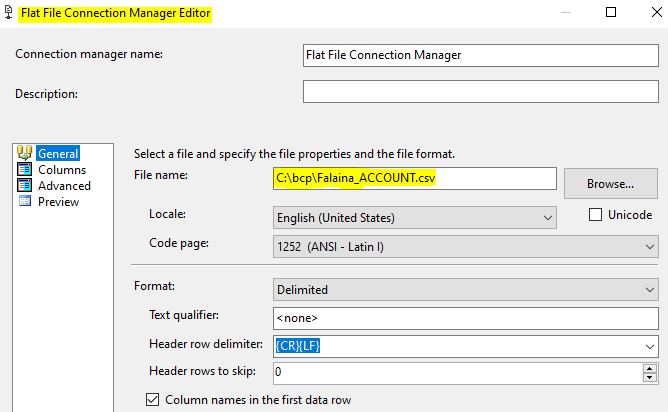
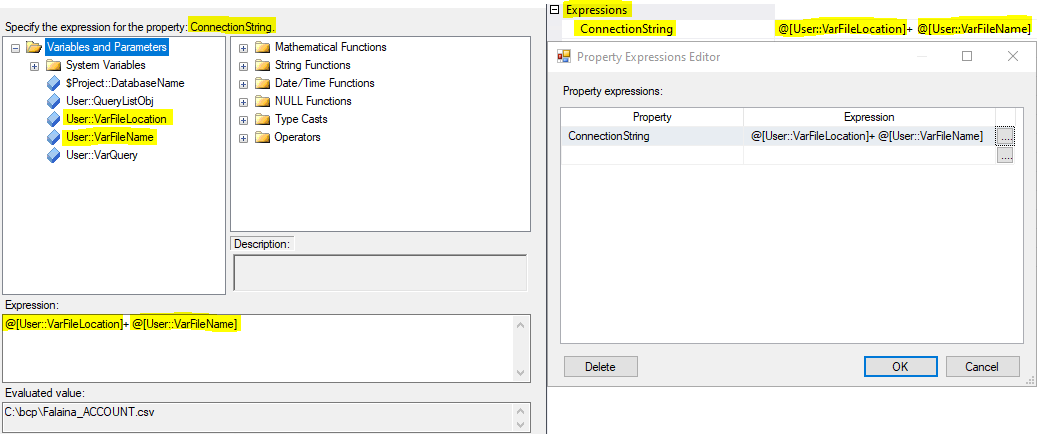
Best Regards,
Mona
If the answer is helpful, please click "Accept Answer" and upvote it.
Note: Please follow the steps in our documentation to enable e-mail notifications if you want to receive the related email notification for this thread.
Hot issues in November--What can I do if my transaction log is full?
Hot issues in November--How to convert Profiler trace into a SQL Server table?
after the SQL Run varQuery need to connect with Data Flow Task?
Hi @Eng Soon Cheah ,
May I know if you want to load data from sql tables to flat files dynamically in Data Flow Task?
May I know if the structures of tables are same?
If yes, please refer to the following steps:
1.Please add a OLEDB Source, then set the data access mode as sql command from variable.
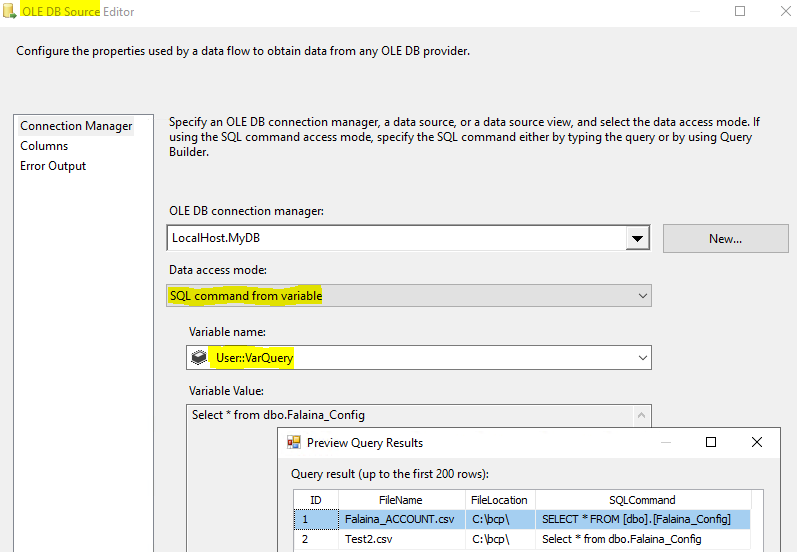
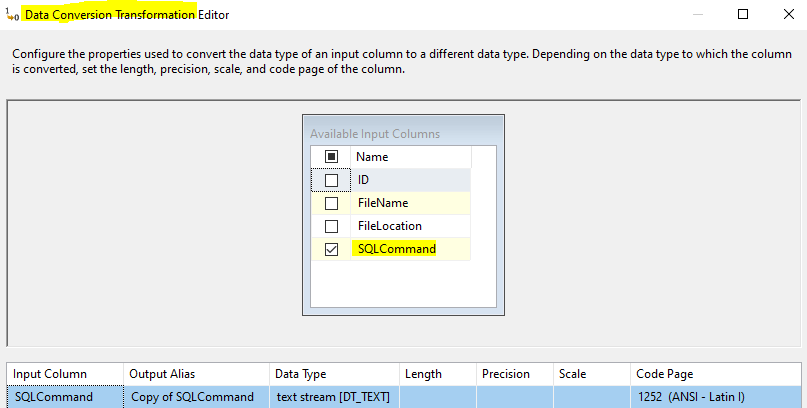
2.Please add a Data Conversion Transformation, then convert the data type of column.
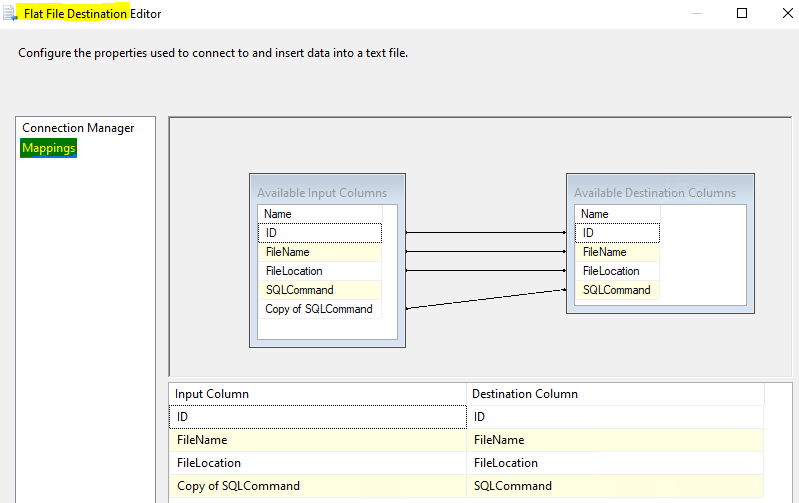
3.Please add a Flat File Destination, then create the empty files and set the expression for connection string in properties of Flat File Connection Manager.(Notice the mapping)
4.Results(Please type example value in the variables)
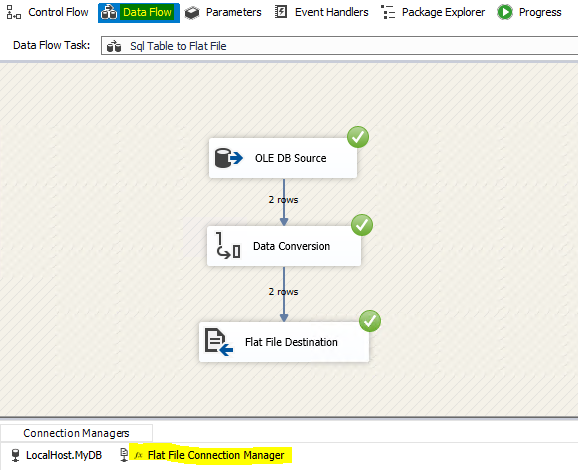
Best Regards,
Mona
Other than above Solution,
You can use Script Task.
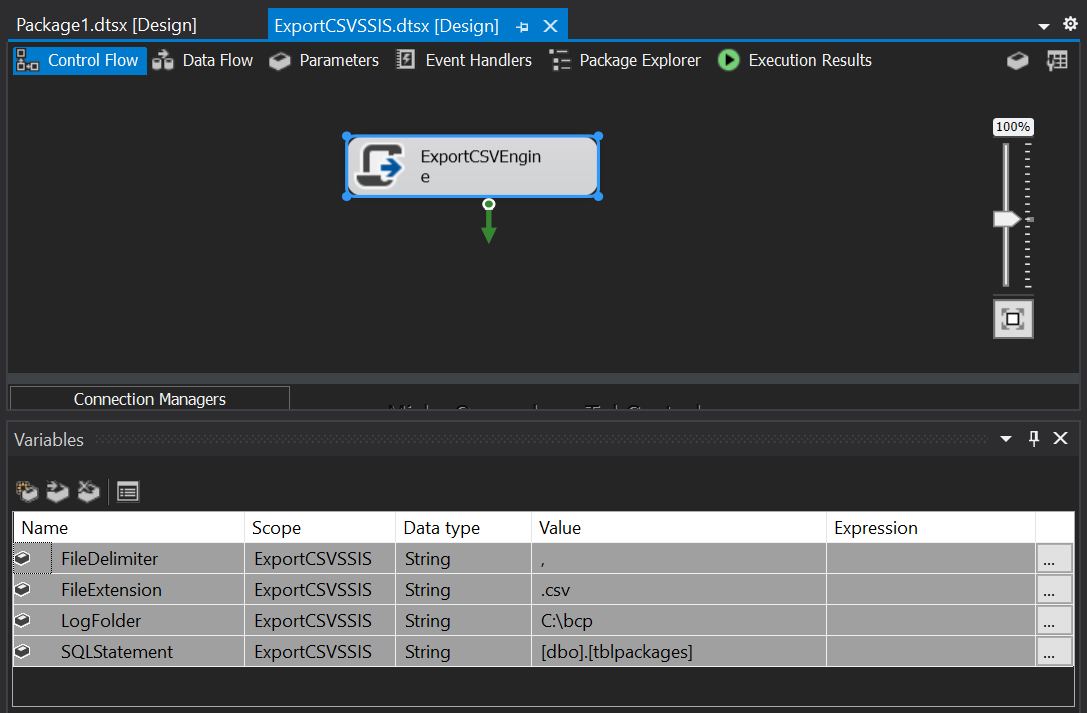
   public void Main()
   		{
               string datetime = DateTime.Now.ToString("yyyyMMddHHmmss");
               try
               {

                   //Declare Variables
                   string SQLStatement = Dts.Variables["User::SQLStatement"].Value.ToString();
                   string FileDelimiter = Dts.Variables["User::FileDelimiter"].Value.ToString();
                   string FileExtension = Dts.Variables["User::FileExtension"].Value.ToString();


                   //USE ADO.NET Connection from SSIS Package to get data from table
                   SqlConnection myADONETConnection = new SqlConnection();
                   myADONETConnection = (SqlConnection)(Dts.Connections["DBConn"].AcquireConnection(Dts.Transaction) as SqlConnection);


                   //Read list of Tables with Schema from Database
                   string query = "SELECT FilesName,FileDestination,SQLStatement FROM "+ SQLStatement;

                   //MessageBox.Show(query.ToString());
                   SqlCommand cmd = new SqlCommand(query, myADONETConnection);
                   DataTable dt = new DataTable();
                   dt.Load(cmd.ExecuteReader());

                   //Loop through datatable(dt) that has schema and table names
                   foreach (DataRow dt_row in dt.Rows)
                   {
                       string FileName = "";
                       string FileDestination = "";
                       string TableName = "";
                       object[] array = dt_row.ItemArray;
                       FileName = array[0].ToString();
                       FileDestination = array[1].ToString();
                       TableName = array[2].ToString();

                       string FileFullPath = FileDestination + FileName; //DestinationFolder + "\\" + SchemaName + "_" + TableName + "_" + datetime + FileExtension;

                       //Get the data for a table into data table
                       string data_query = TableName; //"SELECT * FROM [" + SchemaName + "].[" + TableName + "]";
                       SqlCommand data_cmd = new SqlCommand(data_query, myADONETConnection);
                       DataTable d_table = new DataTable();
                       d_table.Load(data_cmd.ExecuteReader());

                       StreamWriter sw = null;
                       sw = new StreamWriter(FileFullPath, false);

                       // Write the Header Row to File
                       int ColumnCount = d_table.Columns.Count;
                       for (int ic = 0; ic < ColumnCount; ic++)
                       {
                           sw.Write(d_table.Columns[ic]);
                           if (ic < ColumnCount - 1)
                           {
                               sw.Write(FileDelimiter);
                           }
                       }
                       sw.Write(sw.NewLine);

                       // Write All Rows to the File
                       foreach (DataRow dr in d_table.Rows)
                       {
                           for (int ir = 0; ir < ColumnCount; ir++)
                           {
                               if (!Convert.IsDBNull(dr[ir]))
                               {
                                   sw.Write(dr[ir].ToString());
                               }
                               if (ir < ColumnCount - 1)
                               {
                                   sw.Write(FileDelimiter);
                               }
                           }
                           sw.Write(sw.NewLine);

                       }

                       sw.Close();

                       Dts.TaskResult = (int)ScriptResults.Success;
                   }

               }

               catch (Exception exception)
               {

                   // Create Log File for Errors
                   using (StreamWriter sw = File.CreateText(Dts.Variables["User::LogFolder"].Value.ToString() + "\\" +
                       "ErrorLog_" + datetime + ".log"))
                   {
                       sw.WriteLine(exception.ToString());
                       Dts.TaskResult = (int)ScriptResults.Failure;


                   }
               }
           }
This answer has been deleted due to a violation of our Code of Conduct. The answer was manually reported or identified through automated detection before action was taken. Please refer to our Code of Conduct for more information.
Comments have been turned off. Learn more