SQL job fails when user is not logged into the server

Kamil 1 Reputation point
2020-12-08T14:50:08.94+00:00

I have an issue with the SQL job that always fails when I am not logged in with remote connection with the SQL server with the user which is assigned to proxy user.

The job is executing a SSIS package that saves the file on the SQL server Location. The job creates the excel file, however not writing anything to it and fails.
It fails only in situation when I am not logged to server.

The job type is "SQL Server Integration Services Package"

Other job without task related to moving files are working fine.

Is this normal behavior? Is there a way to fix this? Hope this is enough information.

SQL Server | Other
{count} votes

5 answers

Sort by: Most helpful
  1. David Browne - msft 3,851 Reputation points
    2020-12-09T21:24:14.177+00:00

    "Microsoft Access Database Engine" is not built for unattended execution. See

    The Office System Drivers are only supported under certain scenarios, including:

    Desktop applications which read from and write to various files formats including Microsoft Office Access, Microsoft Office Excel and text files.

    To transfer data between supported file formats and a database repository, such as SQL Server. For example, to transfer data from an Excel workbook into SQL Server using the SQL Server Import and Export Wizard or SQL Server Integration Services (provided the SSIS jobs run in the context of a logged-on user with a valid HKEY_CURRENT_USER registry hive).

    https://www.microsoft.com/en-us/download/details.aspx?id=54920
    2 people found this answer helpful.

  2. Kamil 1 Reputation point
    2020-12-08T15:45:16.117+00:00

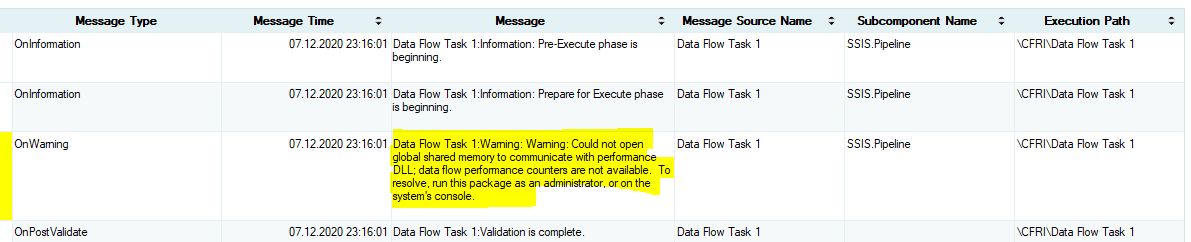
    46343-capture.png

    0 comments No comments

  3. Tom Phillips 17,781 Reputation points
    2020-12-08T20:01:17.357+00:00

    The screen shot you posted is only a warning, not an error. That did not cause the process to fail.

    The most common reason for what you describe is you are trying to write to a mapped drive. You need to use the full UNC path instead.

    0 comments No comments

  4. Kamil 1 Reputation point
    2020-12-09T10:27:53.113+00:00

    I have the folder on C drive and so far I had path C:\FolderName when I changed it to UNC path: \Server01\C$\FolderName it failed with the following error:
    CFRI:Error: SSIS Error Code DTS_E_OLEDBERROR. An OLE DB error has occurred. Error code: 0x80004005.
    An OLE DB record is available. Source: "Microsoft Access Database Engine" Hresult: 0x80004005 Description: "The Microsoft Access database engine cannot open or write to the file '\Server01\C$\FolderName\File.xlsx'. It is already opened exclusively by another user, or you need permission to view and write its data.".

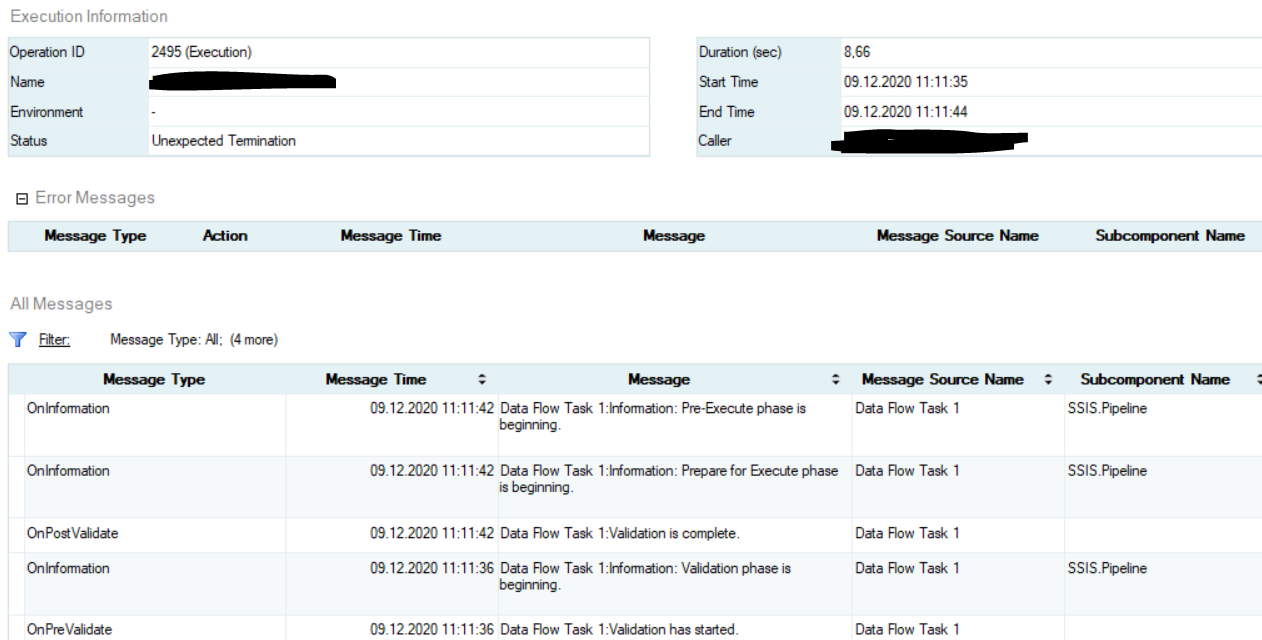
    And actually when I tried to run the job with path C:\FolderName what is happening is unexpected termination, without any specific error:

    46585-image.png


  5. Ben Miller (DBAduck) 966 Reputation points
    2020-12-10T22:56:43.22+00:00

    I had this happen and the solution was to make the Proxy a member of the Local Administrators group on the server. That is not ideal, but there is a privilege that is needed to enable the Proxy Account to create and write data to the Excel File. I am not certain which privilege that is, but to find out if it is just a privilege thing, you can add that Proxy account to the Local Administrators group on the server and if it works, it is security related and then you can work to fix the security privilege that is needed.


Your answer

Answers can be marked as 'Accepted' by the question author and 'Recommended' by moderators, which helps users know the answer solved the author's problem.