Microsoft 365 and Office | SharePoint Server | For business
A family of Microsoft on-premises document management and storage systems.

This browser is no longer supported.
Upgrade to Microsoft Edge to take advantage of the latest features, security updates, and technical support.
' cx='32' cy='32' r='32' /%3E%3Ctext x='50%25' y='55%25' dominant-baseline='middle' text-anchor='middle' fill='%23FFF' %3EMD%3C/text%3E%3C/svg%3E)

Hi @Modus Dev ,
To answer your question:
1)Yes, it is possible to increase list view threshold in SharePoint server as the administrator of Central Administrator, however it is generally not recommended to chang it to avoid performance degradation.
If you still want to do this, please try as follows:
Go to Central Admin>Click Manage Web Applications under Application Management>Select the web application for which you’re adjusting the list view threshold>Select General Settings then Resource Throttling:
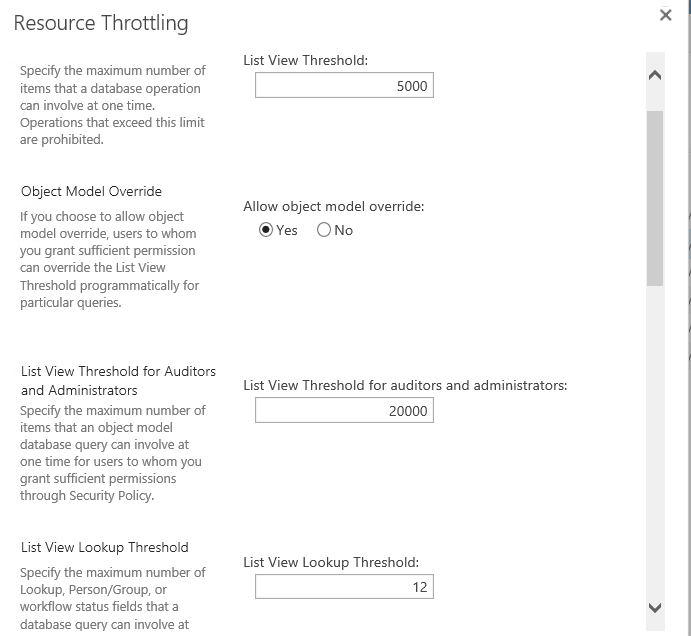
2)Although we can index a lookup column to improve performance, using an indexed lookup column to prevent exceeding the List View Threshold doesn't work.
So we suggest you use another type of column as the primary or secondary index.
In addition, please note that there are no more than 12 lookup columns displayed in the list view, which will cause the same threshold issue.
More information for your reference:
Note: Microsoft is providing this information as a convenience to you. The sites are not controlled by Microsoft. Microsoft cannot make any representations regarding the quality, safety, or suitability of any software or information found there. Please make sure that you completely understand the risk before retrieving any suggestions from the above link.
If an Answer is helpful, please click "Accept Answer" and upvote it.
Note: Please follow the steps in our documentation to enable e-mail notifications if you want to receive the related email notification for this thread.
Hi @Modus Dev ,
Do you have any progress on this issue?
Please remember to update this thread if you need further assistance.
Hi @Modus Dev ,
I’m checking how the things are going on about this issue. Whether the post helps you?
You can accept the post as answer if it helps.
Thank you for your understanding and support.