Microsoft 365 and Office | Excel | For business | Windows
A family of Microsoft spreadsheet software with tools for analyzing, charting, and communicating data

This browser is no longer supported.
Upgrade to Microsoft Edge to take advantage of the latest features, security updates, and technical support.
' cx='32' cy='32' r='32' /%3E%3Ctext x='50%25' y='55%25' dominant-baseline='middle' text-anchor='middle' fill='%23FFF' %3EFS%3C/text%3E%3C/svg%3E)
I am making an array of SKUs and at the end of the SKU the first one for example would be: TG1974TNCA . Is there a way that I can copy the original SKU (dragging that cell down to the other 5 cells) but it will automatically change the last letter to the next letter in the alphabet? i.e. next cell would be TG1974TNCB next cell would be TG1974TNCC . I have HUNDREDS of these to copy and dont want to sit there and type each one when it is just the last letter needs to change.. THANKS!
A family of Microsoft spreadsheet software with tools for analyzing, charting, and communicating data
Tag not monitored by Microsoft.

' cx='32' cy='32' r='32' /%3E%3Ctext x='50%25' y='55%25' dominant-baseline='middle' text-anchor='middle' fill='%23FFF' %3EGM%3C/text%3E%3C/svg%3E)
Hi, thanks for reaching out. I'm not sure what service you're referring to, but this forum 'azure-text-analytics' is for questions specific to Text Analytics API.

1) Do you run Excel on Windows or Mac?
2) "I have HUNDREDS...". Could you be a bit more precise?
(from TG1974TNCA up to TG1974TNZZ = 624 values)
3) What should happen once TG1974TNZZ is reached?

Hi @FunWith Stencils ,
Just checking in to see if the information was helpful. Please let us know if you would like further assistance.
If the response is helpful, please click "Accept Answer" and upvote it.
Note: Please follow the steps in our documentation to enable e-mail notifications if you want to receive the related email notification for this thread.
' cx='32' cy='32' r='32' /%3E%3Ctext x='50%25' y='55%25' dominant-baseline='middle' text-anchor='middle' fill='%23FFF' %3EHS%3C/text%3E%3C/svg%3E)
Excel 365 Pro Plus with Power Query.
Increment last letter.
https://www.mediafire.com/file/7prnh3e99yvp7e1/12_24_20.xlsx/file
https://www.mediafire.com/file/yqbyi18gml2jtrs/12_24_20.pdf/file
Hi @FunWith Stencils ,
Please try this formula:
="TG1974TNC"&CHAR(64+ROW(A1))
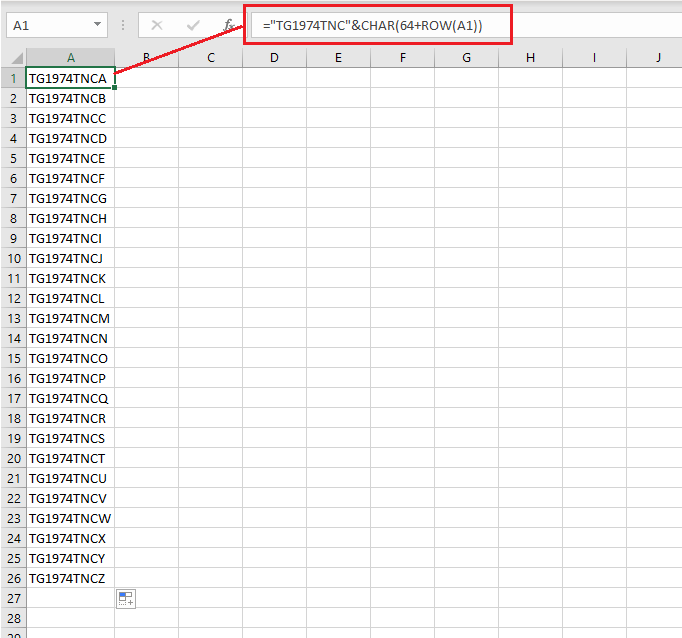
If the response is helpful, please click "Accept Answer" and upvote it.
Note: Please follow the steps in our documentation to enable e-mail notifications if you want to receive the related email notification for this thread.