Azure Data Factory
An Azure service for ingesting, preparing, and transforming data at scale.
This browser is no longer supported.
Upgrade to Microsoft Edge to take advantage of the latest features, security updates, and technical support.
' cx='32' cy='32' r='32' /%3E%3Ctext x='50%25' y='55%25' dominant-baseline='middle' text-anchor='middle' fill='%23FFF' %3EAK%3C/text%3E%3C/svg%3E)
Hi Team,
We have created an ADF COPY activity where it copies the CSV files from one ADLS source container directory to another ADLS destination directory and convert the CSV files to PARQUET.
Multiple files will be read recursively from the source directories using the wildcard filter and preserve the same folder hierarchy in the destination as well.
Eg:

In ADF we have used File Path type as ‘Wildcard file path’ and Wild card folder path as the root Directory eg: ‘RootFolder\’
Question:

Hi @Aneesh Kumar A L , wondering if you get a chance to look into the solution I have provided below. Did it work? Would you please share your feedback with us. If the below suggestion helped, please accept as answer and up-vote the same. Thanks!
Hi @Aneesh Kumar A L ,
1: yes, it's possible to have the target file in the same hierarchy but the filename would be source: rootFolder/category/.../test.csv --> des: rootFolder/category/.../test.parquet, if you keep the same FilePath in Source and Sink Dataset. Only using the CopyActivity with Preserve Hierarchy, I am afraid it's not possible to change the filename to be user-defined yet.
2 and 3: it possible with only copy activity. Add additional column $$FILEPATH in the CopyActivity-->source, no additional change need to be done in the mapping side, unless your source filetype change something else than .csv (e.g, .json, in such case, just reset the mapping and re-map. when filepath column appears, exclude the column in the mapping). You will get the relative-filepath information in the log file. Thanks! :)
Please see the screenshots for details:
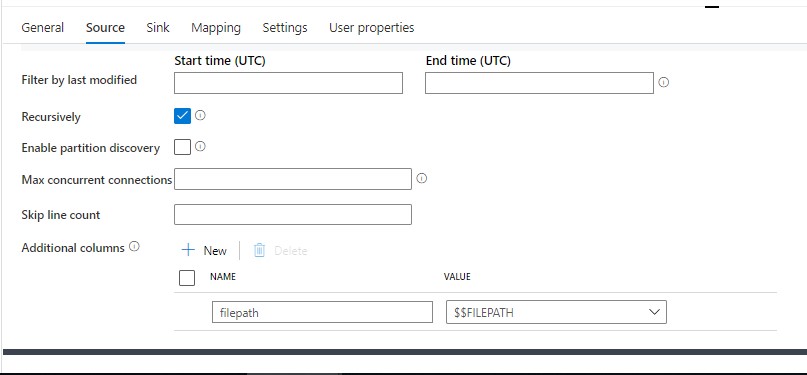
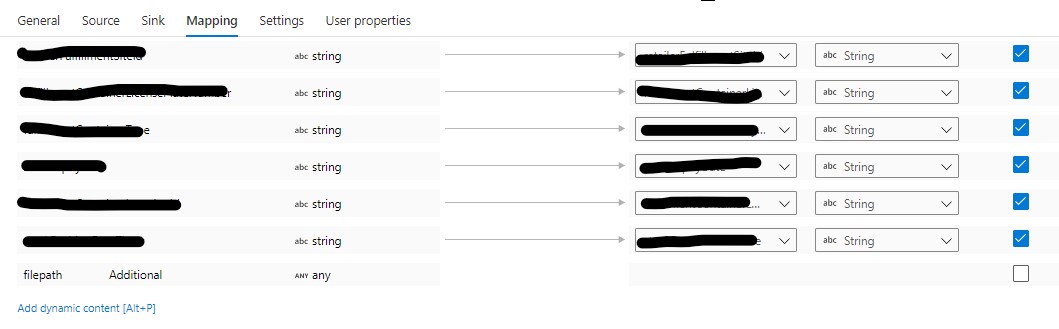
Please let me know if this helps. If the above response helps, please "accept the answer" and "up-vote" the same! Thank you!
' cx='32' cy='32' r='32' /%3E%3Ctext x='50%25' y='55%25' dominant-baseline='middle' text-anchor='middle' fill='%23FFF' %3EH%3C/text%3E%3C/svg%3E)
Hello @Aneesh Kumar A L ,
Thanks for the ask and using the forum .
As already mentioned you are using the recursive option . Can you tell us to how many files are trying to copy ?
One option which I can see is the Getmetadata actvity to get all the files and then pass that to the foreach loop .Inside the FE we can add the
copy activity . This way you should be able to create
the folder structure on the sink side . The getdatameta activity has an limit of 4 MB which we will have to consider while planning .
This also should take care of Pt3 of the ask .
I am not sure we can do much about number #2 .
Let me know if this helps .
Thanks
Himanshu
Hello @Aneesh Kumar A L ,
We have not heard back from you on this and was just following up .
Incase if you have resolution , request you to share the same here , so that other community members can benefit from that .
Thanks
Himanshu
Hi @HimanshuSinha ,
Thanks for your update!
The number of files is huge, it close to 14000. Also does the Getmetadata activity retrieve the file information recursively, if we provided a root directory? I think it won't.
I have already tried one workaround option that will resolve the three questions, but it have a performance impact than the recursive copy activity. What I had done is: get the all the file details from the root directory using 'azcopy.exe list ' command and loaded to a table and iterate the files using FE in ADF, then each file will be passed to the copy activity parallelly. But It process only 20 files at a time and for each COPY activity it does not scale DIUs, parallel copies and peak connections since we are processing one file in a copy activity.
So it would be helpful if we have a solution for the above three questions without any performance issue.
' cx='32' cy='32' r='32' /%3E%3Ctext x='50%25' y='55%25' dominant-baseline='middle' text-anchor='middle' fill='%23FFF' %3EMM%3C/text%3E%3C/svg%3E)
For Question #1 I was able to copy and have the suffix change (file.csv -> file.parquet) but I was not able to cause it to be appended (file.csv -> file.csv.parquet).
In my wildcard filepath folder I used *
In my wildcard filename I used *.csv
I tried this with blob, data lake gen 2, and data lake gen 1.
What settings and data store were you using?
Hi @Nasreen Akter , Thanks for your valuable input!
For the Question #1, based on your input I have set the CopyActivity with Preserve Hierarchy in sink side and ran. But it still produce the file name as 'test.csv.parquet'. I have attached the screenshots for your reference. Please let me know if I miss anything.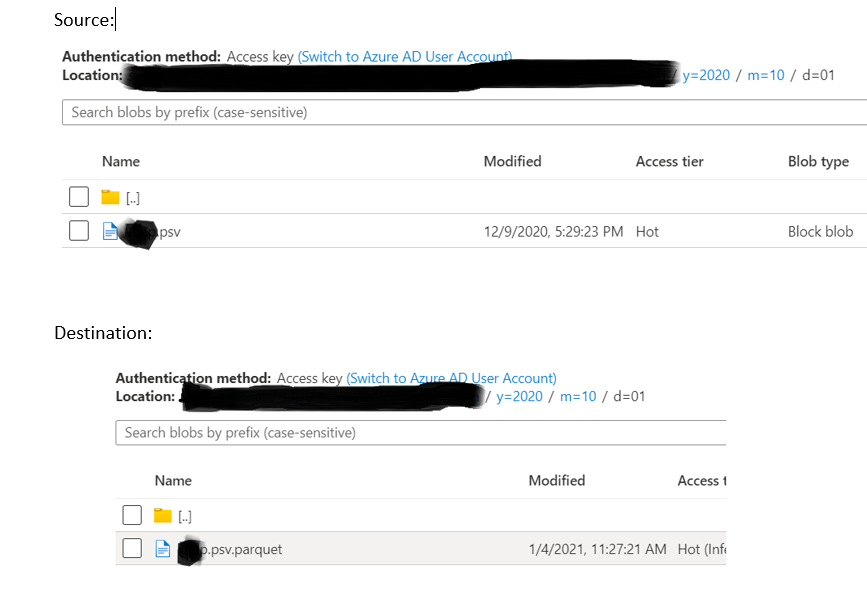
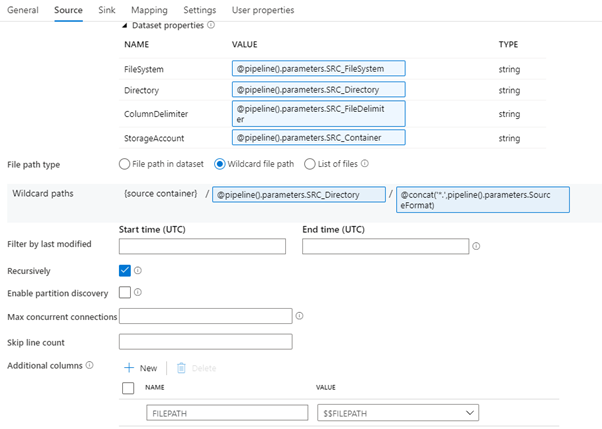
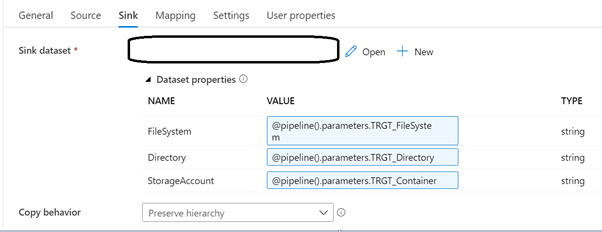
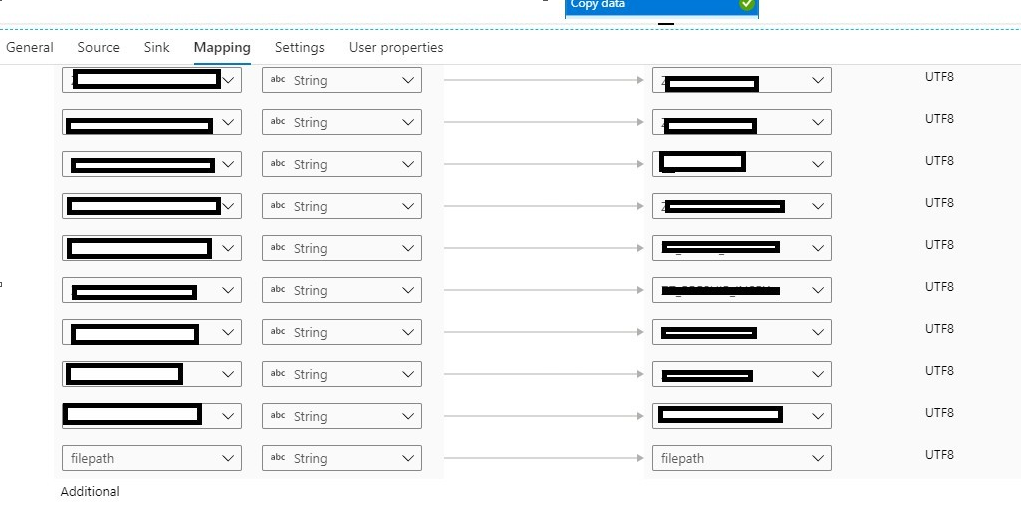
For the Question #2 and #3 I have tried with the file path option, but in the mapping tab we could not able to exclude the destination column name for the file path. Please see the screen shot below. Are you using custom JSON for the mapping?
Hi @Aneesh Kumar A L ,
Thank you for reaching out to me. I have checked the issues you mentioned above.
For Que#1: I see the file extension you used is .psv. If you use .csv instead of .psv, it should work.
Que#2: there is a delete button after each mapping (please see the screenshot), if you delete the column, it will not appear in the target File, but it will show up in the error log.
Hope this helps! Thanks! :)

Hi @Nasreen Akter ,
Thanks for your replay!
For Que#1: I got the issue now, it is not changing the extension due to '.psv' format. Thanks for your guidance.
For Que#2: I have added the additional column 'filepath' in source and it is not included in the mapping as well (mapping we are passing the JSON file dynamically and in that it does not have the 'filepath' column), but still the log does not have the file name information for the skipped rows (from which file the row got skipped). Please see the screenshots below and let me know if I need to make any changes.


Log File after the execution:

Hi @Aneesh Kumar A L , with dynamic mapping, I could not able to log filepath :(
Thanks for your help @Nasreen Akter