Developer technologies | Windows Presentation Foundation
A part of the .NET Framework that provides a unified programming model for building line-of-business desktop applications on Windows.
This browser is no longer supported.
Upgrade to Microsoft Edge to take advantage of the latest features, security updates, and technical support.
' cx='32' cy='32' r='32' /%3E%3Ctext x='50%25' y='55%25' dominant-baseline='middle' text-anchor='middle' fill='%23FFF' %3ERA%3C/text%3E%3C/svg%3E)
I want to pass an ID value from the MainWindow as a paramter to the ViewModel used in a TabControl within the MainWindow. The TabControl displays the associated View using a DataTemplate. How can I accomplish this?
MainWindow looks like this:
<Window x:Class="MyProject.Views.SummaryView"
        xmlns:vw="clr-namespace:MyProject.Views"
        mc:Ignorable="d"
        Title="Main Window">
    <Grid>
            <TabControl>
                <TabItem Header="Tab 1">
                        <vw:Tab1View />
                </TabItem>
        </Grid>
</Window>
The View DataTemplate is defined in a ResourceDictionary like this:
<ResourceDictionary xmlns="http://schemas.microsoft.com/winfx/2006/xaml/presentation"
                    xmlns:x="http://schemas.microsoft.com/winfx/2006/xaml"
                    xmlns:local="clr-namespace:MyProject"
                    xmlns:vw="clr-namespace:MyProject.Views">

<DataTemplate DataType="{x:Type local:Tab1ViewModel}">
        <vw:Tab1View/>
    </DataTemplate>

Hi,
you can set in main ViewModel an ID in each instance of Tab1ViewModel. In Tab1ViewModel you can set a reference to ViewModel to get information from main ViewModel. Try following demo:
XAML:
<Window x:Class="Window071"
        xmlns="http://schemas.microsoft.com/winfx/2006/xaml/presentation"
        xmlns:x="http://schemas.microsoft.com/winfx/2006/xaml"
        xmlns:d="http://schemas.microsoft.com/expression/blend/2008"
        xmlns:mc="http://schemas.openxmlformats.org/markup-compatibility/2006"
        xmlns:local="clr-namespace:WpfApp1.WpfApp071"
        mc:Ignorable="d"
        Title="MainWindow" Height="450" Width="800">
  <Window.DataContext>
    <local:ViewModel/>
  </Window.DataContext>
  <Window.Resources>
    <DataTemplate DataType="{x:Type local:Tab1ViewModel}">
      <local:Tab1View/>
    </DataTemplate>
  </Window.Resources>
  <Grid>
    <TabControl ItemsSource="{Binding View}">
      <TabControl.ItemTemplate>
        <DataTemplate>
          <TextBlock Text="{Binding TabTitle}"/>
        </DataTemplate>
      </TabControl.ItemTemplate>
      <TabControl.ContentTemplate>
        <DataTemplate>
          <StackPanel>
            <TextBlock Text="{Binding MainViewModel.MainText}"/>
            <TextBlock Text="{Binding Text}"/>
          </StackPanel>
        </DataTemplate>
      </TabControl.ContentTemplate>
    </TabControl>
  </Grid>
</Window>
Code:
Imports System.Collections.ObjectModel

Namespace WpfApp071
  Public Class ViewModel
    Public Sub New()
      For i = 1 To 10
        View.Add(New Tab1ViewModel With {.MainViewModel = Me, .TabTitle = $"TabItem {i}", .Text = $"Text in TabItem {i}"})
      Next
    End Sub
    Public Property View As New ObservableCollection(Of Tab1ViewModel)
    Public Property MainText As String = "Text from MainWindow"
  End Class

  Public Class Tab1ViewModel
    Public Property MainViewModel As ViewModel
    Public Property TabTitle As String
    Public Property Text As String
  End Class

  Public Class Tab1View
    Inherits TabItem
  End Class

End Namespace
in C#:
using System.Collections.ObjectModel;
using System.Windows;
using System.Windows.Controls;

namespace WpfApp1
{
  namespace WpfApp071
  {
    public class ViewModel
    {
      public ViewModel()
      {
        for (int i = 1; i <=10; i++)
          View.Add(new Tab1ViewModel { MainViewModel = this, TabTitle = $"TabItem {i}", Text = $"Text in TabItem {i}" });
      }
    public ObservableCollection<Tab1ViewModel> View { get; } = new ObservableCollection<Tab1ViewModel>();
    public string MainText { get; set; } = "Text from MainWindow";
  }
    public class Tab1ViewModel
    {
      public ViewModel MainViewModel { get; set; }
      public string TabTitle { get; set; }
      public string Text { get; set; }
    }
    public class Tab1View : TabItem { }
  }
}
Result:
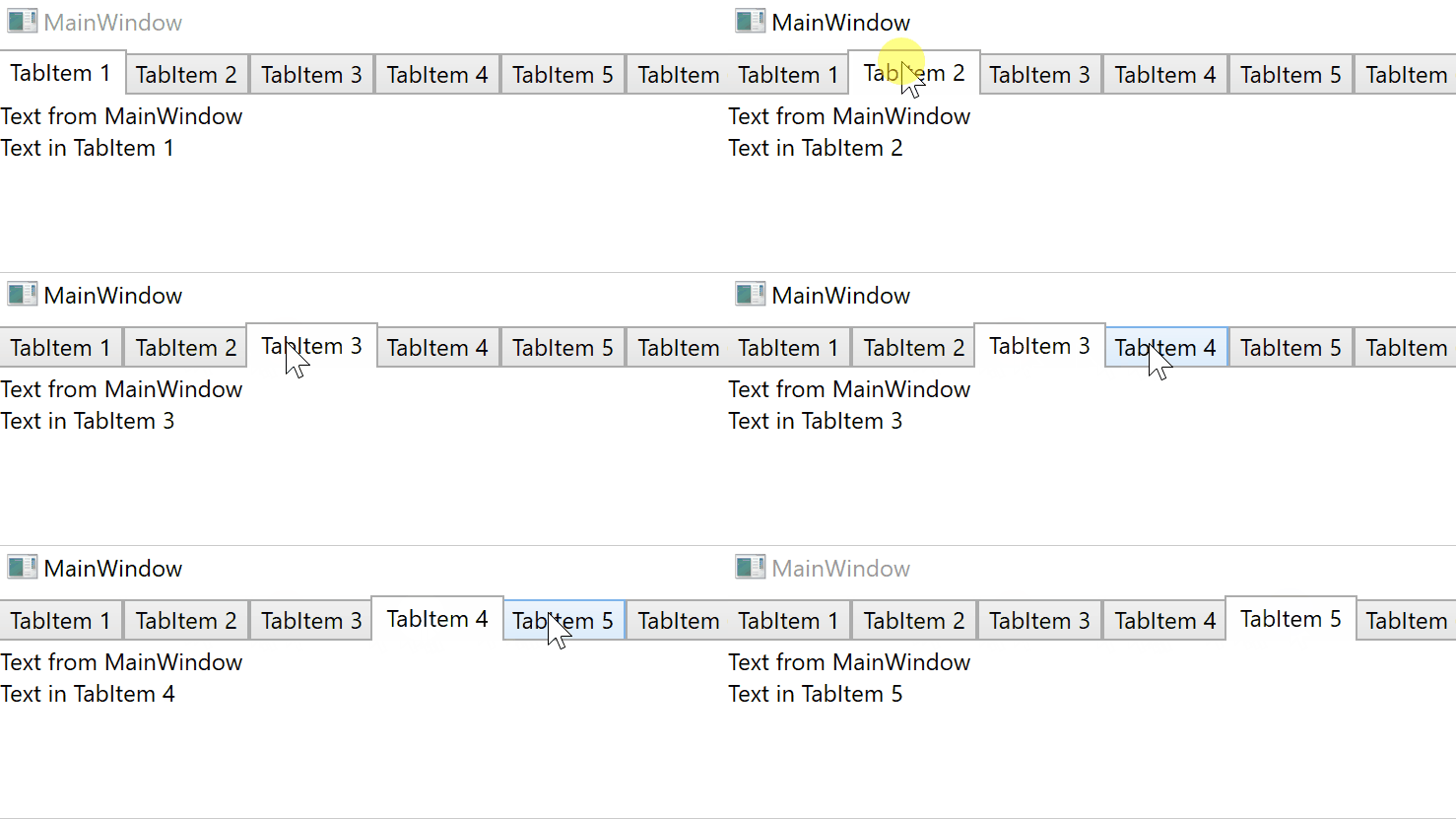

You should add two templates:
TabControl.ItemTemplate, used to render the TabItem headers
TabControl.ContentTemplate, used to render the TabItem contents
I will add a demo with C#:
Part 1 : Add below code in the ResourceDictionary
  <DataTemplate x:Key="DataTemplateHeader" DataType="{x:Type local:MyViewModel}" >
            <TextBlock Text="{Binding Text}"></TextBlock>
        </DataTemplate>

        <DataTemplate x:Key="DataTemplateContent" DataType="{x:Type local:MyViewModel}" >
            <StackPanel >
                <TextBlock FontSize="30" Text="Id is:"></TextBlock>
                <TextBlock FontSize="30" Text="{Binding Id}"></TextBlock>
                <TextBlock FontSize="30" Text="{Binding MainViewModel.MainText}"></TextBlock>
            </StackPanel>
        </DataTemplate>
Part 2: The Code for MainWindow.Xaml
 <Window.DataContext>
        <local:MyViewModel></local:MyViewModel>
    </Window.DataContext>
    <Grid>
        <TabControl ItemsSource="{Binding MyViews}" ItemTemplate="{StaticResource DataTemplateHeader}" ContentTemplate="{StaticResource DataTemplateContent}">
        </TabControl>
    </Grid>
Part 3 : The Code for MainWindow.Xaml.cs
 public partial class MainWindow : Window
    {
        public MainWindow()
        {
            InitializeComponent();
        }
    }
    public class MyViewModel
    {
        public string MainText { get; set; } = "Text from MainWindow";
        public ObservableCollection<MyModel> MyViews { get; set; } = new ObservableCollection<MyModel>();
        public MyViewModel()
        {
            for (var i = 1; i < 8; i++)
                MyViews.Add(new MyModel() { Id = i, Text = "TabItem {i}" , MainViewModel = this});
        }
    }

    public class MyModel
    {
        public int Id { get; set; }
        public string Text { get; set; }
        public MyViewModel MainViewModel { get; set; }
    }
If the response is helpful, please click "Accept Answer" and upvote it.
Note: Please follow the steps in our documentation to enable e-mail notifications if you want to receive the related email notification for this thread.