Microsoft 365 and Office | SharePoint | For business | Windows
A group of Microsoft Products and technologies used for sharing and managing content, knowledge, and applications.

This browser is no longer supported.
Upgrade to Microsoft Edge to take advantage of the latest features, security updates, and technical support.
' cx='32' cy='32' r='32' /%3E%3Ctext x='50%25' y='55%25' dominant-baseline='middle' text-anchor='middle' fill='%23FFF' %3EAM%3C/text%3E%3C/svg%3E)
Hi
I create a datasheet view in sharepoint list. Now I want to mandatory one column based on another column’s value in this view.
How I can do this?
Thanks.
' cx='32' cy='32' r='32' /%3E%3Ctext x='50%25' y='55%25' dominant-baseline='middle' text-anchor='middle' fill='%23FFF' %3EXX%3C/text%3E%3C/svg%3E)
Hi @ameneh maleki ,
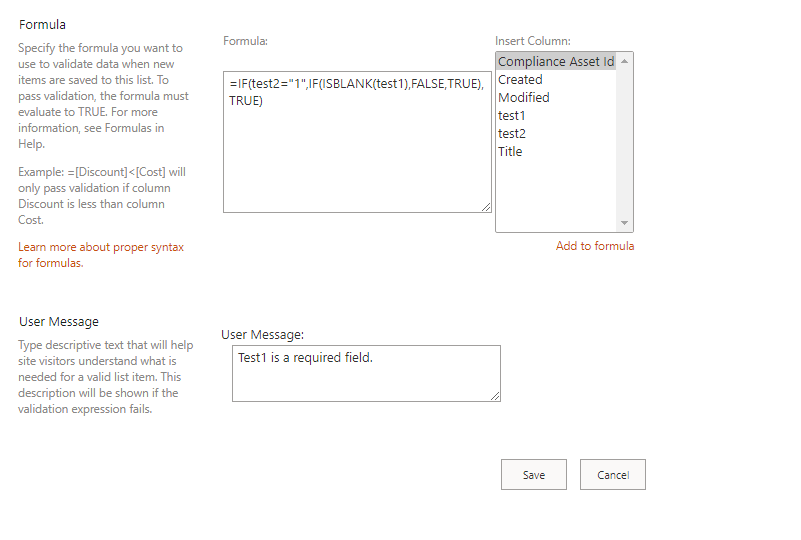
You could set list validation to make a field mandatory based on a selection from another field in the sharepoint list. For example, when test2 field =1, test1 field is mandatory.
1.Go to List settings -> Validation settings -> Use following formula:
=IF([test2] = "1", IF(ISBLANK([test1]), false, true), true)
If the answer is helpful, please click "Accept Answer" and kindly upvote it. If you have extra questions about this answer, please click "Comment".
Note: Please follow the steps in our documentation to enable e-mail notifications if you want to receive the related email notification for this thread.
Hi @ameneh maleki ,
Please kindly consider this comment as a warm follow up, I want to know if your problem has been solved. If you still have any other questions, please feel free to comment here and I'm glad to provide further support.
Hi Xyza Xue Thanks for your reply.
Hi Xyza Xue
Thanks for your reply.
I didn’t have “Insert column” in Formula part in my sharepoint list setting page!
and when i use this formula, get me below error:
"The formula cannot refer to another column. Check the formula for spelling mistakes or update the formula to reference only this column."
What’s the problem?!
Hi, add the formula here in the validation settings in the list settings.
Hi @ameneh maleki ,
How's going today? Do you have further concerns regarding this issue? Please feel free to talk with us if you have other questions. If the above info is helpful to this question, you can click "Accept Answer". Have a nice day!
Hi @ameneh maleki ,
We have not received a response from you. We would appreciate it if you would like to share a recent update on your problem. Please feel free to reach us if any questions or concerns you may have.If the above info is helpful to this question, Please remember to "Accept as answer" to close this case and this will help people in this forum who have similar questions to yours find the answer easier.
Thanks for your reply. Actually I I was using column validation instead of list validation.
Now I realized my mistake.