Azure Databricks
An Apache Spark-based analytics platform optimized for Azure.
This browser is no longer supported.
Upgrade to Microsoft Edge to take advantage of the latest features, security updates, and technical support.
' cx='32' cy='32' r='32' /%3E%3Ctext x='50%25' y='55%25' dominant-baseline='middle' text-anchor='middle' fill='%23FFF' %3EAP%3C/text%3E%3C/svg%3E)
Hi,
I am trying to use Databricks on Azure the first time and am having a lot of difficulties. There are so many confusions and hurdles for me.
First, I wanted to use Databricks free trial on Azure. After creating a new subscription, I wasn't able to launch the workspace as Azure asked me to upgrade my option to Pay As You Go to do the same and create compute. Why is so? We cannot create a cluster on Databricks on Azure then what's the meaning of the free trial?
However, I did as suggested. But even then I haven't been able to create a compute, not even Personal Compute. There is no guideline on how a new user should go forward or what steps they should follow to keep going without any problem. Anytime I click on Create Compute after entering the instance details, I get an error like "ab777a75396 has a quota of 3 for resources of type Public|pAddress with sku SkuNotSpecified. Subscription currently has 0 resources and the template contains 8 new resources of the this type which exceeds the quota. Please contact support to increase the quota for resource type Public|pAddress". I don't understand what this error is for. I didn't expect it as I wanted to use a trial version of Databricks on Azure.
I got a hint on Databricks Community to go to Subscriptions -> Usage + Quotas and ask for quota increase. When I go there and select my instance type to raise the request for quota increase, I get message that my region "US West" doesn't have quota for my instance. How do I go from here? How can I resolve this issue? I am stuck at this place for more than one day. I am really confused how Free trail of Azure is working vs free trial of Databricks is working. At this moment, I have cancelled the Azure Subscription on Azure Portal and deleted all the resources.
Please provide me step by step guidelines to resolve this issue. I am also looking for a live chat option or even a video call if I don't understand your instructions properly. As I am looking at Azure portal first time, I am not familiar with its layout.
' cx='32' cy='32' r='32' /%3E%3Ctext x='50%25' y='55%25' dominant-baseline='middle' text-anchor='middle' fill='%23FFF' %3EST%3C/text%3E%3C/svg%3E)
Thank you for using Microsoft Q&A platform and thanks for posting your question here.
I understand your frustration with the difficulties you're facing while trying to use Databricks on Azure for the first time.
Free Trial Clarification
The Azure Databricks free trial is a limited-time offer that lets you explore the service at no cost, but it comes with restrictions like limited resources and quotas. To create a Databricks cluster, you'll need a Pay-As-You-Go subscription, which is why you're being asked to upgrade. The Azure Free Trial allows only 4 cores, and since creating a Databricks cluster requires more than 4 cores (at least 4 for the Driver and 4 for the Worker), it can't be done with a Free Trial subscription.
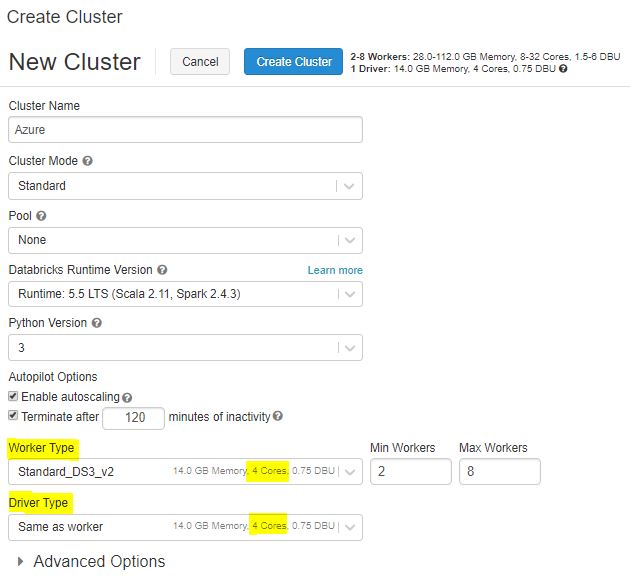
For more details, refer to Quickstart: Run a Spark job on Azure Databricks Workspace using the Azure portal
Regarding the quota limit for public IP addresses in your region (US West)
Problem:
Databricks clusters use one public IP address per node (including the driver node). Azure subscriptions have public IP address limits per region. Thus, cluster creation and scale-up operations may fail if they would cause the number of public IP addresses allocated to that subscription in that region to exceed the limit. This limit also includes public IP addresses allocated for non-Databricks usage, such as custom user-defined VMs.
In general, clusters only consume public IP addresses while they are active. However, PublicIPCountLimitReached errors may continue to occur for a short period of time even after other clusters are terminated. This is because Databricks temporarily caches Azure resources when a cluster is terminated. Resource caching is by design, since it significantly reduces the latency of cluster startup and autoscaling in many common scenarios.
Solution:
If your subscription has already reached its public IP address limit for a given region, then you should do one or the other of the following.
For more details, refer to Issue: Cloud provider launch failure while setting up the cluster (PublicIPCountLimitReached).
Important! Note: Azure free trial/Student/Pass subscription are not eligible for a quota request. You need to upgrade to a
Pay-As-You-Go subscriptionto increase the quota
If you still have questions, you can chat with sales team to get more information.
Hope this helps. Do let us know if you any further queries.
If this answers your query, do click Accept Answer and Yes for was this answer helpful. And, if you have any further query do let us know.
Thank you for the detail explanation using the screenshots. I now feel I have the right support to get going :)
A few follow ups:
How do I know that I have the Pay As You Go subscription? It will be great if you can show it to me using the screenshots. I know I upgraded my free trial to pay-as-you-go but want to see it in the portal.
How will I know the Public IP Address limit and quota for myself in a given region? Only when we try creating a cluster and then getting this error is bad user experience; the user should get the hint about it at the time of choosing the region. Also, the error is not great in its description. It doesn't speak about the root cause and the way to resolve it. I want to pass it as a feedback to your tech team.
Can I choose any region regardless of where I am located in the world? Does my region need to be one of the regions of my residing country?
Another question that I have is: I see my Azure subscription recommends me to upgrade and it takes me to the screen that shows Premium, Standard and Basic.
It doesn't show anything like Free or Pay as You Go. Mine is Basic. Premium and Standard have costs for a month. I want to understand why do they have fixed costs for a month when they are cloud services? How are they different from pay-as-you-go?
Is it like if I choose Premium, I will have more services to access at the given cost and an upper limit on each of them; and when the limit is crossed then I am billed on pay-as-you-go mode? Basically, I am wondering why are there not just 2 options: free and pay-as-you-go vs this type?
I'm glad I could provide the necessary support to get you started!
To confirm your subscription type, follow these steps:
Public IP Address Limit and Quota
As per the documentation says you can usually have up to 10 public IP addresses in any region. If you need more, you can follow the steps I explained before.
Region Selection
While you can generally choose any region for your Azure resources, there are factors to consider:
Azure Subscription Tiers (Premium, Standard, Basic)
Regarding your question about Azure subscription tiers, here's a brief explanation:
When you choose a tier, you'll have access to a set of resources and features within the specified limits. If you exceed those limits, you'll be billed according to the Pay-As-You-Go pricing model.
If you need more details, please refer this document.
I hope this helps clarify the differences between Azure subscription tiers!
Feedback
About the error message for public IP address limits, please share your feedback on our feedback channel. Other users can also vote and comment on your suggestion. This helps our team decide which features to work on next and understand how important your request is.
If you have any further questions or concerns, please don't hesitate to ask.