Microsoft Security | Microsoft Entra | Microsoft Entra ID
A cloud-based identity and access management service for securing user authentication and resource access

This browser is no longer supported.
Upgrade to Microsoft Edge to take advantage of the latest features, security updates, and technical support.
' cx='32' cy='32' r='32' /%3E%3Ctext x='50%25' y='55%25' dominant-baseline='middle' text-anchor='middle' fill='%23FFF' %3EN%3C/text%3E%3C/svg%3E)
Hi,
I have Azure subscription, Azure AD 2 and I enabled MFA and I enrolled all the users, I synced the AD with Azure AD, Also I configured azure MFA with NPS server.
Im getting this error when I run the health-check script:
User1@keyman .com has not a valid license for MFA, it's a warning message to be legal from licensing side... Test FAILED
Test will continue to detect additional issue(s), Please make sure to assign a valid MFA License for the user (AD Premium, EMS or MFA standalone license
the health check script:
https://learn.microsoft.com/en-us/samples/azure-samples/azure-mfa-nps-extension-health-check/azure-mfa-nps-extension-health-check/
Thanks
' cx='32' cy='32' r='32' /%3E%3Ctext x='50%25' y='55%25' dominant-baseline='middle' text-anchor='middle' fill='%23FFF' %3ENA%3C/text%3E%3C/svg%3E)
Hi @paulpedroza
I solved the problem,
before I start you need to know that there are two types of methods to use the NPS, Microsoft doesn't have any documents about the second method.
1- Method 1 application send both primary and secondary requests to the NPS, for example, Cisco VPN with Azure MFA
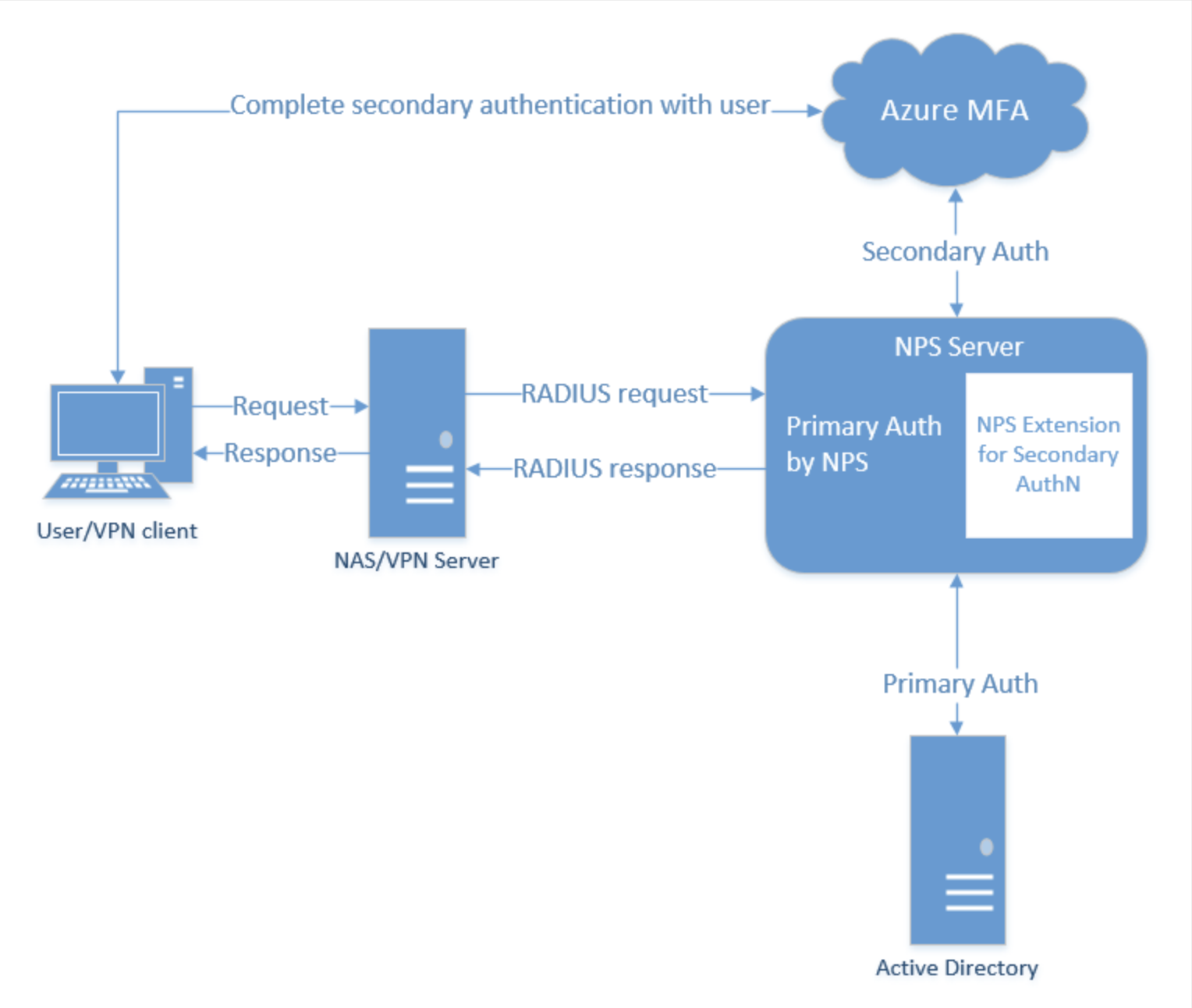
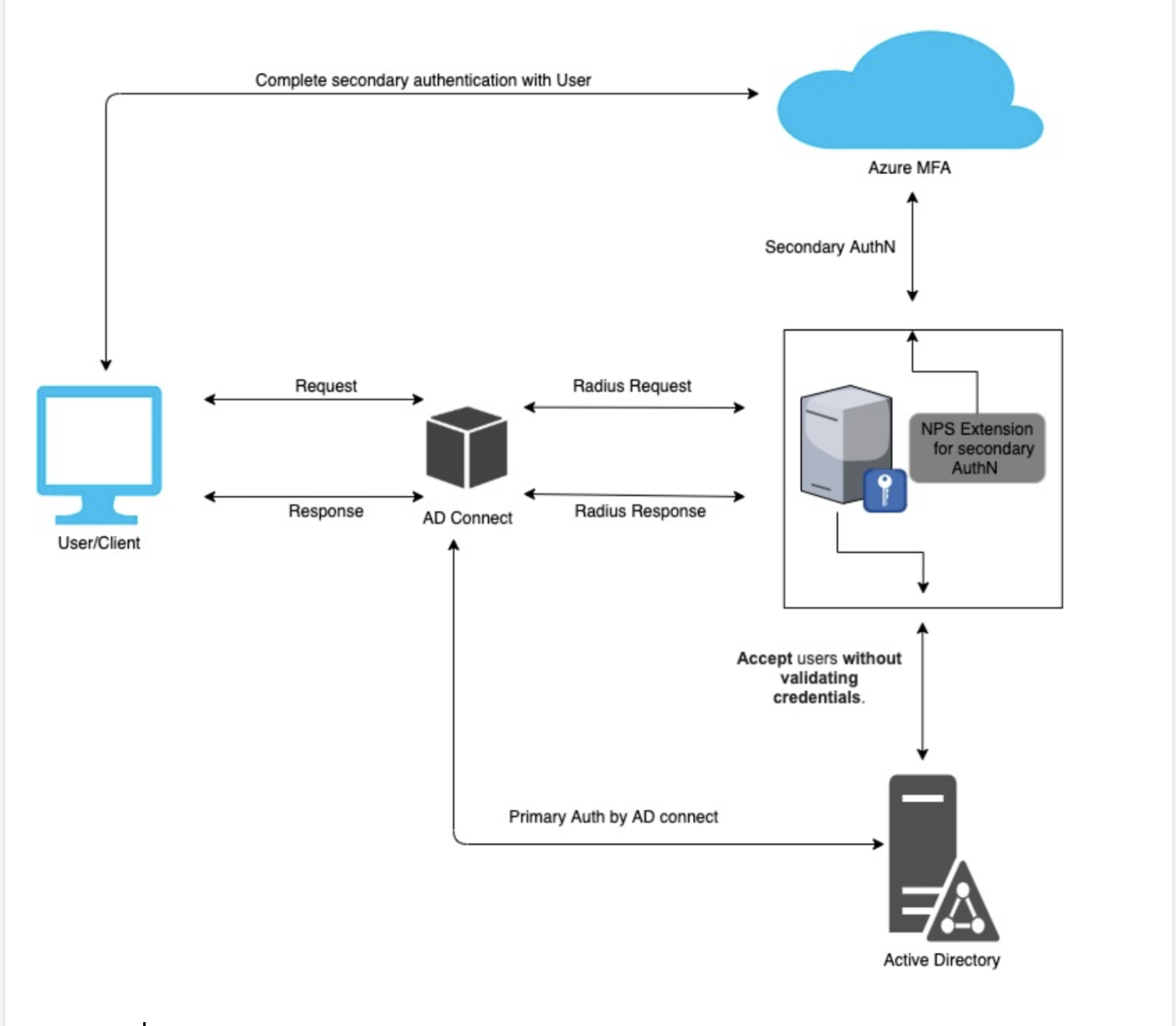
2- Method 2 application send only secondary request to the NPS server and send the primary to another service to take care of it (in this case the NPS server doesn't care about the primary if is authorized or not because there is another service will challenge the primary request, for example:
AWS workspaces with Azure MFA
AWS Ad connect only send a secondary request to the NPS server and send the primary request to the active directory server so the active directory will chick the username and password and the NPS server will take care of azure MFA code method only:
Issue
The problem here is that the MFA Extension is waiting for the message "access accepted "for the primary request from the NPS but because the NPS doesn't receive the primary request so doesn't send a message to the NPS Extension with "access accepted". to fix this issue you need to ignore the primary request and allow all the request without any challenge then the MFA Extension will receive "access accepted" from the NPS for any primary request and start the process the secondary request with MFA Extension, here is how you can ignore the primary request:
Create new connection request policies (For each client)
1- In the conditions add client friendly name (Roadies client name)
2- Sittings > authentication > check Accepting Users Without Validating Credentials.
3- save
make sure that you have another service that checks the primary request also make sure that the users can log in with the correct MFA code only sometimes if you change the MFA setting on azure and the users didn’t update their MFA after the changes on azure they will be able to log in even with wrong MFA code or without even import any MFA info.
I hope this helps you with your issue.
Thanks
Naseem Aljaradi
' cx='32' cy='32' r='32' /%3E%3Ctext x='50%25' y='55%25' dominant-baseline='middle' text-anchor='middle' fill='%23FFF' %3EMR%3C/text%3E%3C/svg%3E)
In Azure AD, you have to assign the licenses to the users directly. Can you confirm if you assigned the Azure AD P2 license to the user.
You can follow the steps listed here to do this: https://learn.microsoft.com/en-us/azure/active-directory/fundamentals/license-users-groups
Hi @Anonymous
Yes the user account has Azure AD 2 with Microsoft 365 E5.
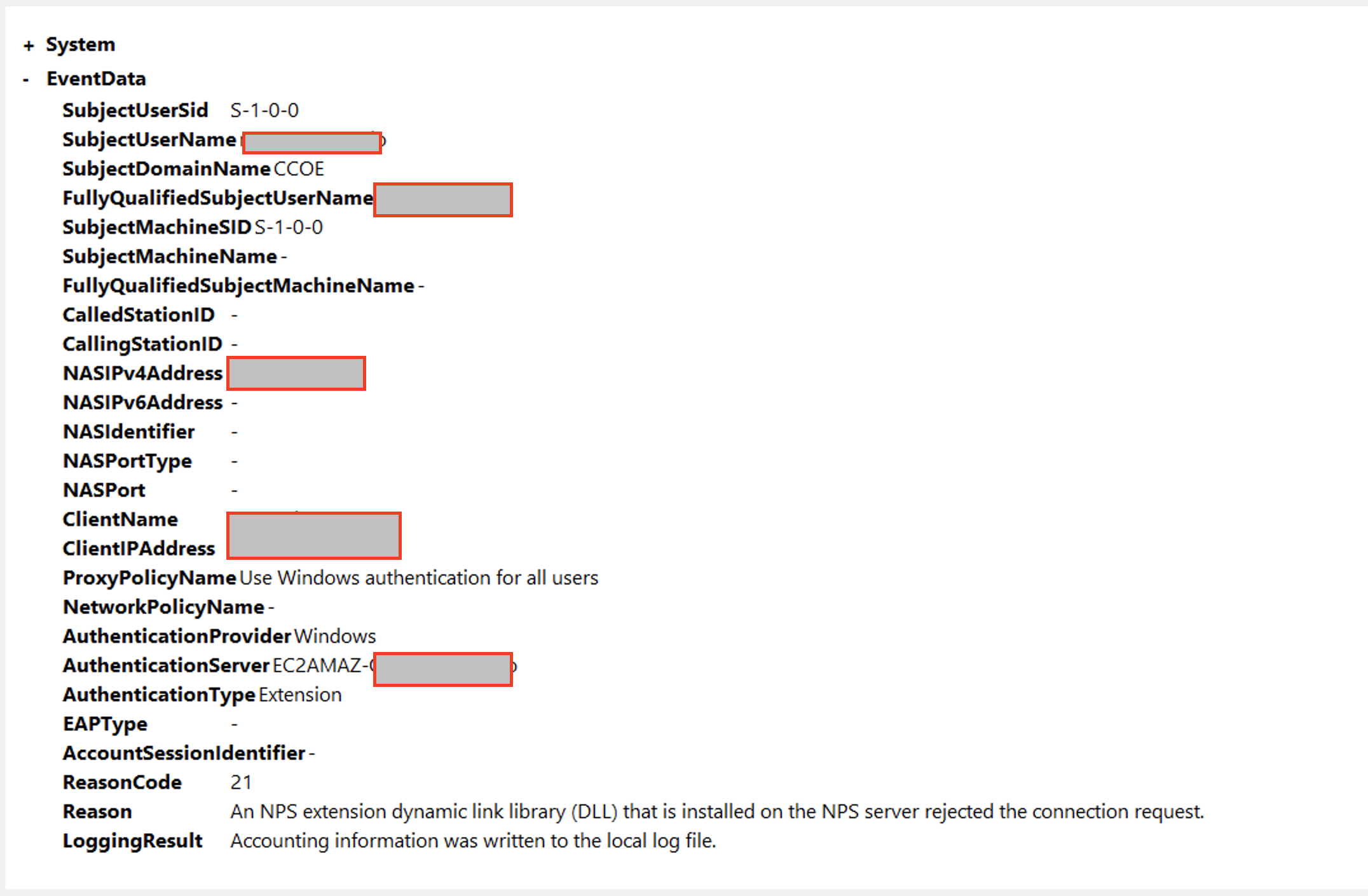
Also I found this Event in %SystemRoot%\System32\Winevt\Logs\AuthZOptCh.evtx
NPS Extension for Azure MFA only performs Secondary Auth for Radius requests in AccessAccept State. Request received for User@keyman .com with response state AccessReject, ignoring request
' cx='32' cy='32' r='32' /%3E%3Ctext x='50%25' y='55%25' dominant-baseline='middle' text-anchor='middle' fill='%23FFF' %3EPA%3C/text%3E%3C/svg%3E)
Hi @Naseem-1842,
Could you solve this problem? I am having the same problem and my users have the correct licenses, but the NPS Extension does not work.
Thanks a lot.
Paul
Thank you very much for your help. It helped me understand the mistake I was making.
Regards,
Paul Pedroza