Microsoft 365 and Office | SharePoint | For business | Windows
A group of Microsoft Products and technologies used for sharing and managing content, knowledge, and applications.

This browser is no longer supported.
Upgrade to Microsoft Edge to take advantage of the latest features, security updates, and technical support.

I have a list with several Date fields. After necessary action user need to update with only today's date. Sample Data:
Claim_Reserved_on Claim_Approved_on Dt_PV_Rec Chq_Process_Print_Dt Chq_Review_Dt
21-Dec-20 22-Dec-20 23-Dec-20 23-Dec-20
15-Dec-20 16-Dec-20 17-Dec-20 18-Dec-20 19-Dec-20
The formula I have used in the Validation Column is as follows:
'=IF(OR(ISBLANK(Claim_Reserved_on)=TRUE,Claim_Reserved_on=TODAY()),TRUE,FALSE)
When user inputs the first date eg "Claim_Reserved_on"= Today's date i.e. let say we are on 21-Dec-20 then ok no issue.
But the issue is when user is updating field "Claim_Approved_on" on the next day let say 22-dec-20, getting ERROR on field "Claim_Reserved_on" saying that the date cannot be 21-Dec-20 the data should be today's date i.e. 22-Dec-20.
Please Help. Thanks in Advance

Hi @parwaze sadool ,
This is OOB behavior when using Today() in SharePoint column validation.
When we update the item on a different date, no matter what column you edit, it will check the "Today()” verification and ask us to update the value to meet the validation.
If you don’t want the value to be changed once other column values change, we suggest you remove column validation and set default value for this column with Today’s date.
Try as follows:
Click “Claim_Reserved_on” column and select Column settings to choose Edit->Select Today’s date under Default value.
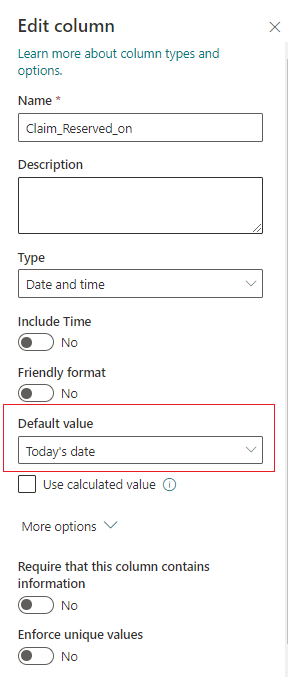
-------------------------------------------------------------------------------------------------------------------------------------------
If an Answer is helpful, please click "Accept Answer" and upvote it.
Note: Please follow the steps in our documentation to enable e-mail notifications if you want to receive the related email notification for this thread.
Hi LiZhang-MSFT
Thanks for your reply.
Removing validation and replace it by Default value will not resolve my problem.
In this list I need to upload some data where claims should be paid then users should follow and do the following:
when doing the check and verification user should input Today's date only.
If I put default date = Today's date then when I insert new records to be verified then the default date will be populated automatically.
Is there another way a java script that can handle this issue. Thanks in Advance. Please HELP!
Hi @parwaze sadool ,
I am going to trying other solutions, I will reply you as soon as possible.
Thank you for your patience.
Hi LiZhang-MSFT.
Thanks in Advance.
Awaiting your reply.
Hi @parwaze sadool ,
Per my research, I don't think we could change the default logic of column validation when using Today().
Thank you for posting in the Q&A forum.