If I modifiy the MSDN sample, it seems to work :
(can also be done with Custom Draw, it flickers less from a quick test...)
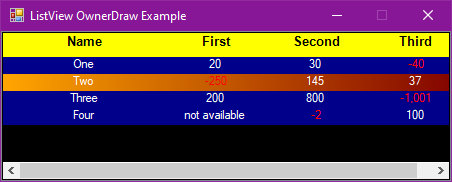
namespace CSharp_ListView_OwnerDraw2
{
    public partial class Form1 : Form
    {
        private ListView listView1 = new ListView();
        private ContextMenu contextMenu1 = new ContextMenu();

        private void Form1_Load(object sender, EventArgs e)
        {

        }

        public Form1()
        {
            // Initialize the ListView control.
            listView1.BackColor = Color.Black;
            listView1.ForeColor = Color.White;
            listView1.Dock = DockStyle.Fill;
            listView1.View = View.Details;
            listView1.FullRowSelect = true;

            // Add columns to the ListView control.
            listView1.Columns.Add("Name", 100, HorizontalAlignment.Center);
            listView1.Columns.Add("First", 100, HorizontalAlignment.Center);
            listView1.Columns.Add("Second", 100, HorizontalAlignment.Center);
            listView1.Columns.Add("Third", 100, HorizontalAlignment.Center);

            // Create items and add them to the ListView control.
            ListViewItem listViewItem1 = new ListViewItem(new string[] { "One", "20", "30", "-40" }, -1);
            ListViewItem listViewItem2 = new ListViewItem(new string[] { "Two", "-250", "145", "37" }, -1);
            ListViewItem listViewItem3 = new ListViewItem(new string[] { "Three", "200", "800", "-1,001" }, -1);
            ListViewItem listViewItem4 = new ListViewItem(new string[] { "Four", "not available", "-2", "100" }, -1);
            listView1.Items.AddRange(new ListViewItem[] { listViewItem1, listViewItem2, listViewItem3, listViewItem4 });

            // Initialize the shortcut menu and
            // assign it to the ListView control.
            contextMenu1.MenuItems.Add("List", new EventHandler(menuItemList_Click));
            contextMenu1.MenuItems.Add("Details", new EventHandler(menuItemDetails_Click));
            listView1.ContextMenu = contextMenu1;

            // Configure the ListView control for owner-draw and add
            // handlers for the owner-draw events.
            listView1.OwnerDraw = true;
            listView1.DrawItem += new DrawListViewItemEventHandler(listView1_DrawItem);
            listView1.DrawSubItem += new DrawListViewSubItemEventHandler(listView1_DrawSubItem);
            listView1.DrawColumnHeader += new DrawListViewColumnHeaderEventHandler(listView1_DrawColumnHeader);

            // Add a handler for the MouseUp event so an item can be
            // selected by clicking anywhere along its width.
            listView1.MouseUp += new MouseEventHandler(listView1_MouseUp);

            // Add handlers for various events to compensate for an
            // extra DrawItem event that occurs the first time the mouse
            // moves over each row.
            listView1.MouseMove += new MouseEventHandler(listView1_MouseMove);
            listView1.ColumnWidthChanged += new ColumnWidthChangedEventHandler(listView1_ColumnWidthChanged);
            listView1.Invalidated += new InvalidateEventHandler(listView1_Invalidated);

            // Initialize the form and add the ListView control to it.
            this.ClientSize = new Size(450, 150);
            this.FormBorderStyle = FormBorderStyle.FixedSingle;
            this.MaximizeBox = false;
            this.Text = "ListView OwnerDraw Example";
            this.Controls.Add(listView1);
        }

        // Clean up any resources being used.
        //protected override void Dispose(bool disposing)
        //{
        //    if (disposing)
        //    {
        //        contextMenu1.Dispose();
        //    }
        //    base.Dispose(disposing);
        //}

        //[STAThread]
        //static void Main()
        //{
        //    Application.EnableVisualStyles();
        //    Application.Run(new ListViewOwnerDraw());
        //}

        // Sets the ListView control to the List view.
        private void menuItemList_Click(object sender, EventArgs e)
        {
            listView1.View = View.List;
            listView1.Invalidate();
        }

        // Sets the ListView control to the Details view.
        private void menuItemDetails_Click(object sender, EventArgs e)
        {
            listView1.View = View.Details;

            // Reset the tag on each item to re-enable the workaround in
            // the MouseMove event handler.
            foreach (ListViewItem item in listView1.Items)
            {
                item.Tag = null;
            }
        }

        // Selects and focuses an item when it is clicked anywhere along
        // its width. The click must normally be on the parent item text.
        private void listView1_MouseUp(object sender, MouseEventArgs e)
        {
            ListViewItem clickedItem = listView1.GetItemAt(5, e.Y);
            if (clickedItem != null)
            {
                clickedItem.Selected = true;
                clickedItem.Focused = true;
            }
        }

        private void listView1_DrawItem(object sender, DrawListViewItemEventArgs e)
        {
            if (e.Item.Selected)
            {
                //e.Graphics.FillRectangle(Brushes.LightGreen, e.Bounds);
                using (LinearGradientBrush brush =
                   new LinearGradientBrush(e.Bounds, Color.Orange, Color.Maroon, LinearGradientMode.Horizontal))
                {
                    e.Graphics.FillRectangle(brush, e.Bounds);
                }
            }
            else
            {
                //e.DrawBackground();
                e.Graphics.FillRectangle(Brushes.DarkBlue, e.Bounds);
                e.DrawFocusRectangle();
            }
            if (listView1.View != View.Details)
            {
                e.DrawText();
            }
        }

        // Draws subitem text and applies content-based formatting.
        private void listView1_DrawSubItem(object sender, DrawListViewSubItemEventArgs e)
        {
            TextFormatFlags flags = TextFormatFlags.Left;

            using (StringFormat sf = new StringFormat())
            {
                // Store the column text alignment, letting it default
                // to Left if it has not been set to Center or Right.
                switch (e.Header.TextAlign)
                {
                    case HorizontalAlignment.Center:
                        sf.Alignment = StringAlignment.Center;
                        flags = TextFormatFlags.HorizontalCenter;
                        break;
                    case HorizontalAlignment.Right:
                        sf.Alignment = StringAlignment.Far;
                        flags = TextFormatFlags.Right;
                        break;
                }

                // Draw the text and background for a subitem with a
                // negative value.
                double subItemValue;
                if (e.ColumnIndex > 0 && Double.TryParse(
                    e.SubItem.Text, NumberStyles.Currency,
                    NumberFormatInfo.CurrentInfo, out subItemValue) &&
                    subItemValue < 0)
                {
                    // Unless the item is selected, draw the standard
                    // background to make it stand out from the gradient.
                    if ((e.ItemState & ListViewItemStates.Selected) == 0)
                    {
                        e.DrawBackground();
                    }

                    // Draw the subitem text in red to highlight it.
                    e.Graphics.DrawString(e.SubItem.Text, listView1.Font, Brushes.Red, e.Bounds, sf);

                    return;
                }

                // Draw normal text for a subitem with a nonnegative
                // or nonnumerical value.
                e.DrawText(flags);
            }
        }

        // Draws column headers.
        private void listView1_DrawColumnHeader(object sender,  DrawListViewColumnHeaderEventArgs e)
        {
            using (StringFormat sf = new StringFormat())
            {
                // Store the column text alignment, letting it default
                // to Left if it has not been set to Center or Right.
                switch (e.Header.TextAlign)
                {
                    case HorizontalAlignment.Center:
                        sf.Alignment = StringAlignment.Center;
                        break;
                    case HorizontalAlignment.Right:
                        sf.Alignment = StringAlignment.Far;
                        break;
                }

                // Draw the standard header background.
                //e.DrawBackground();
                e.Graphics.FillRectangle(Brushes.Yellow, e.Bounds);

                // Draw the header text.
                using (Font headerFont = new Font("Helvetica", 10, FontStyle.Bold))
                {
                    e.Graphics.DrawString(e.Header.Text, headerFont, Brushes.Black, e.Bounds, sf);
                }
            }
            return;
        }

        // Forces each row to repaint itself the first time the mouse moves over
        // it, compensating for an extra DrawItem event sent by the wrapped
        // Win32 control. This issue occurs each time the ListView is invalidated.
        private void listView1_MouseMove(object sender, MouseEventArgs e)
        {
            ListViewItem item = listView1.GetItemAt(e.X, e.Y);
            if (item != null && item.Tag == null)
            {
                listView1.Invalidate(item.Bounds);
                item.Tag = "tagged";
            }
        }

        // Resets the item tags.
        void listView1_Invalidated(object sender, InvalidateEventArgs e)
        {
            foreach (ListViewItem item in listView1.Items)
            {
                if (item == null) return;
                item.Tag = null;
            }
        }

        // Forces the entire control to repaint if a column width is changed.
        void listView1_ColumnWidthChanged(object sender, ColumnWidthChangedEventArgs e)
        {
            listView1.Invalidate();
        }
    }
}
' cx='32' cy='32' r='32' /%3E%3Ctext x='50%25' y='55%25' dominant-baseline='middle' text-anchor='middle' fill='%23FFF' %3EG%3C/text%3E%3C/svg%3E)
