Azure Logic Apps
An Azure service that automates the access and use of data across clouds without writing code.
This browser is no longer supported.
Upgrade to Microsoft Edge to take advantage of the latest features, security updates, and technical support.
' cx='32' cy='32' r='32' /%3E%3Ctext x='50%25' y='55%25' dominant-baseline='middle' text-anchor='middle' fill='%23FFF' %3EA%3C/text%3E%3C/svg%3E)
I am trying to get VM information in a resource group by using "List resources by resource group (Preview)" action.
Logic Apps parameters
Filter: "resourcetype eq 'Microsoft.Compute/virtualMachines'"
Expand: "HardwareProfile"
Filter parameter seems working since it returns VMs, however, Expand parameter does not work. it does not return any hardware profile of VMs.
How should I specify Expand parameter to retrieve hardware profile like VM size?
Is there any reference manual of $expand parameter?

Hi @芹沢 基樹
As per the document of Resources - List By Resource Group I don't see $expand parameter accepting the value as 'HardwareProfile'.
$expand accepts Comma-separated list of additional properties to be included in the response. Valid values include createdTime, changedTime and provisioningState.
For example, $expand=createdTime,changedTime.
I do see another API Resources-Get By ID where you provide the resource ID details and it returns the resource details including the hardware profile details.
"hardwareProfile": {
"vmSize": "Standard_B1s"
}
You can use the Read a resource action in your logic app providing the detail:
Short Resource ID will be virtualMachines/yourVirtualMachineName
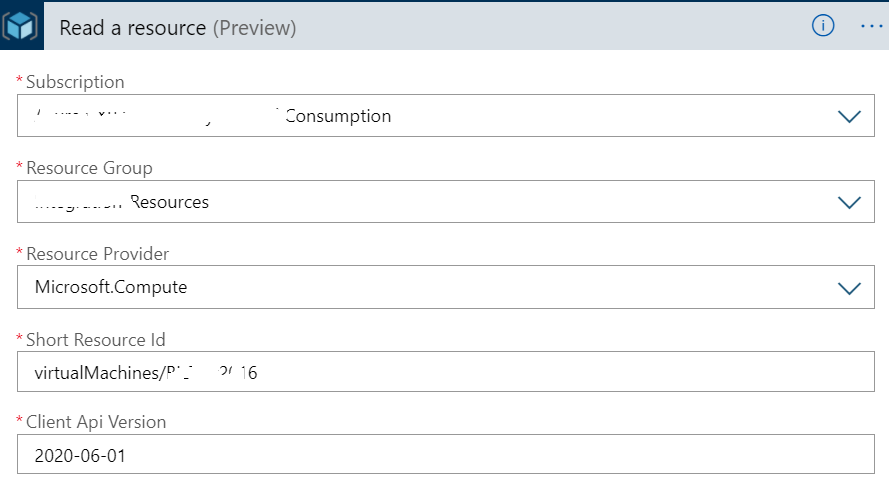
Logic App Input/Response:
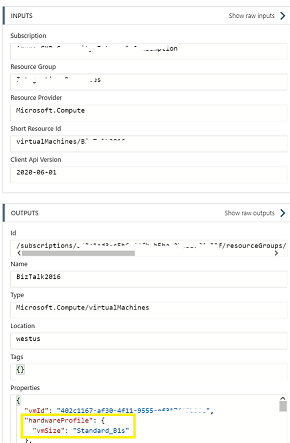
You can modify the above according to your needs rather than hardcoding the values.
Please let me know if you have any queries or concerns.
Thank you for your quick response.
I could get vmsize of all vms by using "Read use a resource" together with "List resources by a resource group".
Glad to know that it has helped and able to resolve your issue.