How to edit DAX code of a measure?

Fra1978 126 Reputation points
2020-12-29T09:29:53.96+00:00

I am reading 'the definitive guide to DAX' and on the 'Introducing aggregators and iterators' section, it gives some sample code, for a column like 'DaysToDeliver' that when aggregated, it shouldn't be SUM but AVG, so gives the next code:

AvgDelivery := AVERAGE ( Sales[DaysToDeliver] )  

Where can I find the code for that measure, I only know how to change those settings through GUi

either, in the 'summarization' part in the DATA panel
51934-image.png

or in the Report in the 'visualizations'
52002-image.png

SQL Server Analysis Services
A Microsoft online analytical data engine used in decision support and business analytics, providing the analytical data for business reports and client applications such as Power BI, Excel, Reporting Services reports, and other data visualization tools.
0 comments No comments
{count} votes

Answer accepted by question author
  1. Lukas Yu -MSFT 5,826 Reputation points
    2020-12-30T06:45:52.057+00:00

    Hi,

    It looks like you are using Power BI ?
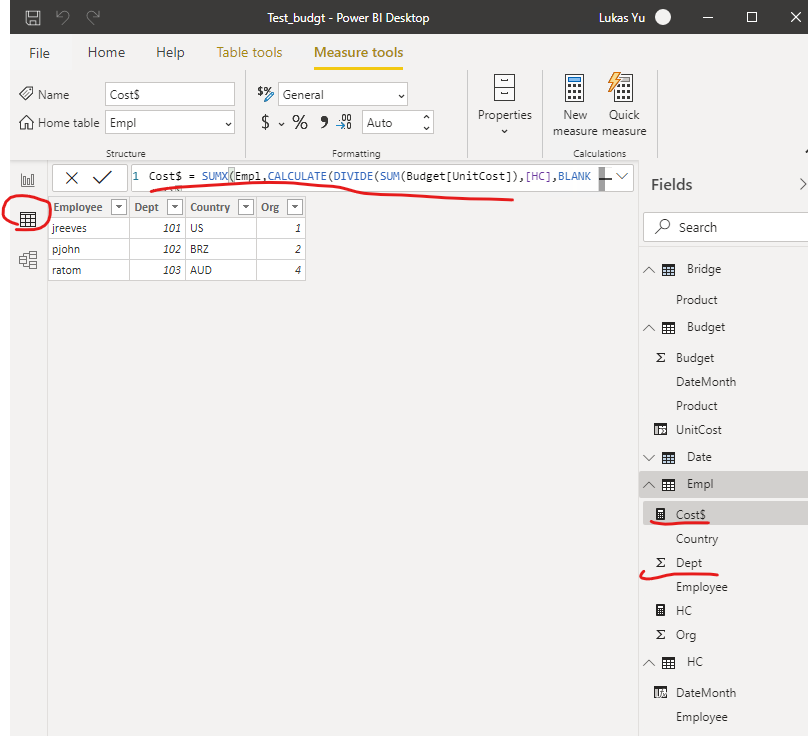
    You could click the second tab on the left "Data" find you the measure you want to check in the right drop down. Click it, and in the Expression box you would find the dax code you intend to code.
    For example, in my project I find the cost DAX code :
    52187-image.png

    Hope this helps.
    Lukas


    If the answer is helpful, please click "Accept Answer" and upvote it.

    Note: Please follow the steps in our documentation to enable e-mail notifications if you want to receive the related email notification for this thread.
    What can I do if my transaction log is full?--- Hot issues November
    How to convert Profiler trace into a SQL Server table -- Hot issues November

    0 comments No comments

0 additional answers

Sort by: Most helpful

Your answer

Answers can be marked as 'Accepted' by the question author and 'Recommended' by moderators, which helps users know the answer solved the author's problem.