I have a CMFCMenuButton on my dialog which is set to the DarkMode_Explorer theme.
Therefore, when the dropdown menu part is display it is correctly showing with dark backgrounds.
The only caveat is that there is one instance where I load another menu resource and append it to my buttons' menu.
Code snippets:
- I load the menu that I want to dynamically add like this:
CMenu menuManageSpeakers;
menuManageSpeakers.LoadMenu(IDR_MENU_POPUP_MANAGE);
- I populate that menu's submenus dynamically (they show fine in dark mode). Then, I insert the menu to my menu button menu:
const CMenu* pSubMenu = menuManageSpeakers.GetSubMenu(0);
if (pSubMenu)
{
	pMnuPopup->InsertMenu(-1,
		MF_BYPOSITION | MF_POPUP,
		reinterpret_cast<UINT_PTR>(pSubMenu->GetSafeHmenu()), subMenuText);
}
Here you can see the problem:
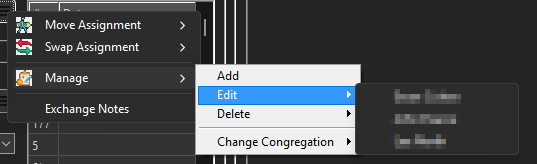
It is odd that the sub-menus (level 3) are dark. But not this middle menu.
' cx='32' cy='32' r='32' /%3E%3Ctext x='50%25' y='55%25' dominant-baseline='middle' text-anchor='middle' fill='%23FFF' %3EC%3C/text%3E%3C/svg%3E)
' cx='32' cy='32' r='32' /%3E%3Ctext x='50%25' y='55%25' dominant-baseline='middle' text-anchor='middle' fill='%23FFF' %3EMY%3C/text%3E%3C/svg%3E)