Login after switch user when 1 user is already logged in takes 6 minutes for second user on Windows 10 Pro/Home

iseebirdsfly 1 Reputation point
2021-01-02T00:03:29.437+00:00

Doing fresh Windows 10 PRO install on NVMe SSD and AMD 5950x, 32GB RAM. I have 2 local users on Windows 10 PRO. Login to any user takes 1-2 seconds. But If I login to 1 user and then hit Win+L (switch user) and try to login to second user it takes 1 minute to pass Preparing Windows screen and then another 5 minutes before Start Menu and task bar becomes operational.

More details:

  • I enabled detailed messages in GPO but the only message I see is Preparing Windows
  • This is completely fresh install to new 2TB NVMe SSD. No other drives. I tried to reinstall 3 times.
  • There are no meaningful errors/warnings in Event Viewer. I only get error because Windows are not activated yet at the beginning of the login and then I get an error 'Windows Hello for Business provisioning has encountered an error during policy evaluation. ExitCode: This network connection does not exist. ' at the end. I tried disabling Hello for Business with no effect.
  • I run Windows performance recorder but I don't see anything interesting in the report. I can send the report if anyone can take a look.
  • There is no difference if users are admin or not. I tried with 4 users. No matter the combination, first user takes seconds to login and others are very slow.
  • If I sign out the user then next login for any user takes 2 seconds.
  • I even tried installing Windows Home and I get same result.
  • After both users are logged in I can switch fast between them.
  • Computer is connected to the internet

I have no idea what else to try. I tried everything what I could find on the internet. Let me know if you need video or any additional data.

Windows for business | Windows Client for IT Pros | User experience | Other
0 comments No comments
{count} votes

2 answers

Sort by: Most helpful
  1. MotoX80 37,161 Reputation points
    2021-01-02T22:20:36.46+00:00

    I love puzzles.

    So my first thought is that various programs get launched when a user logs on. I wonder if one of them is hanging when the second user logs on because the program is already running from the 1st user.

    https://learn.microsoft.com/en-us/sysinternals/downloads/autoruns

    Run autoruns and click on the Logon tab. You can uncheck entries which will temporarily disable that entry.

    Start with the entries in HKLM\SOFTWARE\Microsoft\Windows\CurrentVersion\Run and HKCU\SOFTWARE\Microsoft\Windows\CurrentVersion\Run.

    It won't solve the root problem but if disabling a specific entry makes the logon speed up, then you'll know where to look next.

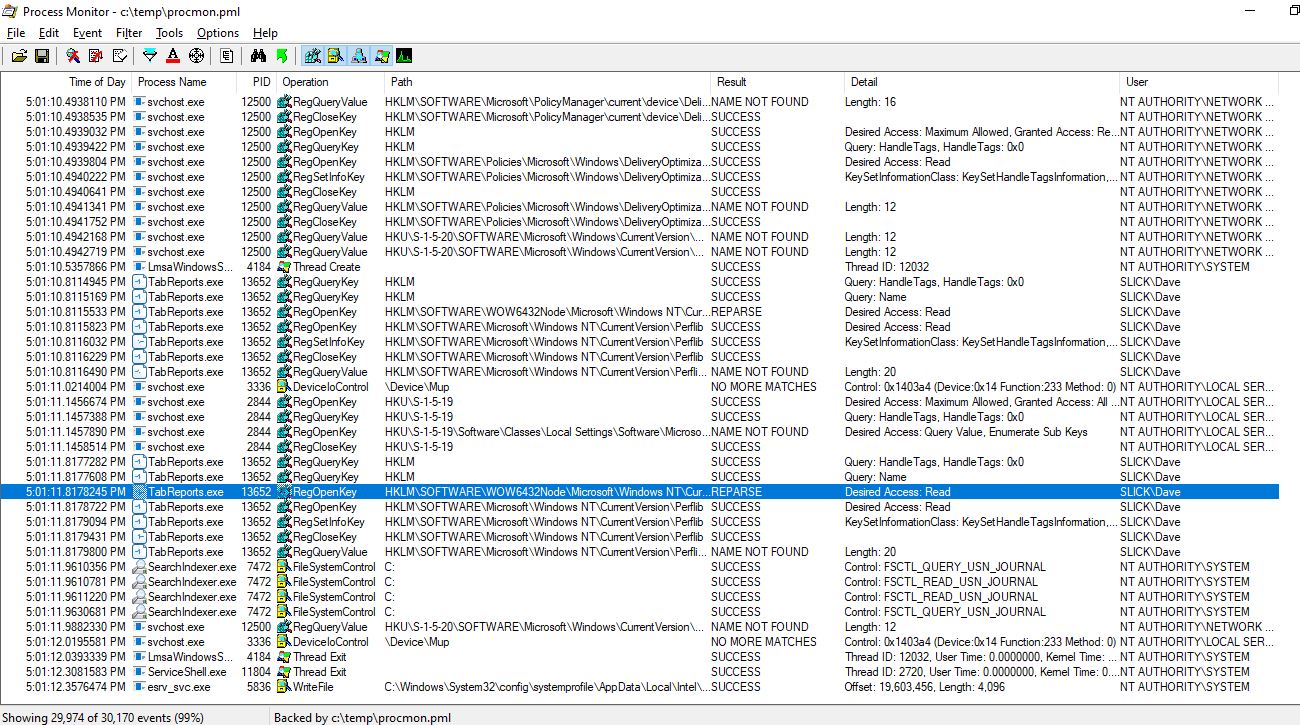
    If that doesn't find anything then next I would try Process Monitor.

    https://learn.microsoft.com/en-us/sysinternals/downloads/procmon

    That will show you every file, registry, and network call that your system makes. It can be a lot of data. I usually configure it to capture 1 or 2 million entries and to drop filtered events.

    It's a tool that you have to play with a bit to figure out. You'll want to try to see what calls are being made during the 5 minute hang period. And what process is making them. You should be able to see when processes get launched by the second user.

    After the second user gets logged on, immediately switch back to 1st one and stop the trace.
    52760-capture.jpg

    1 person found this answer helpful.
    0 comments No comments

  2. AliceYang-MSFT 2,111 Reputation points
    2021-01-04T08:52:59.533+00:00

    Hi,

    Thank you for the detailed information you provided and the tests you made.

    I tested switching users on my PC too. When I switch to user2 for the first time, it takes several minutes to prepare Windows, such as creating a user profile.

    If I sign out user2 and sign in user1, I can switch back to user2 fast.

    I’d like to know whether the 6 minutes happens every time or only the first time when you switch to user2 while user1 is logged in.

    You can also try different ways to switch user to check whether the issue persists.

    Please note: Information posted in the given link is hosted by a third party. Microsoft does not guarantee the accuracy and effectiveness of information.

    ----------

    If the Answer is helpful, please click "Accept Answer" and upvote it.
    Note: Please follow the steps in our documentation to enable e-mail notifications if you want to receive the related email notification for this thread.

    0 comments No comments

Your answer

Answers can be marked as 'Accepted' by the question author and 'Recommended' by moderators, which helps users know the answer solved the author's problem.