Developer technologies | VB
An object-oriented programming language developed by Microsoft that can be used in .NET.
This browser is no longer supported.
Upgrade to Microsoft Edge to take advantage of the latest features, security updates, and technical support.
' cx='32' cy='32' r='32' /%3E%3Ctext x='50%25' y='55%25' dominant-baseline='middle' text-anchor='middle' fill='%23FFF' %3EH%3C/text%3E%3C/svg%3E)
Hallo,
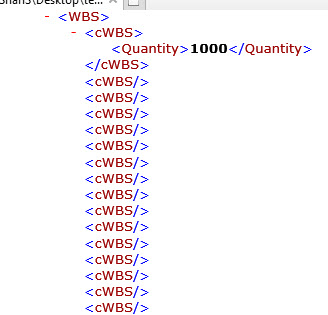
I want to Serialize list of Objects when it is specific property has value. I have following code it woks partially ..if you see the screenshot i have one object instance serialized but i want to eliminate remaining empty tag elements (<cWBS/>) from the xml file . How can i do that?
Private Sub Form1_Load(sender As Object, e As EventArgs) Handles MyBase.Load

	Dim WBSList As New WBS

	With WBSList
            .Add(New cWBS With {.L4 = 1, .L5 = 1, .Description = "Item1"})
            .Add(New cWBS With {.L4 = 1, .L5 = 2, .Description = "Item2"})
            .Add(New cWBS With {.L4 = 1, .L5 = 3, .Description = "Item3"})
            .Add(New cWBS With {.L4 = 1, .L5 = 4, .Description = "Item4"})
            .Add(New cWBS With {.L4 = 1, .L5 = 5, .Description = "Item5"})
            .Add(New cWBS With {.L4 = 1, .L5 = 6, .Description = "Item6"})
            .Add(New cWBS With {.L4 = 1, .L5 = 7, .Description = "Item7"})
            .Add(New cWBS With {.L4 = 1, .L5 = 8, .Description = "Item8"})
            .Add(New cWBS With {.L4 = 1, .L5 = 9, .Description = "Item9"})
            .Add(New cWBS With {.Marker = "H0", .L4 = 1, .L5 = 0, .Description = "Item10"})
	End with

End Sub


   Public Sub SerializeObj(obj As Object, ByVal path As String)

        Dim ws As New XmlWriterSettings With {.NewLineHandling = NewLineHandling.Entitize}
        Dim serializer As New XmlSerializer(obj.GetType, New XmlRootAttribute("Test"))

        Using xmlWriter As XmlWriter = XmlWriter.Create(path, ws)
            serializer.Serialize(xmlWriter, obj)
        End Using

    End Sub

    Public Function deSerializeObj(obj As Object, ByVal path As String) As Object

        Try

            Dim fs As FileStream = New FileStream(path, FileMode.Open)
            Dim serializer As New XmlSerializer(obj.GetType, New XmlRootAttribute("Test"))
            obj = CType(serializer.Deserialize(fs), Object)
            fs.Close()
            Return obj

        Catch ex As Exception
            MessageBox.Show ("Can Not Read File!")
        End Try

    End Function


Public Class cWBS

    <XmlIgnore()> Public Property ID As Integer?
    <XmlIgnore()> Public Property Marker As String
    <XmlIgnore()> Public Property L4 As Integer?
    <XmlIgnore()> Public Property L5 As Integer?
    <XmlIgnore()> Public Property L6 As Integer?
    <XmlIgnore()> Public Property L7 As Integer?
    <XmlIgnore()> Public Property L8 As Integer?

    <XmlIgnore()>
    Public Property Description As String  '//
    Public Property Quantity As Integer?

    <XmlIgnore()>
    Public Property Cost As Integer?
    Public Property Remarks As String

    Public Function ShouldSerializeQuantity() As Boolean
        Return Not Quantity Is Nothing)
    End Function

End Class
Public Class WBS
    Inherits System.ComponentModel.BindingList(Of cWBS)
End Class
An object-oriented programming language developed by Microsoft that can be used in .NET.
Hallo @Viorel
No . It has to be de-serialized again. Any alternate method? by keeping ID as primary key and de-serialize it according to ID?
' cx='32' cy='32' r='32' /%3E%3Ctext x='50%25' y='55%25' dominant-baseline='middle' text-anchor='middle' fill='%23FFF' %3EXZ%3C/text%3E%3C/svg%3E)
Hi @Hobbyist_programmer ,
If you eliminate empty nodes from xml file, the deserialised list will not contain these eliminated elements.
In order to get the correct result after deserializing the file, the integrity of the XML file must be ensured.
Hallo XingyuZhao, if i change the number of object instances in the program and if i try to deserialize a the old file which has less object instances then how will it restore it to the right objects? . i would like to serialize and deserialize according to primary key or based on some id? . how can i do that?

If empty <cWBS/> elements are removed, then the deserialised list will contain less elements than original. Is this the intended behaviour?
To extract the objects to be serialised, consider something like this:
Dim filtered = myList.Where(Function(d) d.Quantity IsNot Nothing)
Then serialise it.