Azure IoT Edge
An Azure service that is used to deploy cloud workloads to run on internet of things (IoT) edge devices via standard containers.
This browser is no longer supported.
Upgrade to Microsoft Edge to take advantage of the latest features, security updates, and technical support.
' cx='32' cy='32' r='32' /%3E%3Ctext x='50%25' y='55%25' dominant-baseline='middle' text-anchor='middle' fill='%23FFF' %3ERS%3C/text%3E%3C/svg%3E)
I am working on adding a docker based module addition to IoT edge, using REST API call, via JAVA. So for normal module addition, I am using the URL,"https://fullyqualifiedname.azure-devices.net/devices/devicename/modules/modulename?api-version=2020-03-13" for adding a module, under an IoT edge.
But when I am using a docker based custom module addition, I came to realise that the parameters are getting added under, $edgeAgent and $edgeHub(the auto-generated modules). This is when I am creating the custom module via the azure portal. So for a custom module, the above url cannot be considered, for API call.
I tried a separate update on $edgeAgent and $edgeHub, as well, but they seem to throw 404 error, saying "
ErrorCode:ModuleNotFound;Device devicename Module modulename at IotHub iothubname not registered."
So I am confused on whether there is a separate API call for adding a dockerised module or is there any other way to go ahead with this? Please do help me out. Thanks in advance!

Hello @Rakesh S ,
The IoT Hub supports two kinds of devices, 'direct internet-connected' devices and Azure IoT Edge devices.
The first group of 'physical' devices supports the concept of 'logical' modules. Each module has its own identity and twin:
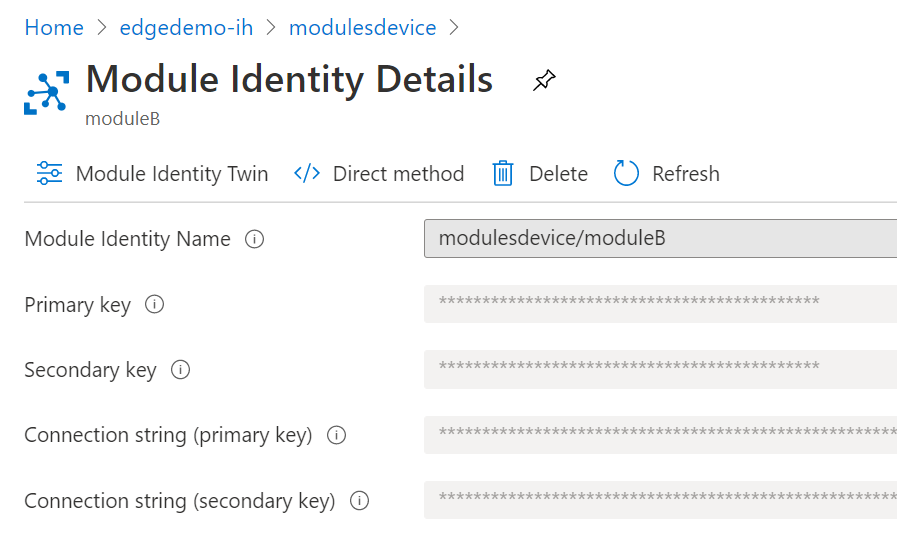
This is useful eg. if a device is split up into different individual parts (perhaps from multiple vendors?) but working together as one.
For example, in the past, I have seen how the internal hardware of a TV set was produced by different vendors and all parts were interconnected by the smart tv software. Here, this device/module option could be useful.
The second group is the group of Edge devices, this is what you want to manipulate.
An edge device also supports the concept of modules, each with its own twin but not with a separate identity.
You manipulate an edge device using a deployment manifest. This is a JSON text which describes which modules you want to deploy, what the registry location of these (docker container) modules are, and how the internal routing is set (next to configuration, properties etc.).
For this, a separate REST call is available:
POST https://fully-qualified-iothubname.azure-devices.net/devices/{id}/applyConfigurationContent?api-version=2020-05-31-preview
How to use this REST call is described here.
Can you help me out with a sample payload also please?
As seen in the blog, a deployment manifest has to be provided.
You can either follow the 'Set modules' wizard in the Azure portal (the summary is a full deployment manifest):

Or check out the generated manifests in Visual Studio Code (when you use one of the IoT Edge Module templates):

Please accept the correct answer so other members of the community can find it quickly and be useful for them as well.