Microsoft Teams | Microsoft Teams for business | Other
Additional features, settings, or issues not covered by specific Microsoft Teams categories

This browser is no longer supported.
Upgrade to Microsoft Edge to take advantage of the latest features, security updates, and technical support.
' cx='32' cy='32' r='32' /%3E%3Ctext x='50%25' y='55%25' dominant-baseline='middle' text-anchor='middle' fill='%23FFF' %3EAS%3C/text%3E%3C/svg%3E)
Hi, i wanna ask about teams share for guests like im a a guest in a team in the app when i wanna share i have only white board option i don't have PowerPoint or the other options like screen or any app i have in background to open it i have onky the whiteboard option how to fix that?

What is your client version?
Does this issue persist all the time? Or what changes do you do before this issue happened?
Does anyone else have the same issue?
I tested in my lab with Teams version 1.3.00.30866(64-bit). When I start a Teams meeting with a guest, the sharing function can work well as below.
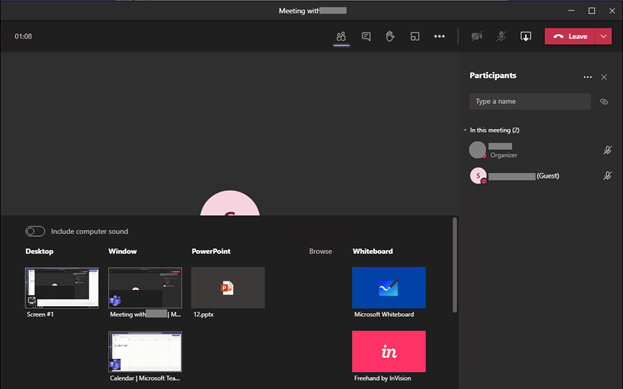
If I start a screen sharing from the chat window, it only contains desktop and Windows.

It recommends you make sure your client is the latest version and clear the client cache. Then have a try.
If still no luck, log in Teams web client(https://teams.microosft.com) and try again.
If the response is helpful, please click "Accept Answer" and upvote it.
Note: Please follow the steps in our documentation to enable e-mail notifications if you want to receive the related email notification for this thread.
@Ali Safwan ,
I am writing here to confirm if any update about this thread.
If the suggestion helps, please be free to mark it as an answer for helping more people.
@Ali Safwan ,
Haven't received your update for a long time, any update now?
If the above suggestion helps, please be free to mark it as answer for helping more people.