Azure Backup
An Azure backup service that provides built-in management at scale.
This browser is no longer supported.
Upgrade to Microsoft Edge to take advantage of the latest features, security updates, and technical support.
' cx='32' cy='32' r='32' /%3E%3Ctext x='50%25' y='55%25' dominant-baseline='middle' text-anchor='middle' fill='%23FFF' %3EPT%3C/text%3E%3C/svg%3E)
Hi,
I created a Windows VM in Azure using an Azure Marketplace image (SQL Server 2017 standard on Windows server 2016 image). I then customized that server to my project requirements (enabled SMTP service, installed, company software, etc) and now its currently in use. This server gets backed up daily using Azure Backup. Now I have being asked to create 4 more servers with the same identical requirements. So I am thinking of using the Azure Backup snapshot to deploy these 4 machines instead of creating them from scratch.
The question is, will I breach any EULA rules by using Azure Backup snapshots to deploy these new servers (since all those 4 servers will have the same license key for windows and sql server) inside my Azure subscription?

In addition to olufemiaMSFT post:
IMO, EULA is applicable while doing restore of any VM as it involves create new VM form. It is treated as any other restore from Azure Backup and treated as spinning of any new VM from Compute perspective.
You may want to refer to - https://adinermie.com/cloning-azure-vms-into-production-via-azure-backup/ to understand pitfalls of doing Azure backup clone.
Thank you @SadiqhAhmed-MSFT . Really great article.

Thank you your post on MS Q&A
There are various issues that are associated with restore from backup/clone.
Example of issues that Project may face -- Duplicate SIDs,VM name, etc in the same environment,Registry, DLLs, SQL db issues, etc. This could impact your Project. Additionally, IMO,EULA are other areas of issues that you may face. Hence, not recommended way.
Ideal way is creating a one time Master/Golden image and later use this image for providing new VMs. This will be good method if you get small number of provisioning request.
https://community.spiceworks.com/how_to/156360-how-to-create-an-image-of-a-generalized-vm-in-azure
https://knowledge.mycloudit.com/steps-to-clone-and-make-a-golden-image
Further "provision VM" automation :-- Post Master Golden image ARM templates can be used further to automate VM provisioning if you happen to get 10-20 provisioning requests on weekly basis)
(Please don’t forget to "Accept the answer" & “up-vote” , this can be beneficial to other members. Thank You)
Regards,
J.D.

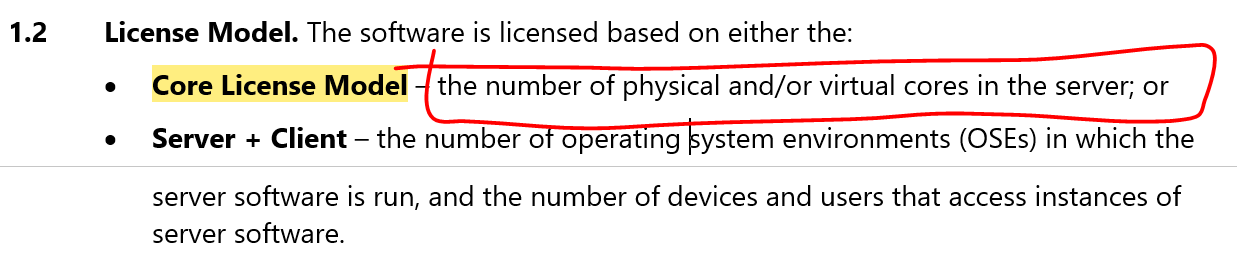
Hello @PRADEEP THILANKA WARAGODA , I recommend reviewing the applicable Microsoft Legal Terms of Use for the Standard image you selected (license_std.rtf) - refer to screenshot/illustration below.
Specifically, the section on Use Rights for Core License Model in the license_std.rtf provides guidance on using multiple instances of this software image across cores. First step is to determine total # of licenses / virtual core required for your scale-out project.
Kindly review the shared references and don't hesitate to ping if you have any follow-up questions.


Thank you @olufemia-MSFT
