Developer technologies | Windows Forms
A set of .NET Framework managed libraries for developing graphical user interfaces.
This browser is no longer supported.
Upgrade to Microsoft Edge to take advantage of the latest features, security updates, and technical support.

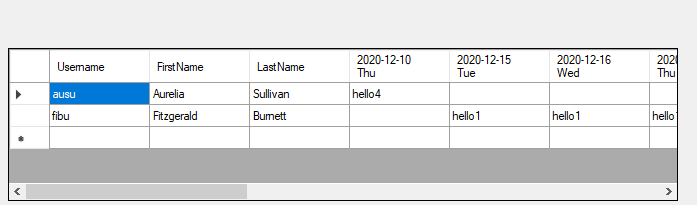
I would like to display Access crosstab query in Visual Studio DataGridView (If I don't use crosstab query, simply a table query, it works, so other parts of code is fine).
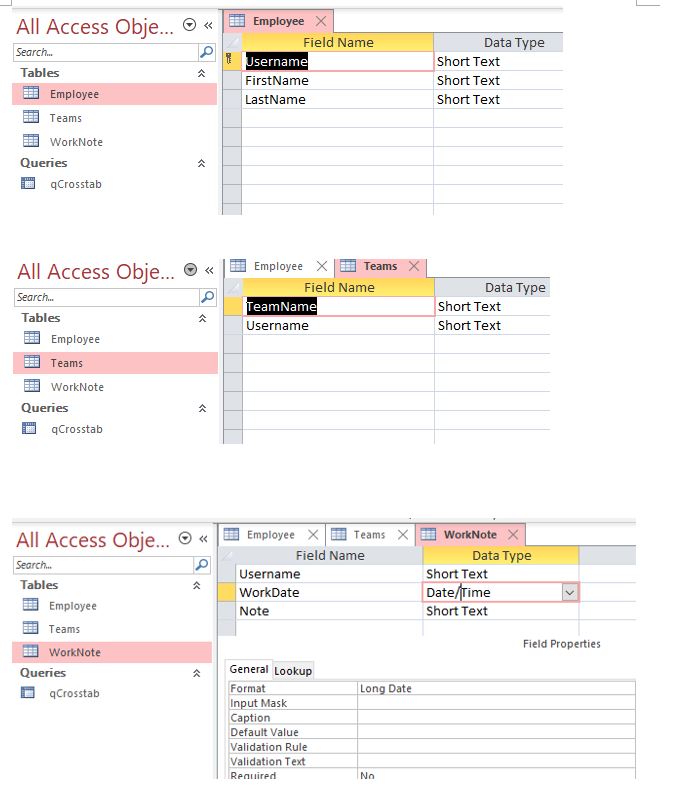
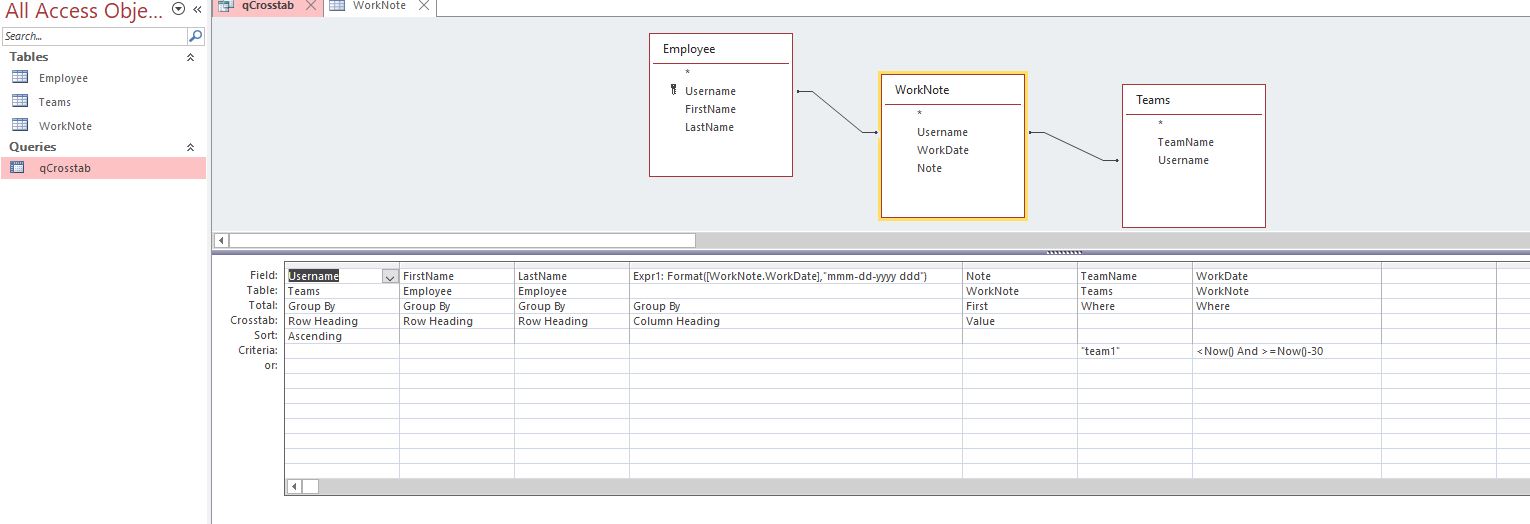
Below crosstab query code is simply copied from Access SQL View after I set up crosstab query (via Access crosstab query wizard), and I don't quite understand the SQL Inner Join statement. But it returns what I want (use date as column heading name).
Below is the code. Apparently, it needs to be modified in order for compiling.
Here is Access file on Google drive (with space in-between in case of being blocked): https://drive. google. com/
drive/folders/1ihZ6OW0l5oJhlPgxWxJCRkJI5P4DEMt0?usp=sharing
1ihZ6OW0l5oJhlPgxWxJCRkJI5P4DEMt0
How to modify below SQL statement?
Thanks.
             private void btnCrosstabQuery_Click(object sender, EventArgs e)
             {

                 OdbcConnection Cn = new OdbcConnection(GlobalVariables.DatabaseConnectionString);
                 OdbcDataAdapter adapt;
                 DataTable dt;
                 Cn.Open();
                 //The code to query table Employee works fine
                 //adapt = new OdbcDataAdapter("SELECT * from Employee", Cn);

               adapt = new OdbcDataAdapter("TRANSFORM First(WorkNote.Note) AS FirstOfNote
SELECT Teams.Username, Employee.FirstName, Employee.LastName
FROM Teams INNER JOIN (Employee INNER JOIN WorkNote ON Employee.Username = WorkNote.Username) ON Teams.Username = WorkNote.Username
WHERE (((Teams.TeamName)="team1") AND ((WorkNote.WorkDate)<Now() And (WorkNote.WorkDate)>=Now()-30))
GROUP BY Teams.Username, Employee.FirstName, Employee.LastName
ORDER BY Teams.Username
PIVOT Format([WorkNote.WorkDate],"yyyy-mm-dd ddd");", Cn);


                 dt = new DataTable();
                 adapt.Fill(dt);
                 dgvUsers.DataSource = dt;
                 Cn.Close();
             }
' cx='32' cy='32' r='32' /%3E%3Ctext x='50%25' y='55%25' dominant-baseline='middle' text-anchor='middle' fill='%23FFF' %3ETY%3C/text%3E%3C/svg%3E)
Did you forget to add a space at the beginning or end of the line when concatenating strings?
That would cause certain words to be connected together, like this:
TRANSFORM First(WorkNote.Note) AS FirstOfNoteSELECT Teams.Username, Employee.FirstName, Employee.LastNameFROM Teams INNER JOIN(Employee INNER JOIN WorkNote ON Employee.Username = WorkNote.Username) ON Teams.Username = WorkNote.UsernameWHERE(((Teams.TeamName) = 'team1') AND((WorkNote.WorkDate) < Now() And(WorkNote.WorkDate) >= Now() - 30))GROUP BY Teams.Username, Employee.FirstName, Employee.LastNameORDER BY Teams.UsernamePIVOT Format([WorkNote.WorkDate],'yyyy-mm-dd ddd')'
FirstOfNoteSELECT, UsernameWHERE, etc. are connected together.
Adding spaces should solve the problem:
                string sqlString = "TRANSFORM First(WorkNote.Note) AS FirstOfNote"+
                                    " SELECT Teams.Username, Employee.FirstName, Employee.LastName"+
                                    " FROM Teams INNER JOIN(Employee INNER JOIN WorkNote ON Employee.Username = WorkNote.Username) ON
                                         Teams.Username = WorkNote.Username"+
                                    " WHERE(((Teams.TeamName) = 'team1') AND((WorkNote.WorkDate) < Now() And(WorkNote.WorkDate) >= Now() -
                                         30))"+
                                    " GROUP BY Teams.Username, Employee.FirstName, Employee.LastName"+
                                    " ORDER BY Teams.Username"+
                                    " PIVOT Format([WorkNote.WorkDate],'yyyy-mm-dd ddd')";
                adapt = new OdbcDataAdapter(sqlString, Cn);
If the response is helpful, please click "Accept Answer" and upvote it.
Note: Please follow the steps in our documentation to enable e-mail notifications if you want to receive the related email notification for this thread.