SQL Server Reporting Services
A SQL Server technology that supports the creation, management, and delivery of both traditional, paper-oriented reports and interactive, web-based reports.
This browser is no longer supported.
Upgrade to Microsoft Edge to take advantage of the latest features, security updates, and technical support.
' cx='32' cy='32' r='32' /%3E%3Ctext x='50%25' y='55%25' dominant-baseline='middle' text-anchor='middle' fill='%23FFF' %3EPS%3C/text%3E%3C/svg%3E)
We had created over 30 subscriptions in our SQL Server 2017 Reporting Services environment. When I go to create or modify an existing subscription, I get the error - An error has occurred. Please try again later. The subscriptions are still running but we cannot make changes.

Hi @Paul Shepard ,
An error has occurred. Please try again later.
It can be due to quite a few things. The first place to check would be the Reporting Services logs and see what errors you can find in the logs. If it is 2017 and above, The files are located at: C:\Program Files\Microsoft SQL Server Reporting Services\SSRS\LogFiles
Most of the time errors are located in those files. And what to do depends on what the error is.
Could you describe what version you are currently using? Did you perform other operations before reporting the error? Can a new subscription be successfully created?
For the case of encountering this error after upgrading, you can refer to: An Error occurred try again later when trying to modify subscription.
Finally, I look forward to you providing the relevant error log, it may be helpful to resolve your issue.
Best Regards,
Joy
If the answer is helpful, please click "Accept Answer" and upvote it.
Note: Please follow the steps in our documentation to enable e-mail notifications if you want to receive the related email notification for this thread.
Hi @Paul Shepard ,
Has your issue been resolved?
If you have any question, please feel free to let me know.
If the answer is helpful, please click "Accept Answer" and upvote it.
Best Regards,
Joy
If the answer is helpful, please click "Accept Answer" and upvote it.
Note: Please follow the steps in our documentation to enable e-mail notifications if you want to receive the related email notification for this thread.
Joy,
In report server config mgr
Edition - sql server standard
product version 14.0.600.906
report server mode - standard
service account - use built in account - Virtual service account
execution account - empty
subscription settings - empty
I can create and modify reports. We have existing subscriptions that are executing fine. I just cant modify/create new subscriptions. Ive created a report from scratch and tried to no effect.
When I click on the NEW SUBSCRIPTION button on the report - I get the error, An error has occurred.
Subscription can't be created or edited because the credentials used to run the report are not stored, or if a linked report, the link is no longer valid.
Hi @Paul Shepard ,
Thanks for your feedback.
Subscription can't be created or edited because the credentials used to run the report are not stored, or if a linked report, the link is no longer valid.
The problem sounds like the report expects the user to provide credentials when it is viewed. When you create a subscription, it does not have the credentials to execute the report.
I have encountered this error once, and I reconfigured the data source authentication and connection in the report manager.
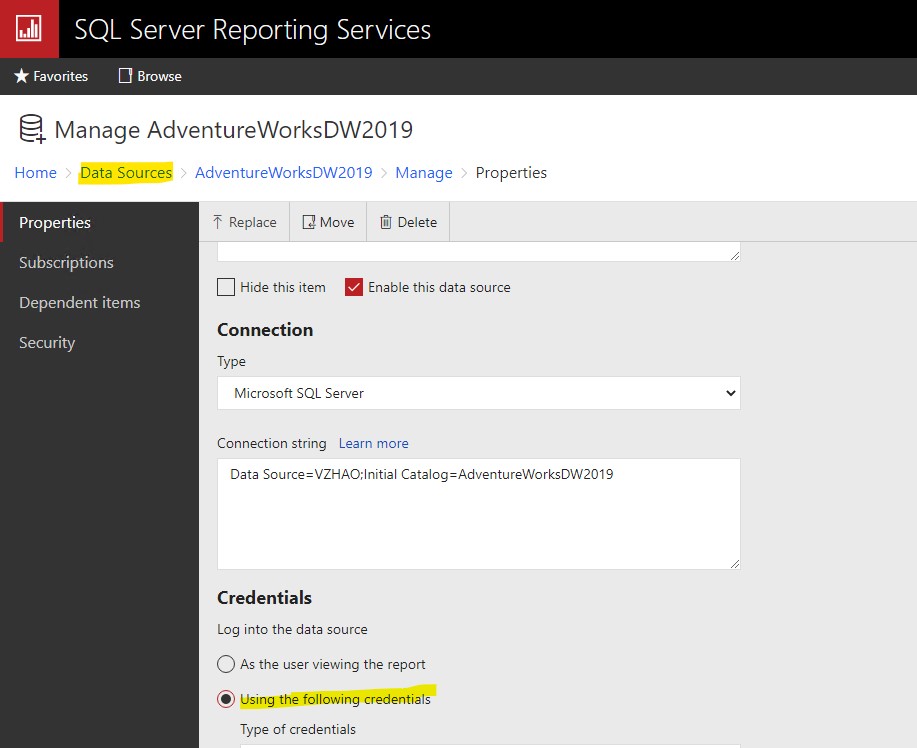
And then GoTo: Report>Properties> Click on the Data Sources tab and you will see following options:
a)A shared data source
b)A custom data source
Are you using a shared data source? Is it using Windows integrated security? If so, can you change it to use a service account made just to run these reports? You may need to view these properties by viewing the data source itself.
If it is a custom data source is the option "Credentials supplied by the user running the report" selected? If so, can you change it to "Credentials stored securely in the report server"?
Use option b) and click on option Credentials stored securely in the report server and provide credential information and further you can use options: Windows credentials and Impersonate the authenticated User if you require. Click on apply button.
*You can use any option of them provided in first option(a) also using the shared data source which is having credential saved into report server.
Once you have done with above you will be able to create subscription.
Either way, if you want to set up a subscription, I have made it work by providing credentials in the data source rather than have the user input them.
If you are worried about security, I would suggest managing that on the report level rather than the data source level.
Best Regards,
Joy
If the answer is helpful, please click "Accept Answer" and upvote it.
Note: Please follow the steps in our documentation to enable e-mail notifications if you want to receive the related email notification for this thread.
' cx='32' cy='32' r='32' /%3E%3Ctext x='50%25' y='55%25' dominant-baseline='middle' text-anchor='middle' fill='%23FFF' %3ES%3C/text%3E%3C/svg%3E)
Hi @Joy
I selected custom data source but I dont see below options, could you please check below screenshot
If it is a custom data source is the option "Credentials supplied by the user running the report" selected? If so, can you change it to "Credentials stored securely in the report server"?
In type of credentials only windows and database user is present
Joy,
I tried going into our shared data sources and receive the An error has occurred message. I am also not able to modify or add there. The data source properties are set to use the following credentials - database username and password. Does Microsoft offer the ability to log a case and have a teams meeting to look at our environment?
Hi @Paul Shepard ,
Microsoft supports telephone business, you could view:
https://support.microsoft.com/en-us/help/4051701/global-customer-service-phone-numbers
Or you can fill in your requirements here: https://support.microsoft.com/en-us/supportforbusiness/productselection
According to the error you received, the failure to create or edit a subscription is indeed a problem with data source authentication. If you cannot modify it in the report manager, you can try to reset the data source in vs or report builder and redeploy.
Best Regards,
Joy
If the answer is helpful, please click "Accept Answer" and upvote it.
Note: Please follow the steps in our documentation to enable e-mail notifications if you want to receive the related email notification for this thread.