Hello,
I choosed to create a new question since I could not find solutions on other similar topic.
The situation:
A 1TB drive of my Legion 5 (second slot, D:) is now stuck at 48.6% decryption of the bitlocker.
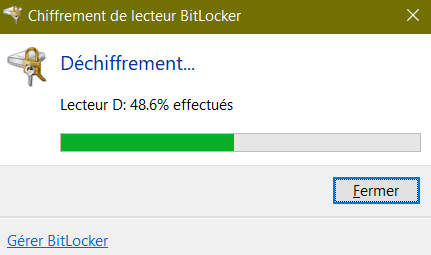
I tried multiple solutions:
From windows admin cmd:
- manage-bde -status D: >> shows 51.3% encrypted
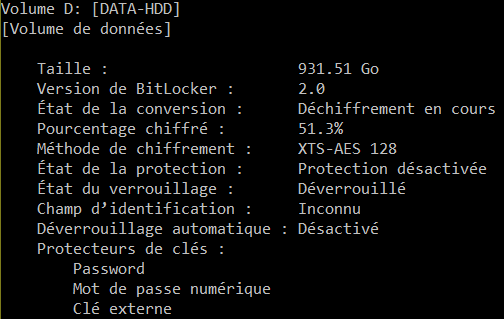
- manage-bde -pause D: >> nothing, cursor blinking
- manage-bde -unlock D: <recovery key> >> nothing happens, cursor blinking
- checkdisk D: >> nothing happens, but the command cannot be stopped with ctrl^C
I tried the previous command as well when booting on comman prompt but same result.
I tried to boot to safemode, but it is not possible. I manage to reach the choice window, but the computer just waits on a blackscreen booting.
In addition, my computer features abnormal behavior:
- opening explorer creates 4 black boxes on the screen, with a "wait" mouse icon when hoverting over it

EDIT2: boxes seem to come from third party software, like Grammarly, for some reasons.
- the task manager opens and is not responding. No way to see the list of processes
- accessing control panel is hard and very slow.
- running the manage-bde -pause seems to freeze the computer. Control panel wont open, clicking shutdown does also nothing. Opening a new cmd is not possible after this point...
- third party software like iboysoft bitlocker recovery can't open. EDIT: it is also stuck on opening "reading storage information"
- third party software wondershare recoverit is stuck reading the disks
- when I disconnect an external drive, windows does not recognize that drive is removed, and it stays in the explorer window
- connecting a drive is not possible, unless booting with the drive connected
What happened:
I disabled bitlocker on 3 drives at the same time. my 500Gb SSD, 1Tb HDD and external 500Gb HDD.
I had the bitlocker box saying it was 100% completed on external drive. I close the window, and I think I missed the fact that it was not complete on the internal HDD.
At this point, I tried using my computer normaly, but already, I got task manager not responding and explorer crashing. At this point, explorer wouldn't reboot, to which I typed a shutdown /l in cmd. The computer was stuck on "disconnecting", to which i decided to force shutdown with the power button.
Notes:
I didn't tried repair-bde yet.
I hope there is a way to get it back on track.
How long should manage-bde -pause take?
There is also no button to interupt bitlocker in control panel:

Thank you in advance
***Move from Windows / Windows 10 / Files, folders, and storage ***
' cx='32' cy='32' r='32' /%3E%3Ctext x='50%25' y='55%25' dominant-baseline='middle' text-anchor='middle' fill='%23FFF' %3EA%3C/text%3E%3C/svg%3E)
