Microsoft Security | Microsoft Entra | Microsoft Entra External ID
Managing external identities to enable secure access for partners, customers, and other non-employees

This browser is no longer supported.
Upgrade to Microsoft Edge to take advantage of the latest features, security updates, and technical support.
' cx='32' cy='32' r='32' /%3E%3Ctext x='50%25' y='55%25' dominant-baseline='middle' text-anchor='middle' fill='%23FFF' %3EYA%3C/text%3E%3C/svg%3E)
Hi,
Is there's any way to customize the default placeholder messages and error messages in the login form
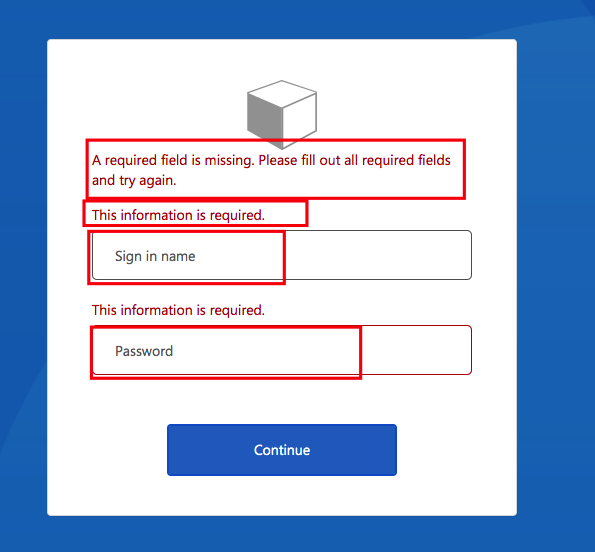
We're customizing this screen using query params, as a single B2C tenant is used across multiple apps, and it's not possible to create and upload policy for each app.

Hello @Yogesh Agrawal · Thank you for reaching out.
Please find below the parameters to customize the messages, you have highlighted in your question.
<LocalizedString ElementType="ErrorMessage" StringId="UserMessageIfClaimsPrincipalDoesNotExist">The username or password provided in the request are invalid.</LocalizedString>
<LocalizedString ElementType="ErrorMessage" StringId="UserMessageIfInvalidPassword">The username or password provided in the request are invalid.</LocalizedString>
With above parameters, for both invalid username and invalid password, it will return same message, which is "The username or password provided in the request are invalid."
<LocalizedString ElementType="UxElement" StringId="required_field">This information is required.</LocalizedString>
above parameter can be used to customize "This information is required." message.
Use UserHelpText parameter for the pre-populated text in a given text box, under the claims schema where the sign in and password claims are defined. Please refer to UserHelpText parameter in the examples documented here: ClaimsSchema
-----------------------------------------------------------------------------------------------------------
Please "Accept the answer" if the information helped you. This will help us and others in the community as well.
Thanks, @AmanpreetSingh-MSFT for the quick reply.
Need your help to change default wrong password message. Not found such in the above link you've shared.
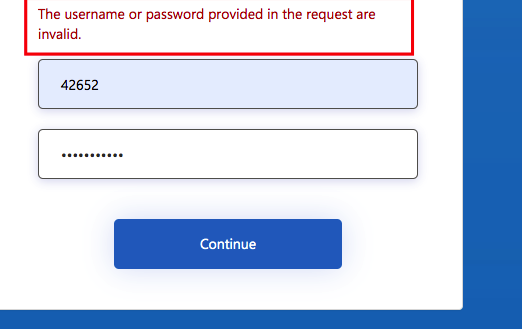
Hi @Yogesh Agrawal · This can be customized using StringId="UserMessageIfInvalidPassword" as mentioned in my Answer above.
Changed StringId="UserMessageIfInvalidPassword in policy, but seems not working.
Attached the screenshots of the changes, did in the policy XML file.
Kindly check.

