Issue with SCOM Log File Monitoring - SCOM 2019

Saiyad Rahim 411 Reputation points
2025-04-30T09:18:53.1533333+00:00

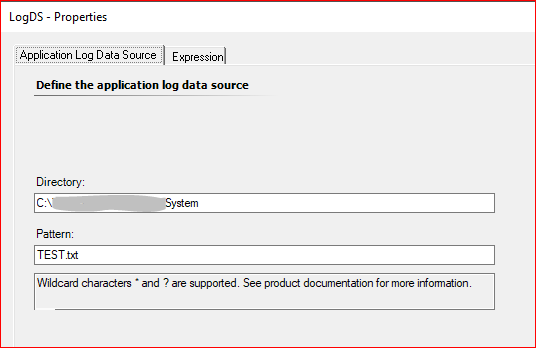
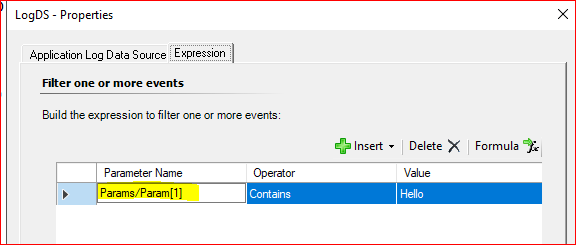
First time attempted to create a simple Text Log File Rule using Authoring>Mgmt Pack Objects> Rules. Looks simple enough to to pick and alert on the word "Hello" in a text file named Test.txt. I have not used a trailing backslash in my directory path. Both System and the SCOM Action account have access to the Folder/File.

Somehow I am not getting any alerts being generated for this monitor, no idea if its working or not or if my config is correct or not.

Used Alert Generating Rules > Event Base> Generic Text Log (Alert)

Below are the settings:
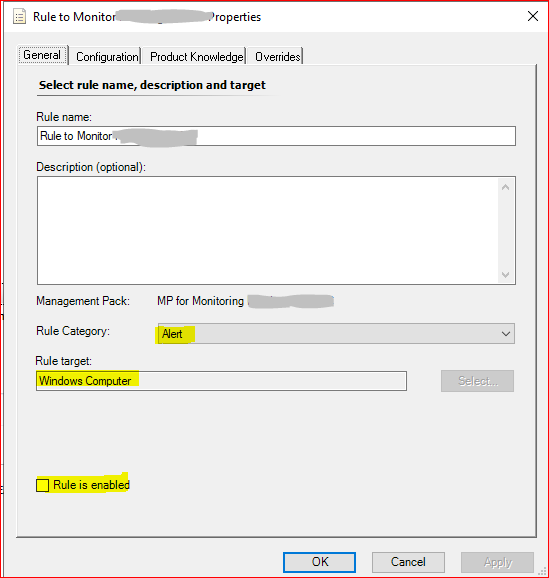
1

2

3

4

Did i miss a step somewhere or is my config needs adjustments?

Any help will be appreciated.

System Center Operations Manager
A family of System Center products that provide infrastructure monitoring, help ensure the predictable performance and availability of vital applications, and offer comprehensive monitoring for datacenters and cloud, both private and public.
0 comments No comments
{count} votes

1 answer

Sort by: Most helpful
  1. Graham 176 Reputation points
    2025-05-03T08:58:45.8066667+00:00

    Hi

    If you definitely have an Alert rule then also, check that you don't already have an alert "somewhere" and the suppression settings. It might be that there is an alert from days ago which you haven't spotted where the repeat count is being incremented and no new alert generated.

    Also, there is a water mark and the rule only checks new entries so if you are deleting lines then it might be that the rule isn't going back that far. This is explained here - https://marthijnvanrheenen.wordpress.com/2014/11/08/tips-and-tricks-for-monitoring-log-files-with-system-center-operations-manager/

    Kevin Holman walks through this here - https://kevinholman.com/2009/06/19/using-a-generic-text-log-rule-to-monitor-an-ascii-text-file-even-when-the-file-is-a-unc-path/ - double check your steps against this (although it is an old article, it is still accurate today).

    0 comments No comments

Your answer

Answers can be marked as 'Accepted' by the question author and 'Recommended' by moderators, which helps users know the answer solved the author's problem.