Developer technologies | Transact-SQL
A Microsoft extension to the ANSI SQL language that includes procedural programming, local variables, and various support functions.
This browser is no longer supported.
Upgrade to Microsoft Edge to take advantage of the latest features, security updates, and technical support.
' cx='32' cy='32' r='32' /%3E%3Ctext x='50%25' y='55%25' dominant-baseline='middle' text-anchor='middle' fill='%23FFF' %3EDC%3C/text%3E%3C/svg%3E)
After adding column encryption to a table in our database our stored procedures changed their formatting (spaced and indentations changed). Below is a sample before and after.
ALTER PROCEDURE [dbo].[kd_updtblActualFoods]
    (@MealID        int,
     @FoodID        int,
     @ActGrams      real,
     @Caregiver     bit = 0,
     @UserLoginID   int
    )

AS
    BEGIN

        --Put login userid into session context for use in trigger(s)
        EXEC sp_set_session_context 'USERID', @UserLoginID;

        DECLARE @OldGrams real;
        DECLARE @CaregiverCreated bit;

        SELECT @CaregiverCreated = Caregiver
          FROM dbo.tblActualMeals
         WHERE (MealID = @MealID);

        SELECT @OldGrams = ActGrams
          FROM dbo.tblActualFoods
         WHERE (MealID = @MealID)
           AND (FoodID = @FoodID);

        --only update if ActGrams changed

        UPDATE dbo.tblActualFoods
           SET ActGrams = @ActGrams
         WHERE (MealID = @MealID)
           AND (FoodID = @FoodID)
           AND (@OldGrams <> @ActGrams);

        RETURN;

        --if grams changed then change meal to unverified
        --when changed by client (@Caregiver=1) but created by nutritionist (@CaregiverCreated=0)
        IF @OldGrams <> @ActGrams
            BEGIN
                UPDATE dbo.tblActualMeals
                   SET Verified = CASE WHEN @CaregiverCreated = 0 AND @Caregiver <> 0 THEN 0
                                       ELSE Verified
                                       END
                 WHERE (MealID = @MealID)
                   AND (Verified = 1);
            END

    END
And AFTER encryption
ALTER PROCEDURE [dbo].[kd_updtblActualFoods]
@MealID INT, @FoodID INT, @ActGrams REAL, @Caregiver BIT=0, @UserLoginID INT
AS
BEGIN
    EXECUTE sp_set_session_context 'USERID', @UserLoginID;
    DECLARE @OldGrams AS REAL;
    DECLARE @CaregiverCreated AS BIT;
    SELECT @CaregiverCreated = Caregiver
    FROM   dbo.tblActualMeals
    WHERE  (MealID = @MealID);
    SELECT @OldGrams = ActGrams
    FROM   dbo.tblActualFoods
    WHERE  (MealID = @MealID)
           AND (FoodID = @FoodID);
    UPDATE dbo.tblActualFoods
    SET    ActGrams = @ActGrams
    WHERE  (MealID = @MealID)
           AND (FoodID = @FoodID)
           AND (@OldGrams <> @ActGrams);
    IF @OldGrams <> @ActGrams
        BEGIN
            UPDATE dbo.tblActualMeals
            SET    Verified = CASE WHEN @CaregiverCreated = 0
                                        AND @Caregiver <> 0 THEN 0 ELSE Verified END
            WHERE  (MealID = @MealID)
                   AND (Verified = 1);
        END
END
A Microsoft extension to the ANSI SQL language that includes procedural programming, local variables, and various support functions.
Answer accepted by question author

Make sure that you don't have the option "Enable Always Encrypted" on the Always Encrypted tab in the Connection dialog from the connections where you edit stored procedures.
When you have this option enabled, and you also have enabled parameterisation for Always Encrypted, SSMS will analyse yourr code to replace constants with encrypted values.
Note that you can right-click a query window and select Connect->Change Connection from the context menu to change the connection - or just change connection parameters. Personally, I have tied this to Ctrl-Q on my keyboard, as I do it every once in a while.
But it was checked when you most recently changed the procedure. That, or you had enabled column encryption on the "Additional Connection Parameters" tab.
Yes, I have the text of "column encryption setting=enabled" in the additional connection parameters tab.

Hi @David Chase ,
How did you get your procedure AFTER encryption?
Using sp_helptext or other command?
I made a test using part of DDL of [tblPatients] you provided in previous post.
CREATE TABLE [dbo].[tblPatients](
     [PatientID] [int] IDENTITY(1,1) NOT NULL,
     [FirstName] [nvarchar](20) ,
     [MiddleName] [nvarchar](20) ,
     [LastName] [nvarchar](30) ,
     [DOB] [smalldatetime]
Then I create one precedure as below adding some comments,spaces and indentations:
create PROCEDURE [dbo].[kd_selPatientSearch]
     @SearchText        nvarchar(150),
     @SearchType        int = 0

 AS
 BEGIN
     -- SET NOCOUNT ON added to prevent extra result sets from
     -- interfering with SELECT statements.
     SET NOCOUNT ON;
    --vjhlghjwsfhddfgjh
     SELECT P.FirstName,
             P.LastName,
             P.CaregiverLogin
           --dgjfhjdfhj
       FROM dbo.tblPatients AS P
---fghgkuyil
      WHERE (
   CASE WHEN @SearchType = 0 AND P.CaregiverLogin = @SearchText THEN 'T'
                  WHEN @SearchType = 1
   --drtreytu
   AND (P.LastName = @SearchText
   OR P.FirstName = @SearchText)
   THEN 'T'
                  ELSE 'F'
                  END = 'T'
   )
end
Then I executed below command:
sp_helptext [kd_selPatientSearch]
The output is as below:
CREATE PROCEDURE [dbo].[kd_selPatientSearch]
@SearchText NVARCHAR (150), @SearchType INT=0
AS
BEGIN
    SET NOCOUNT ON;
    SELECT P.FirstName,
           P.LastName,
           P.CaregiverLogin
    FROM   dbo.tblPatients AS P
    WHERE  (CASE WHEN @SearchType = 0
                      AND P.CaregiverLogin = @SearchText THEN 'T' WHEN @SearchType = 1
                                                                       AND (P.LastName = @SearchText
                                                                            OR P.FirstName = @SearchText) THEN 'T' ELSE 'F' END = 'T');
END
Later I added column encryption to tblPatients table (FirstName,MiddleName and [LastName]).
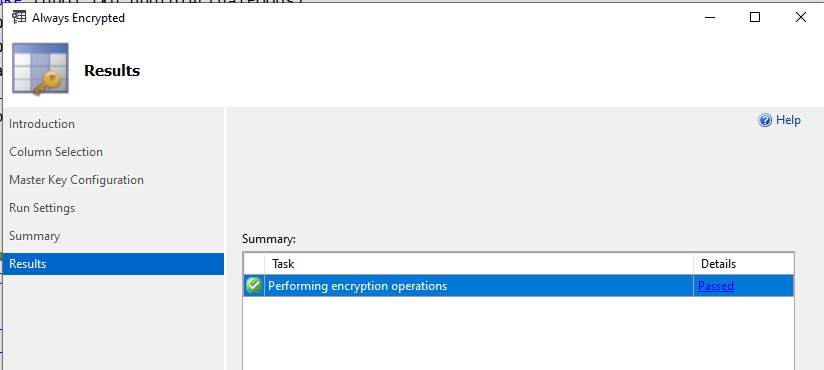
Finally I ran the sp_helptext command again and found that the output is the completely same with previous one which was before encryption.
So the format of procedure could not change whether adding column encryption to a table or not in my test.
You could also try to execute the sp_helptext [kd_updtblActualFoods] before encryption and see whether format changes.
Hope this could be a little helpful to you.
Best regards
Melissa
If the answer is helpful, please click "Accept Answer" and upvote it.
Note: Please follow the steps in our documentation to enable e-mail notifications if you want to receive the related email notification for this thread.
I just right-clicked the proc in SSMS and chose "Modify" and the reformatted code was displayed.