Not Monitored
Tag not monitored by Microsoft.
37,794 questions
This browser is no longer supported.
Upgrade to Microsoft Edge to take advantage of the latest features, security updates, and technical support.
' cx='32' cy='32' r='32' /%3E%3Ctext x='50%25' y='55%25' dominant-baseline='middle' text-anchor='middle' fill='%23FFF' %3EDS%3C/text%3E%3C/svg%3E)
I am trying to setup an environment to where I can have people throughout the country connect to Azure VPN and access a File Share under the Storage Account service. I have the Storage Account setup with a Service Endpoint. I have a VNet setup that connects to that Service EndPoint. I have a P2S VPN Gateway setup on the VNet.
I can connect to the VPN but cannot map a drive to the File Share using things like net use in Windows. Which makes sense as it is trying to resolve the Storage Account URL Storageaccountname.file.core.windows.net using my ISP which is trying to get the public IP address of the storage account. I need the internal IP address but there is no Azure DNS server on the VPN connection so I found another article and how to get an internal IP address to mount a drive. https://learn.microsoft.com/en-us/azure/storage/files/storage-files-configure-p2s-vpn-windows. At the end of the article it has a section called Mount Azure file share where it has powershell script to mount a drive but this is for S2S VPN, not P2S. It tries to get the IP of the PrivateEndpoint, which I do not have in my scenario as that is for a site service. I tried to see if I could get the Nic of the ServiceEndpoint but that seems to fail.
I am out of ideas at this point and could sure use some help.
Thank you,
Damon
' cx='32' cy='32' r='32' /%3E%3Ctext x='50%25' y='55%25' dominant-baseline='middle' text-anchor='middle' fill='%23FFF' %3EDS%3C/text%3E%3C/svg%3E)
Hi @Damon Strong ,
Did you get any additional information on this? I have been trying to do the same thing. I can mount the drive from Windows explorer using SMB, but not AAD.

Hello,
Here for P2S, to create a file share and access it from the desktop, you need to create and configure a Private End Point under the subnet you have the storage account exists.
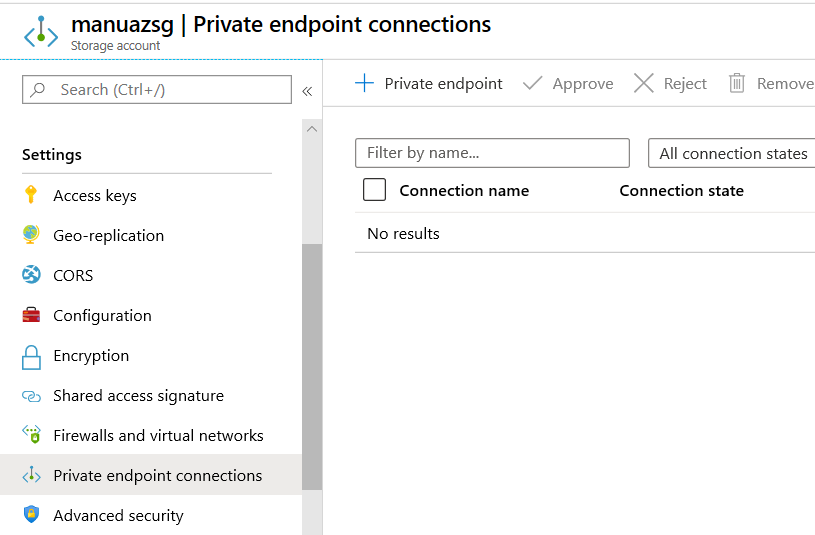
Go to 'Private Endpoint Connection' under settings of storage account in azure portal as below:
Next create it as shown in the below figure. Remember to select the options as shown:
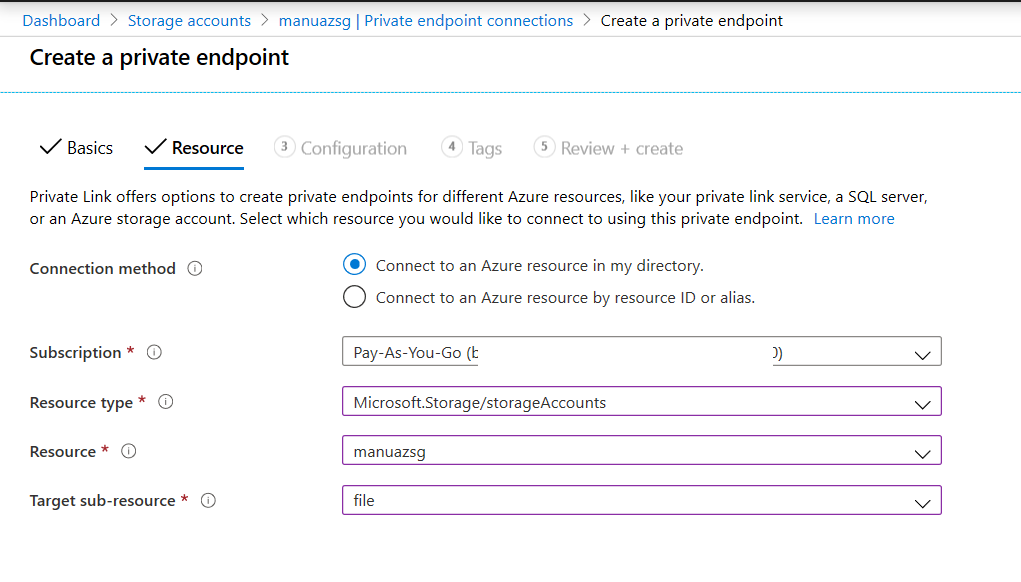
Follow the steps and select the subnet created in earlier steps.
Once the creation is completed, note the Network interface IP address from the summary page. This the IP address which you can connect through your P2S network
When you map the drive, use the folder format as \Private IP Address\Filesharename
Note: Here you need to use the file share name instead of storage account name
Hope, the above additional steps helps to connect the file share using the P2S network
Regards,
Manu
' cx='32' cy='32' r='32' /%3E%3Ctext x='50%25' y='55%25' dominant-baseline='middle' text-anchor='middle' fill='%23FFF' %3EB%3C/text%3E%3C/svg%3E)
Using a Private Endpoint will add an entry point to the service into your VNET, using a private IP address in the subnet you allocate the endpoint to. However, by default, the Azure File Share is still accessible via its public IP address. To prevent access from the internet to the file share's public address you have to add storage firewall/network security rule settings to the share, which limits the networks from which access is permitted.
There appears to be a problem here when used in combination with a P2S VPN gateway. After restricting access from all networks (including the internet) you then have to explicitly allow access to the storage resource from subnets within your VNET or from listed public IP addresses.
P2S VPN clients are assigned addresses within a leasepool subnet range defined when you create the virtual network gateway. This subnet does not have a subnet ID - it is separate to VNET subnets and cannot overlap. So it is not possible to authorise access to the storage file from the VPN client range subnet.
Additionally, it will not be possible to authorise access from the client leasepool range by adding it to authorised IPs, if you are using a private IP range as only public IP addresses (or ranges) are allowed.
So it appears that whilst you can setup a Private Endpoint to route connections via Microsoft's fabric to a Storage File service from your VNET without traversing external routes, you cannot then disable access via its public IP without also breaking access from P2S connected clients. Does anyone know of a way to get round this?
' cx='32' cy='32' r='32' /%3E%3Ctext x='50%25' y='55%25' dominant-baseline='middle' text-anchor='middle' fill='%23FFF' %3EJP%3C/text%3E%3C/svg%3E)
I have this working in my environment where the P2S VPN VNET is peered to the VNET where the Storage Account resides.
My Azure P2S VPN is part of VNET-A which is peered to VNET-B. The Storage account has a private endpoint for each of Blob and File storage, the ip addresses of which are part of a subnet in VNET-B. Network Access is enabled for all the subnets in only VNET-A and VNET-B .
This configuration allows me, when connected via the Azure VPN Client, to access the content of Blob Containers and File Shares using Azure Storage Explorer. As soon as I drop off the VPN, these become inaccessible to me.