Microsoft 365 and Office | SharePoint | For business | Windows
A group of Microsoft Products and technologies used for sharing and managing content, knowledge, and applications.

This browser is no longer supported.
Upgrade to Microsoft Edge to take advantage of the latest features, security updates, and technical support.
' cx='32' cy='32' r='32' /%3E%3Ctext x='50%25' y='55%25' dominant-baseline='middle' text-anchor='middle' fill='%23FFF' %3EIK%3C/text%3E%3C/svg%3E)
Dear All,
On the Sharepoint (365) site I would like to see the Quick Launch menu on the left.
According to the explanation of Sharepoint itself, it would always appear by default ... not for me.
I have been looking for how to activate it, but that option does not exist for me.
Via another site I learned that this option can only appear if the correct feature is activated, namely the SharePoint Server Publishing feature.
![56332-image.png][1]
When I click on Activate, however, I get the following 3 messages:
*Site
The feature being triggered has Site scope and depends on a Site Collection scope feature that is not yet activated. Please activate the following function and try again: SharePoint Server Publishing Infrastructure f6924d36-2fa8-4f0b-b16d-06b7250180fa
Web
The Site scope feature that is triggered depends on the FeatureDefinition / 15 / 22a9ef51-737b-4ff2-9346-694633fe4416 hidden feature (id: 22a9ef51-737b-4ff2-9346-694633fe4416) with Site scope. Hidden functions cannot be automatically activated between different ranges. There may be one or more visible features of the Site scope that automatically trigger the dependent hidden feature.
Web
The Site scope feature that is triggered depends on the featureDefinition / 15 / dffaae84-60ee-413a-9600-1cf431cf0560 hidden feature (id: dffaae84-60ee-413a-9600-1cf431cf0560) with Site scope. Hidden functions cannot be automatically activated between different ranges. There may be one or more visible features of the Site scope that automatically trigger the dependent hidden feature.*
However, the solution offered 'Activate SharePoint Server Publishing Infrastructure' does not work for me as it is not available in my feature list.
Who knows what I have to do to get that 'Quick Start menu' visible on my site?
Thanks in advance for reading ... I keep my fingers crossed for a quick answer because I am a bit off at the moment ...
With best regards,
Piet Gheysen
PS: for the sake of completeness I will paste ALL available features that I have available below, maybe this will help ...
To work
Provides a tile view for common actions for SharePoint sites.
Get started with Project Web App
This feature creates an instance of a list of Promoted Links with articles on how to get started with your Project Web App site.
Announcement tiles
Enables the Announcement Tiles feature and adds the Web Part to the site.
App permissions may be used by workflows
Allow reading and writing to all items on this site for workflows.
Retention
This feature is used to track external actions, such as lawsuits, investigations, or audits, that require you to delay the deletion of documents.
Duet Enterprise - SAP Workflow
Enables the site to host SAP workflow task types
Duet Enterprise Reporting
Retrieves data from the SAP System and generates reports. You can also create and save report settings to generate reports according to your personal preferences.
Duet Enterprise Site Branding
This feature enables Duet Enterprise logo to appear as the site logo.
External system events
This component enables notification and event recipients for the external list and external content types.
Community site function
This feature adds community functionality such as discussion categories, content and people reputation, and the member list. In addition, it provides pages on the community site that contain these lists and features.
Search configuration list instance feature
Create instance of search configurations list - Provides a list from which search configurations can be imported and exported
Search configuration template feature
Create Search Configurations Template - Provides a Search Configurations List Template that can be used to import and export search configurations
Site features in SharePoint Server Enterprise
Features such as Visio Services, Access Services and Excel Services Application, which are part of the SharePoint Server Enterprise license.
Active
Site features in SharePoint Server Standard
Features such as User Profiles and Search, which are part of the SharePoint Server Standard license.
Track content
Set users to follow documents or sites.
Active
Content management
Create rules based on metadata that move content submitted to this site to the appropriate library or folder.
Content type for workflow task
Adds the SharePoint 2013 workflow task content type

Hi, @ICT Kindervriend ,
I am checking how things are going here. Do you get any update about your question?
Hi, @ICT Kindervriend ,
The most straightforward way will be going to the SharePoint Admin center if you have admin permission, check the active sites. You can see clearly the template of all the sites.
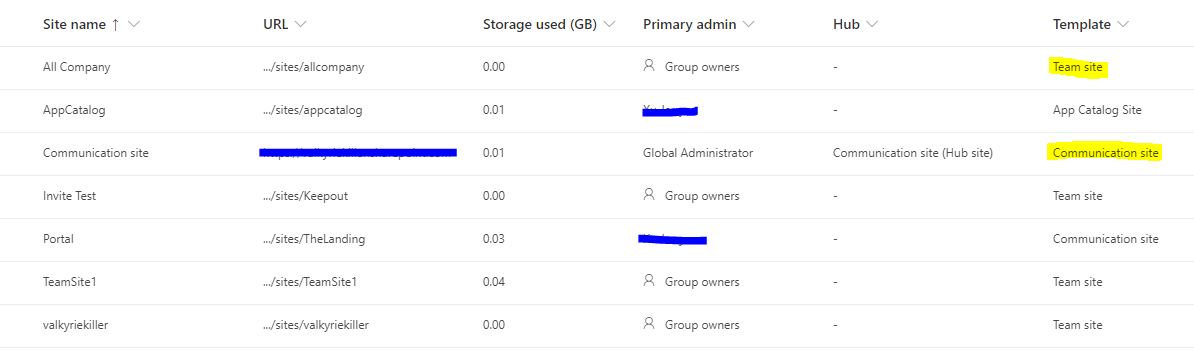
You can learn more about communication site here. Mostly if you can see the navigation links lined like below, it will be a communication site.

If an Answer is helpful, please click "Accept Answer" and upvote it.
Note: Please follow the steps in our documentation to enable e-mail notifications if you want to receive the related email notification for this thread.

Provided you're using a Modern site template...
Thx For your reply.
How can I see (after creation of the site) if I'm working with a comm site (or not)?